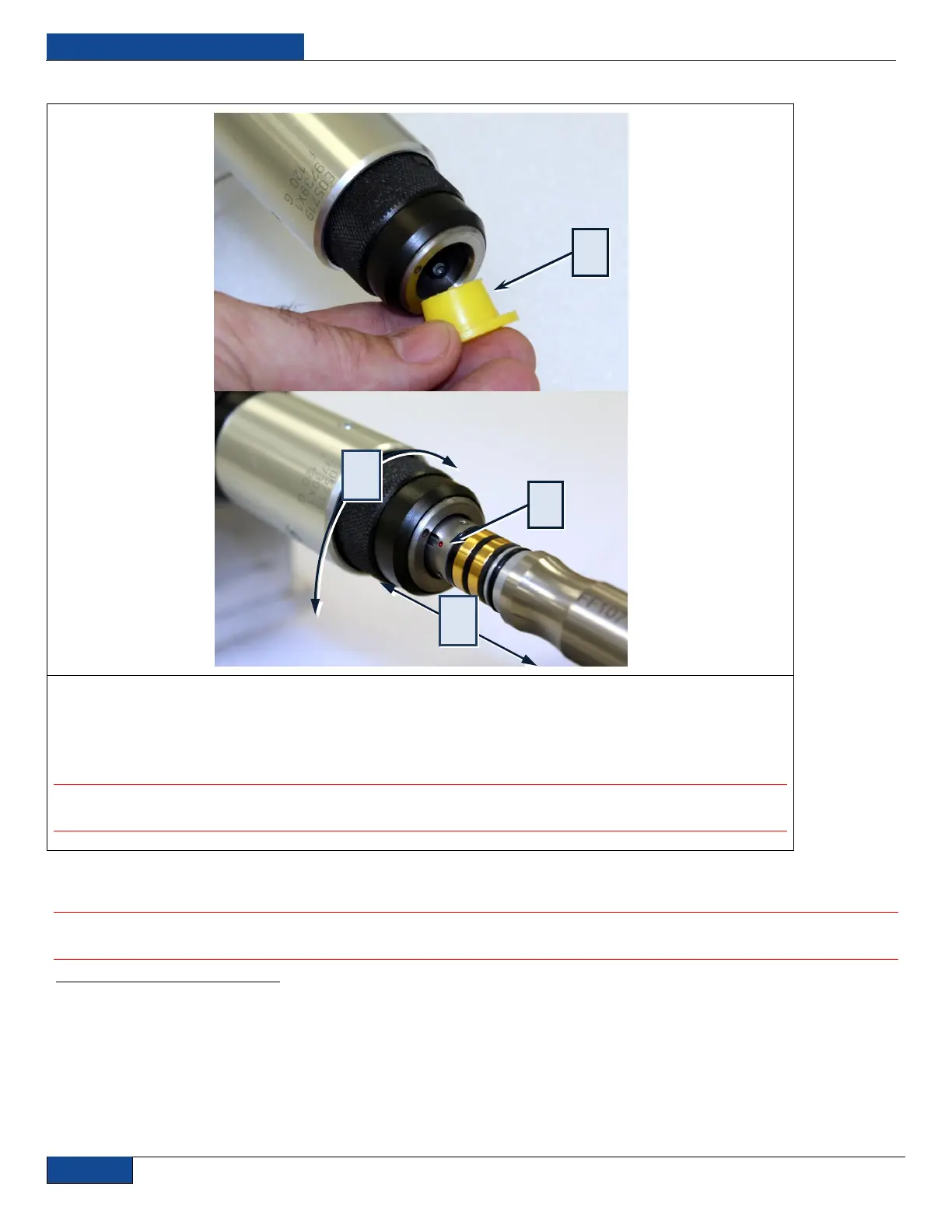
Figure 18: Installing the Fiber
1. Remove the plastic protection cap at the bayonet enclosure.
2. For connecting the fiber to the bayonet, the red dot at the fiber has to be in line with the red dot at the
bayonet enclosure.
3. Gently slide the fiber all the way into the fiber port.
1
4. Lock the fiber into place by rotating the bayonet knurled ring.
2
IMPORTANT: Hand tighten only as the use of tools can lead to damage to the bayonet
enclosure.
15. If the fiber is not to be connected immediately with a suitable optical component, use compressed
air to clean the protection cap and install over the fiber end.
IMPORTANT: Do not forget to clean the cap and sleeve before installing them back onto
connector.
1
A conical guide positions the fiber connector into the interfacing unit.
2
The connector is locked in position by a bayonet that also ensures correct orientation. The safety interlock system connects only when the bayonet is closed, via
the two contact rings of the connector. When managing fiber do not exceed the maximum bend radius is 100mm unstressed and 200mm stressed.


 To Next Page