EasyManua.ls Logo

IPG YLR Series - Sequence Editing and Management; Building and Modifying Sequences; Sequence Storage and Recall

IPG YLR Series
102 pages
Print Icon
To Next Page IconTo Next Page
To Previous Page IconTo Previous Page
Loading...
YLR-SERIES USER GUIDE
54
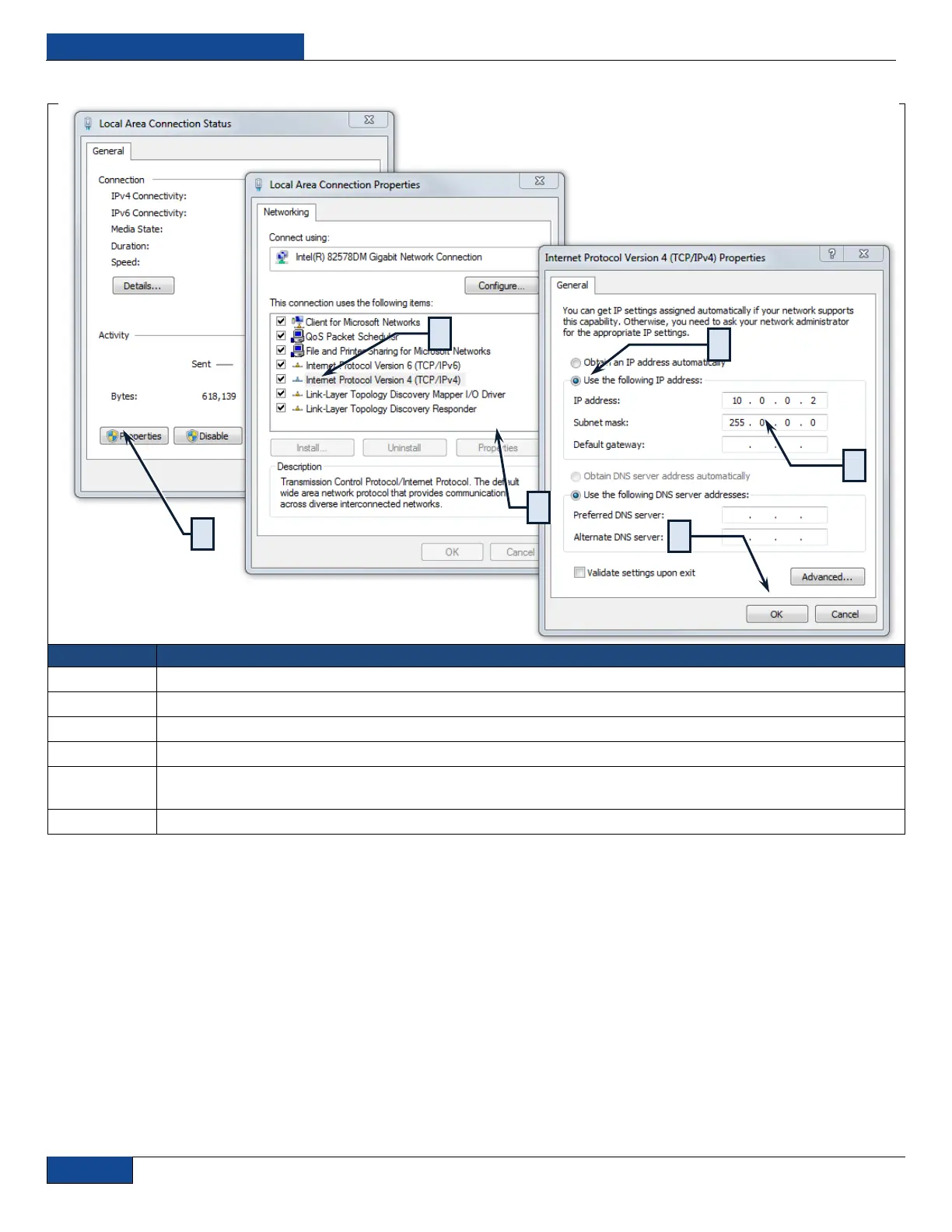
Table 12: Configuring the Local Area Connection for Ethernet
S
S
T
T
E
E
P
P
D
D
E
E
S
S
C
C
R
R
I
I
P
P
T
T
I
I
O
O
N
N
1
Navigate to the Local Area Connection screen on your computer and click the “Properties” command button.
2
Select the Internet Protocol TCP/IP Setting (TCP/IP 4 on Windows 7 OS).
3
Click the Properties command button.
4
Click the Radio Button to “Use the following IP address” to manually assign the IP adress.
5
Assign the IP address to 10.0.0.x (x can not be 10 as 10.0.0.10 is the default IP address of the Laser). Assign
the Subnetmask to its default setting to 255.0.0.0 by clicking on the Textbox.
6
Pres the “OK” command button to accept these manual changes.
1
2
3
4
5
5

Table of Contents