PULSE SHAPING SOFTWARE OPTION | IPG PHOTONICS
S
S
U
U
B
B
M
M
E
E
N
N
U
U
P
P
A
A
N
N
E
E
L
L
E
E
d
d
i
i
t
t
i
i
n
n
g
g
P
P
a
a
n
n
e
e
l
l
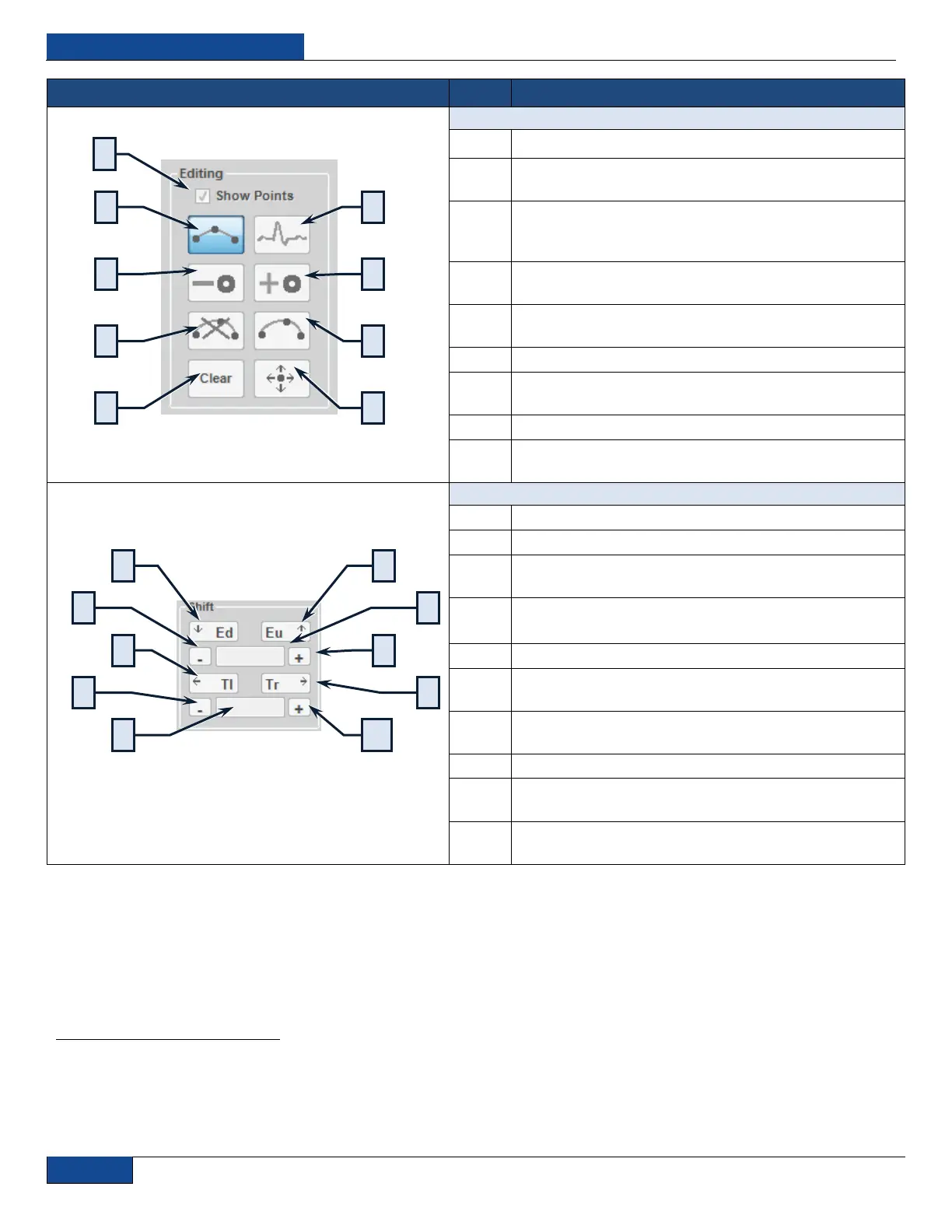
Show Points: Displays the points between each segment
Pulse Line: Plots pulse points in the chart and lines are
automatically formed
Freehand: Plots an arbitrary pulse in the chart and points
and lines are automatically formed by mouse movement
along the graph
Remove Pulse Point: Removes a pulse point from any
position along the chart
Add Pulse Point: Adds a pulse point at any position along
the chart
Remove Arc: Removes a previously created arc
Add Arc: Creates an arc between two existing pulse
points
Clear: Clears the pulse chart
Move Pulse Point: Relocates a pulse point on the chart
between two segments
Emission Down: Shifts all pulse points down in emission
Emission Up: Shifts all pulse points up in emission
Decrease Emission Shift Step: Decreases the emission
shifting step size
Emission Step: Sets the emission shifting step size
(.25 – 100%)
Time Shift Left: Shift all pulse points back in time
Increase Emission Shift Step: Increases the emission
shifting step size
Decrease Time Shift Step: Decreases the time shifting
step size
Time Shift Right: Shifts all pulse points forward in time
Emission Scale Ref: Sets the reference point for emission
scaling (0 – 100%)
Increase Time Shift Step: Increases the time shifting step
size
1
Due to the digitized nature of the pulses, approximations are used to compute modulations, so modulation step values, especially the very small ones may not
have an effect. It is recommended to save original pulse or use the Snapshot interface while manipulating the pulse so it‟s easy to compare the modulated pulse
against the original.



 To Next Page