IPG PHOTONICS | PULSE SHAPING SOFTWARE OPTION
S
S
U
U
B
B
M
M
E
E
N
N
U
U
P
P
A
A
N
N
E
E
L
L
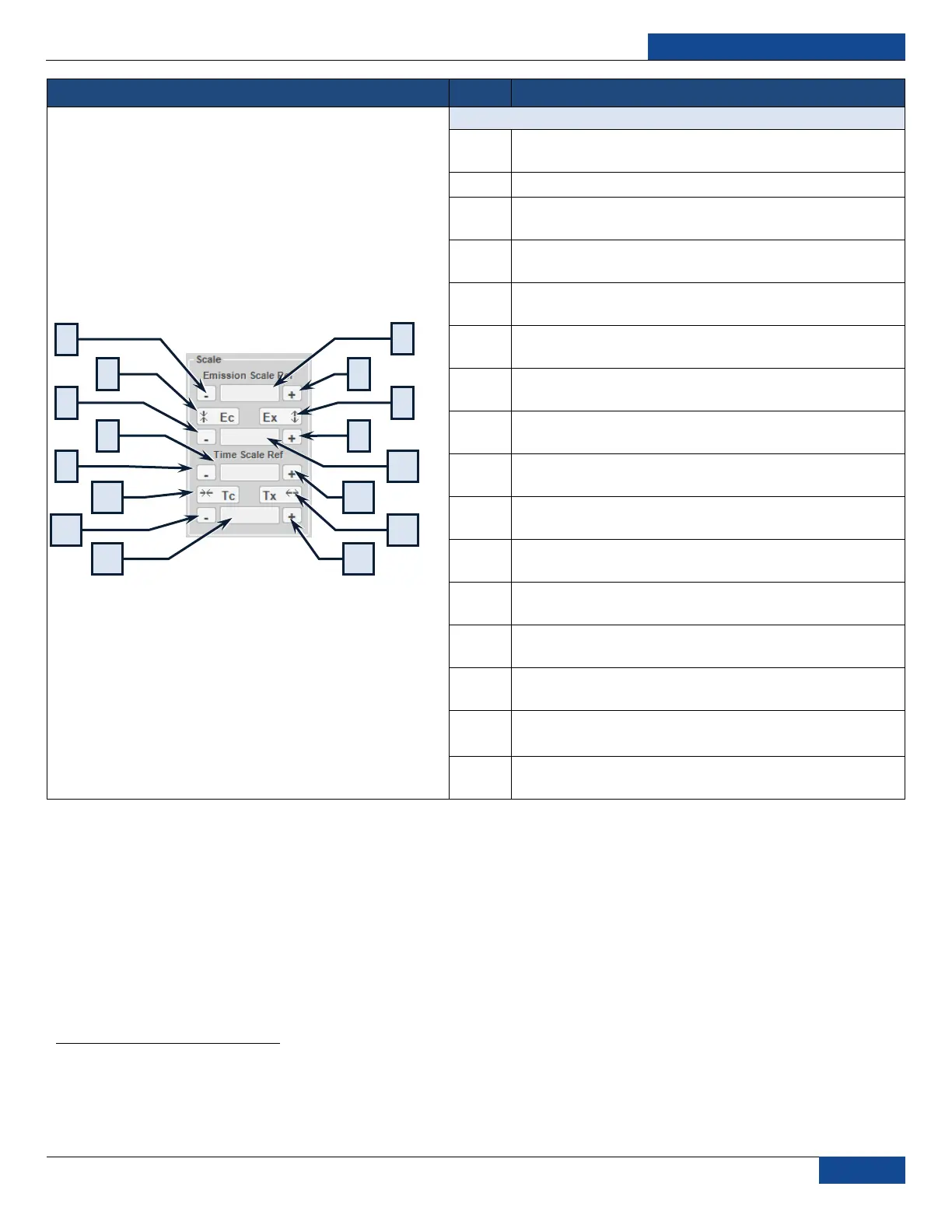
Decrease Emission Scale Ref: Decreases the reference
point for emission scaling
Time Step: Sets the time shifting step size (ms)
Compress Emission: Compresses all pulse points in
emission with regards to the reference point
Increase Emission Scale Ref: Increases the reference
point for emission scaling
Decrease Emission Scale Step: Decreases the step size
for emission scaling
Expand Emission: Expands all pulse points in emission
with regards to the reference point
Time Scale Ref: Sets the reference point for time scaling
(0 – 50ms)
Increase Emission Scale Step: Increases the step size for
emission scaling
Decrease Time Scale Ref: Decreases the reference point
for time scaling
Emission Scale Step: Sets the step size for emission
scaling (.25 – 100%)
Compress Time: Compresses all pulse points in time with
regards to the reference point
Increase Time Scale Ref: Increases the reference point
for time scaling
Decrease Time Scale Step: Decreases the step size for
time scaling
Expand Time: Expands all pulse points in time with
regards to the reference point
Mod Time Scale: Sets the step size for time scaling
(.25 – 100%)
Increase Time Scale Step: Increases the step size for
time scaling
1
Due to the digitized nature of the pulses, approximations are used to compute modulations, so modulation step values, especially the very small ones may not
have an effect. It is recommended to save original pulse or use the Snapshot interface while manipulating the pulse so it is easy to compare the modulated pulse
against the original.



 To Next Page