EasyManua.ls Logo

Iseki TH4365 - PTO Operating Control

Iseki TH4365
113 pages
Print Icon
To Next Page IconTo Next Page
To Previous Page IconTo Previous Page
Loading...
OPERATION
55
P
TO Operatin
g
Contro
l
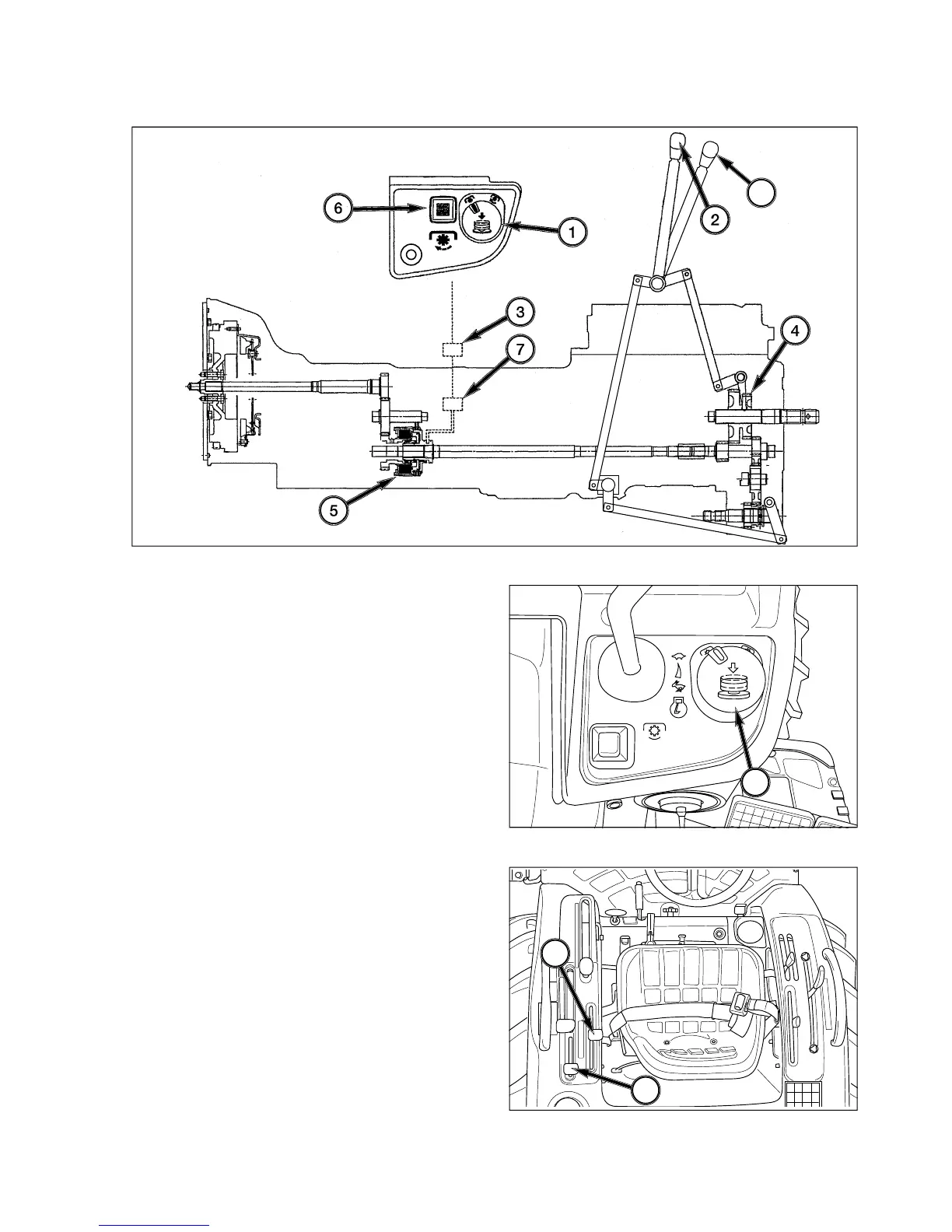
FIG. 5-26: To select rear PTO - Make sure PT
O
con-
trol switch is
O
FF and then move rear PT
O
selector
l
ever, 2, en
g
a
g
e
g
ear set, 4, inside rear housin
g
.
FIG. 5-27: To en
g
a
g
e PTO - Turn PT
O
switch, clock-
wise and then pull up to actuate h
y
draulic clutch, 5, and
c
omplete the drive. The indicator li
g
ht in the warnin
g
l
i
g
ht strip will come on, showin
g
PT
O
clutch is en
g
a
g
ed.
FIG. 5-27: To disen
g
a
g
e PTO - Push PT
O
switch, 1,
to release h
y
draulic clutch, 5.
When further use of rear PT
O
is not required, depress
c
lutch pedal and return rear PT
O
selector lever, 2, to
neu
tr
a
l.
FIG. 5-28
:
To select mid PT
O
- Make sure PT
O
con-
trol switch is off and then move PT
O
selector lever, 8,
f
orward to mid PT
O
position to en
g
a
g
e
g
ear set in mid
PT
O
.
NOTE: PTO can be engaged/disengaged b
y
control
s
witch, 1, independentl
y
of main clutch. Re
-
d
uce engine rpm prior to engaging
(
switching
o
n
)
and disengaging
(
switching o
ff)
PT
O
.
Alwa
y
s move PTO control switch to OFF
b
efore shifting rear or mid PTO selector

l
evers. Rear and mid PT
O
can be operate
d
s
eparatel
y
or together.
FIG. 5-2
6
FIG. 5-27
FIG. 5-2
8
8
1
2
8

Table of Contents

Related product manuals