EasyManua.ls Logo

Iseki TH4365 - Electrical System; Battery

Iseki TH4365
113 pages
Print Icon
To Next Page IconTo Next Page
To Previous Page IconTo Previous Page
Loading...
TH4295,4335,4365
82
E
LECTRICAL SYSTE
M
Batter
y
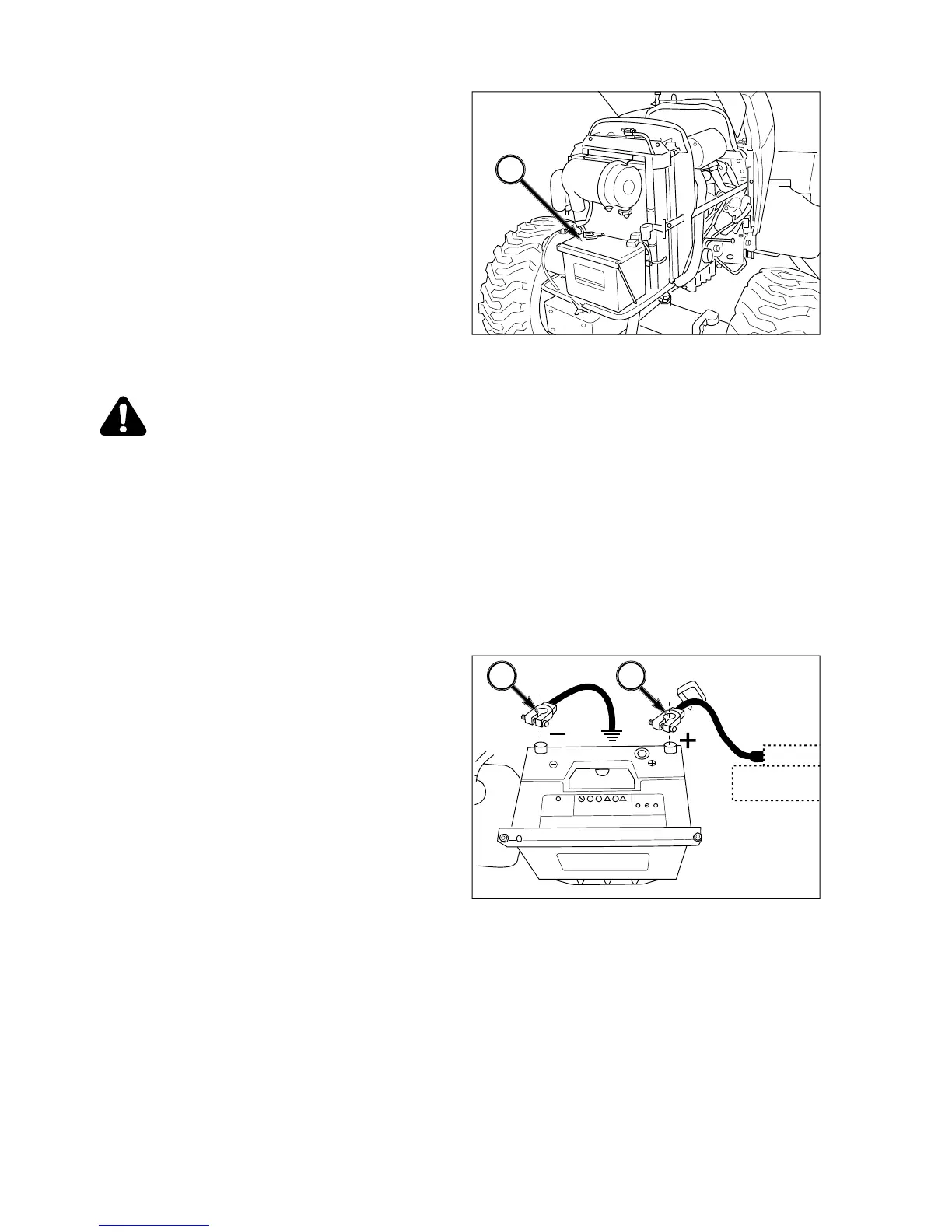
FIG. 6-27
:
Batter
y
, 1, is located under en
g
ine hood in
f
ront o
f
radiator. I
f
batter
y
requires onl
y
minor servic-
in
g
or char
g
in
g
, it is recommended that hood side
p
anels be removed to access batter
y
.
When batter
y
removal, electrol
y
te inspection or cable
c
leanin
g
is necessar
y
, front
g
rille must be removed
fr
o
m Tr
ac
t
o
r.
Keep top o
f
batter
y
clean and ensure cable connec-
tions are clean and ti
g
ht. Debris on batter
y
can cause
dischar
g
e of batter
y
and possible source of fire.
CAUTION: Batteries
p
roduce ex
p
losive
h
y
dro
g
en
g
as when char
g
ed. Keep all
sparks and open flame awa
y
from batter
y.
When necessar
y
to disconnect batter
y
c
ables, alwa
y
s disconnect the
g
rounded
(
-
)
cable first to prevent short circuits
.
Batteries contain sulfuric acid electrol
y
te
(
fluid
)
. Wear e
y
e and face protection. If
e
lectrol
y
te comes in contact with skin or
c
lothes, wash immediatel
y
. Contact ph
y
si-
c
ian if electrol
y
te is in
g
ested or
g
ets in
eyes.
FIG. 6-28
:
Tractors are shipped with batter
y
installed.
If batter
y
replacement should become necessar
y
,
disconnect ne
g
ative
(
-
)
cable, 1,
f
irst and then remove
p
ositive
(
+
)
cable, 2. Loosen and remove batter
y
s
ecurin
g
clamp and carefull
y
remove batter
y
from
Tr
ac
t
o
r.
When installin
g
batter
y
, cable, 2, connected to starter
s
olenoid should be connected to positive
(
+
)
batter
y
terminal first then cable, 1,
g
rounded to Tractor frame
c
an be connected to ne
g
ative
(
-
)
batter
y
terminal.
N
O
TE: Make sure replacement batter
y
is o
f
identical
s
ize and equal capacit
y
.
I
MPORTANT: Do not reverse batter
y
cable connec
-
t
ions as severe electrical s
y
stem dam
-
a
ge will result.
FIG. 6-27
FIG. 6-2
8
1
1
2

Table of Contents

Related product manuals