29
S
ECTION
23:
T
ESTING
THE
S
YSTEM
The system contains a test mode that allows you to test
sensors and panic signals without creating false alarms in
monitored systems. Please follow the instructions in this
section carefully.
Automatic Test Features
Your security system conducts routine tests, checking for
problems like power failures, low batteries, sensors that
aren’t working, and communication trouble with the cen-
tral monitoring station.
When your system detects a problem, trouble beeps
sound to alert you. See “Troubleshooting” on page 31 for
an explanation of the causes of trouble beeps and what
you can do to fix the problem.
Manual Tests
The automatic tests your system performs provide con-
tinuing reassurance that it is working properly. There are
also weekly system tests you can do yourself as an added
safeguard. Taking time to do these tests will familiarize
you with your system and alert you to anything unusual,
such as cut phone lines or sensors that have been tam-
pered with.
Sensor Test
This test verifies that the sensors in your system are oper-
ating correctly. The ability to conduct a sensor test is a
code attribute.
Check the User Sheets in Appendix A to see which access
codes have the ability to conduct a sensor test. See
“Assigning Code Attributes” on page 12 or talk to your
installer for information on changing code attributes.
Resetting Smoke Detectors
Most hardwired and wireless smoke detectors used with
this system automatically reset themselves.
To reset a smoke alarm:
Disarm the system. The smoke detector will reset
once all the smoke has cleared.
In some cases, the installer may have installed a smoke
sensor reset switch which you’ll need to press.
1. Disarm the system.
2. The light on the smoke detector remains lit until
the smoke clears.
3. Disarm system again to reset hardwired detectors.
1. Enter Test Mode by pressing
8
+
CODE
+
3
.
Touchpads display, “Press Status. System Armed to Sensor Test,” or
“✽SENSOR TEST nn MINUTES LEFT.”
When less than 5 minutes remain in Test Mode time, the system sounds a
short beep every 60 seconds.
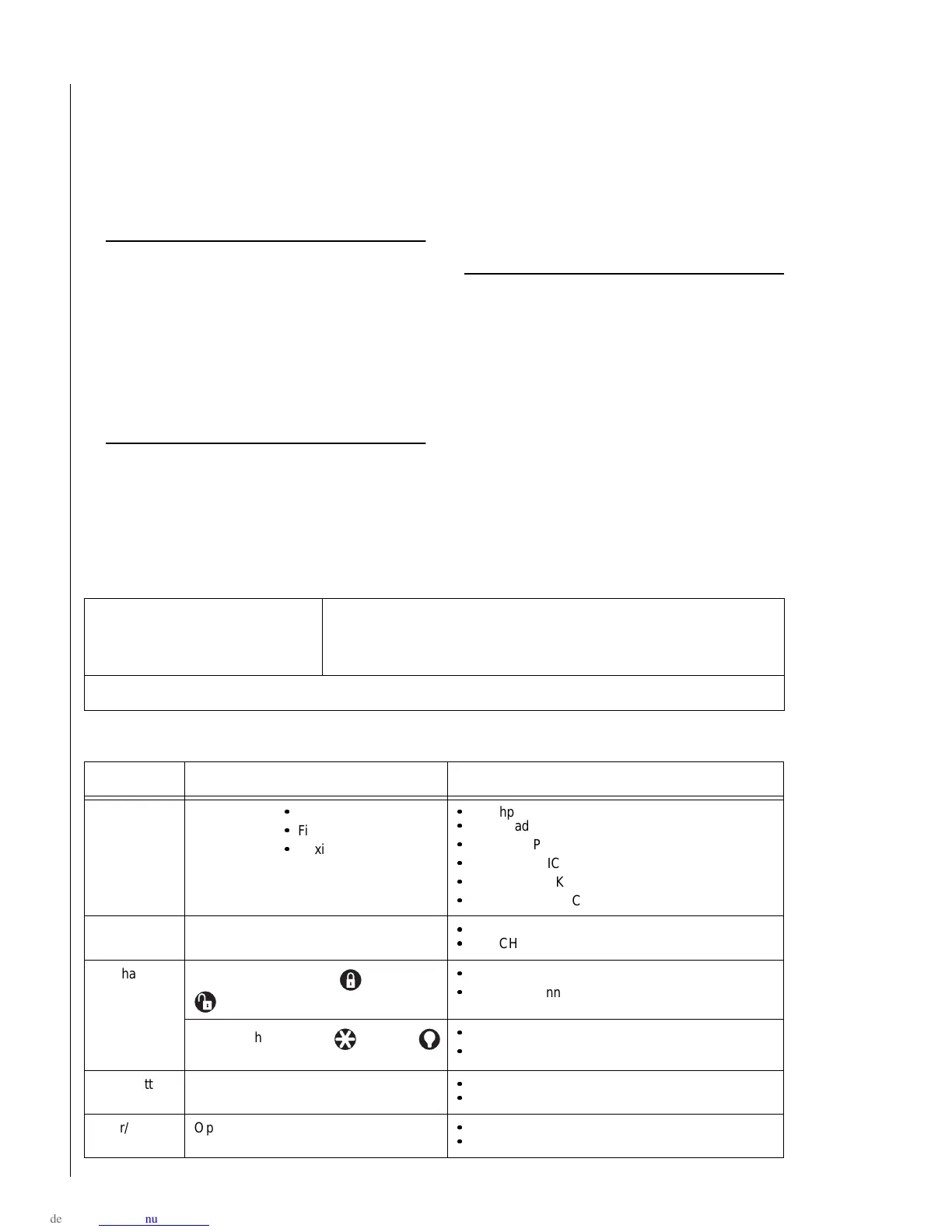
2. Follow the test procedure for each device.
Device Test procedure Touchpad Result(s)
Touchpad Send a:
Police panic alarm,
Fire panic alarm, and
Auxiliary panic alarm.
Touchpad Panic POLICE OK
Touchpad Panic FIRE OK
Touchpad Panic AUXILIARY OK
POLICE PANIC OK
FIRE PANIC OK
AUXILIARY PANIC OK
Wireless
Touchpad
Press the Bypass key.
Zones nn OK
TOUCHPAD nn OK
Keychain
Touchpad
Press and hold the Lock and Unlock
buttons simultaneously for 3 seconds.
Zones nn OK
TOUCHPAD nn OK
Press and hold the Star and Light
buttons simultaneously for 3 seconds.
Touchpad Panic AUXILIARY OK
AUXILIARY PANIC OK
Panic button Press and hold the appropriate panic but-
ton(s) for 3 full seconds.
Zones nn OK
SENSOR nn OK
Door/window
sensor
Open the secured door or window.
Zones nn OK
SENSOR nn OK



 To Next Page