95
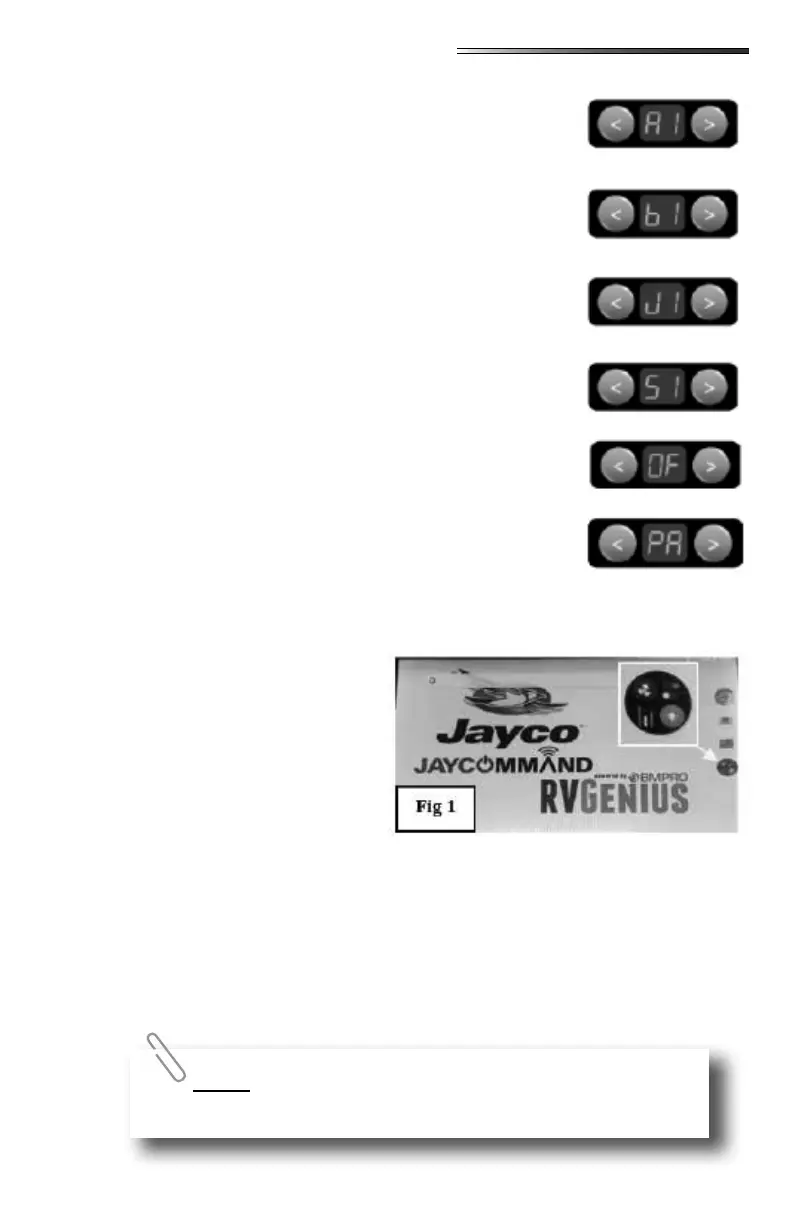
(between arrow buttons) use the arrow keys to scroll
through the following selections:
Menu Display shows or (awnings) Cycle between awnings
with the arrows.
○ Press and hold or to extend or retract the
selected awning.
○ Menu Display shows or (bunk lifts)
Cycle between bunk lifts with the arrows press or
to operate.
○ Menu Display shows or (Jacks)
Cycle between jacks then press or to operate.
○ Menu Display shows or (slideouts)
Cycle between slides using the arrow buttons.
○ Press and hold or to extend or retract the
selected slideout.
○ Menu Display shows (must then press the
button) to turn o all loads (lights and fans plus touch-
screen). This does not shut down the generator. Press
any of the numbered light buttons to turn the touchscreen
back on.
○ Menu Display shows (pair):
○ Press to pair your phone or tablet
○ Or press to pair one of the wall mounted remote
controls.
○ The on the small display will begin ashing on and
o indicating the system is in pairing mode and you can connect your Bluetooth
smart device. When the
device is paired, display
will go out.
Normally when power is turned ON to
the RV, the touchscreen system auto-
matically boots up.
If the touchscreen system requires a
reset for some reason, or if the touch-
screen has been turned o:
○ Pressing either of the arrow keys, or a numbered key will turn the system ON.
(or keys will not turn on the system).
○ Two splash screens with the BMPro logo will appear rst during boot up.
○ The screen shown here () appears after the two splash screens.
○ To go directly to the RVMaster touchscreen, press the icon for the touchscreen.
(shown enlarged in the yellow box) or if you just let the boot up process nish, it
should go directly to the touchscreen.
○ The RVMaster touchscreen is now active and ready to use.
Pressing the RESET button on the touchscreen (See Touchscreen
Control Panel) will also reboot the touchscreen.




 To Next Page