JB-lighting Lichtanlagen GmbH Sallersteigweg 15 D-89134 Blaustein phone: +49 7304 9617-0
www.jb-lighting.de - 11 -
2.2 SELECT / CONFIG-set configuration by means of library
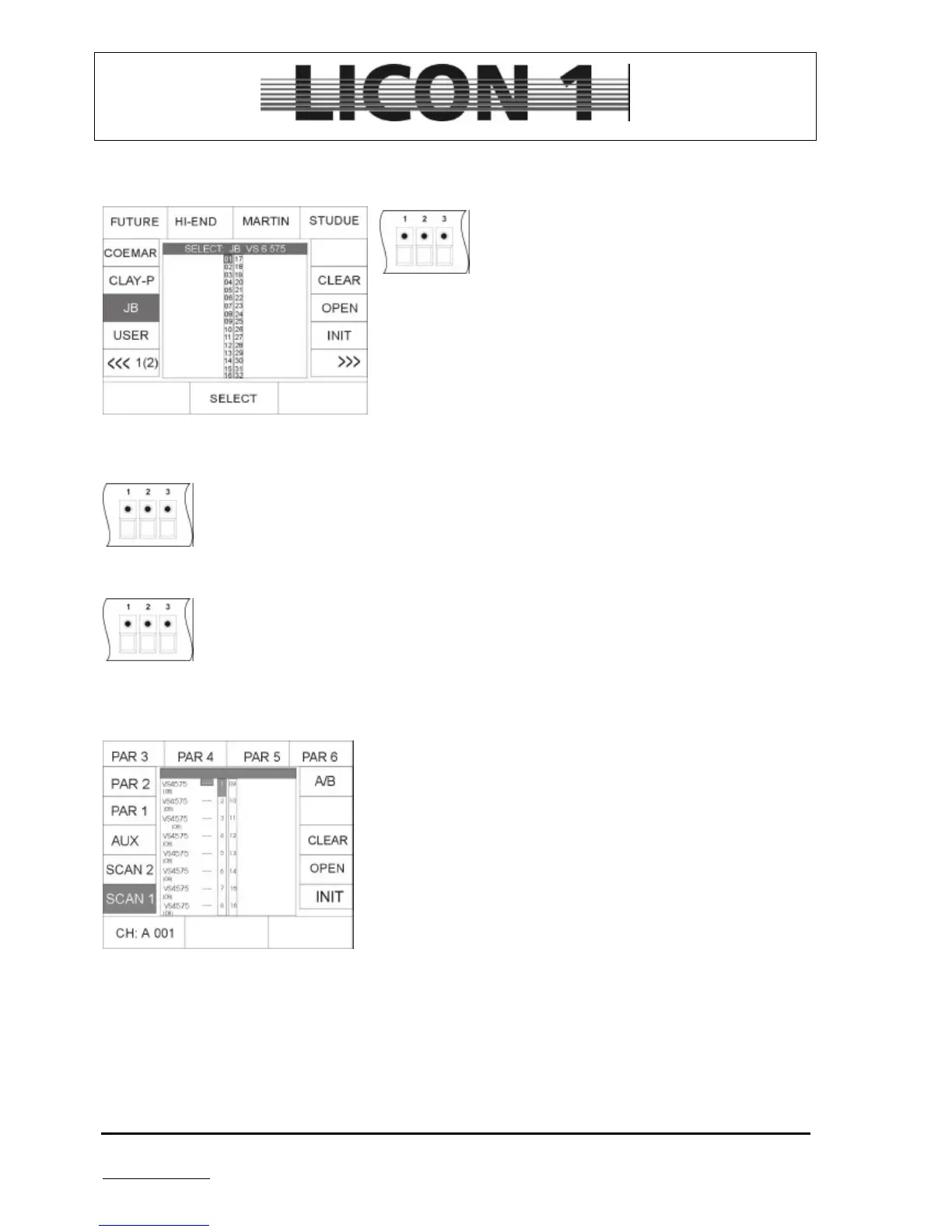
Enter select menu by pressing softkey CONFIG/SELCT:
Press keys of fixture/par-selection block to
choose the number of fixtures which are going to
be entered to fixture list. (Only one type of fixture
can be entered in the fixture list at the same time).
Press softkeys to choose brand name from library. Use encoder
wheel to select type of fixture.
Press softkey INIT to insert fixture to list.
For each different type of fixture repeat procedure.
à press ESCAPE to leave menu
2.2.1 Delete one fixture from list
To delete one or more fixtures from list select them first by pressing the keys in the
Fixture/Par selection block. Confirm process by pressing softkey OPEN.
2.2.2 Delete all fixtures from list
To clear the whole fixture list press softkey CLEAR and confirm by pressing softkey YES .
2.3 PATCH / Assignment of fixtures start addresses
After setting the fixture list, enter the start addresses of the fixtures.
To enter the start addresse activate patch menu by pressing
softkeys CONFIG/PATCH
The display will show the fixture list, which has been entered before.
Each fixture is displayed by its short name. The number of required
DMX channels is listed below the fixture in brackets. There is two
pages for fixtures (scan 1 and scan 2), four pages for dimmer (par 1
– par 4) and one page for the aux keys.
The activated pages is displayed in an inverted way.
The softkeys:
SCAN 1. DMX addresses for fixture no. 1 to fixture no. 16
SCAN 2: DMX addresses for fixture no. 17 to fixture no. 32
AUX: DMX addresses for the aux keys
PAR 1. DMX addresses for dimmer channel no. 1 to 16
PAR 2. DMX addresses for dimmer channel no. 17 to 32
PAR 3. DMX addresses for dimmer channel no. 33 to 48
PAR 4. DMX addresses for dimmer channel no. 49 to 64


 To Next Page