JB-lighting Lichtanlagen GmbH Sallersteigweg 15 D-89134 Blaustein phone: +49 7304 9617-0
www.jb-lighting.de - 66 -
16.1 Direct access
To get direct access to the edit functions of the dimmer section press one of the
PAR keys.
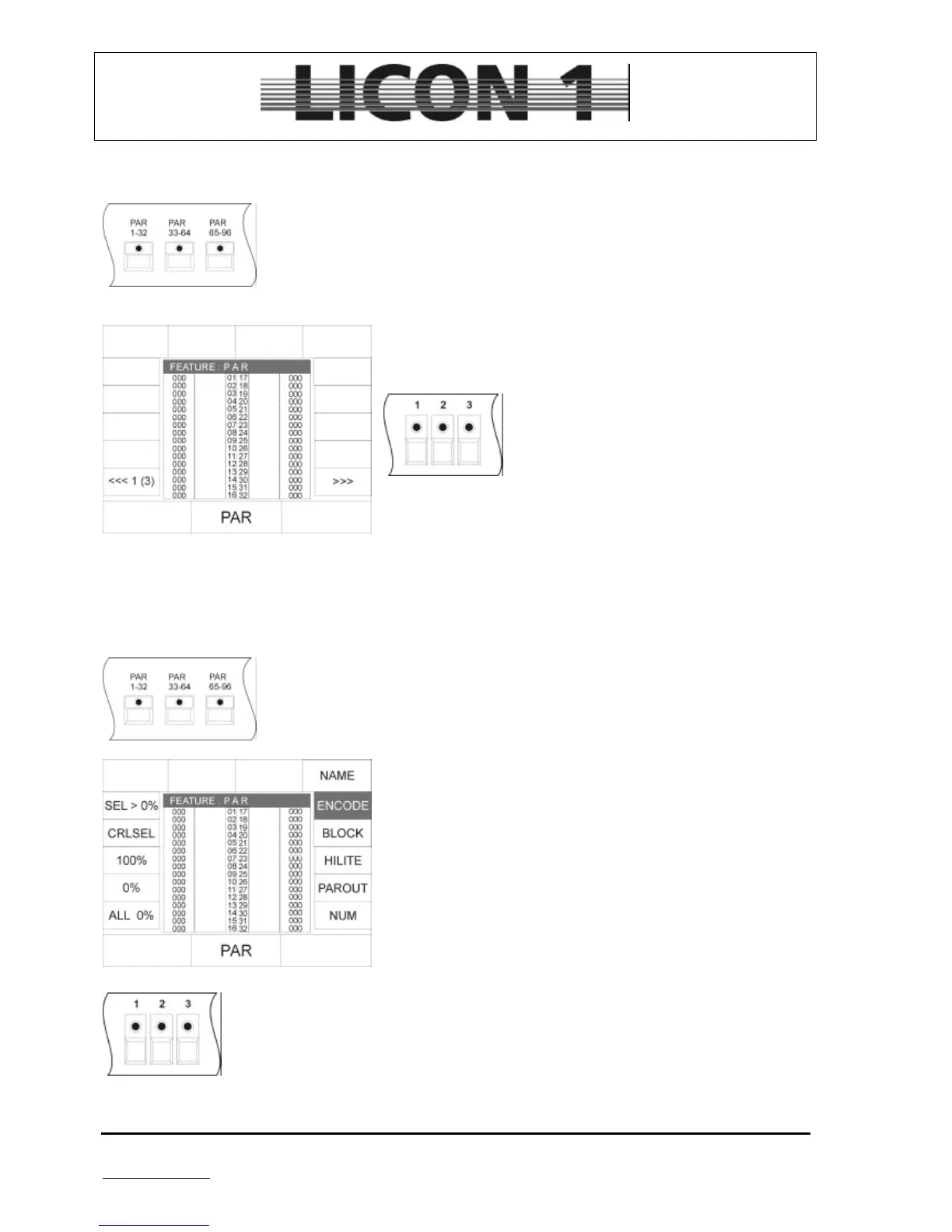
After pressing one of the PAR keys twice the display will show the following configuration:
If Presets have been stored, they can be recalled using this
display configuration.
To enter DMX values select the channels by
means of the keys in the Fixture- /PAR
selection block. Enter value by means of the
encoder wheel situated in the middle.
Caution: The DMX values are entered for all active channels.
If there are channels selected from number 33 to 96 there
values are changed, too even if they are not shown on the
display.
This way of programming is very time consuming. Faster and more efficient ways of programming PAR
channels are described in the chapters 16.2 to 16.8
16.2 Encode mode
To enter encode-mode press one of the PAR keys twice.
Then press softkey ENCODE.
The activated state of the encode-mode is shown by inversion of
the display.
The encode-mode offers the possibility to enter data for PAR
channels similar to the fixture features.
Activate channels by pressing the fixture/par selection keys


 To Next Page