JB-lighting Lichtanlagen GmbH Sallersteigweg 15 D-89134 Blaustein phone: +49 7304 9617-0
www.jb-lighting.de - 47 -
10.2.2 Page no. 2 of the chase generator (the order of fixtures)
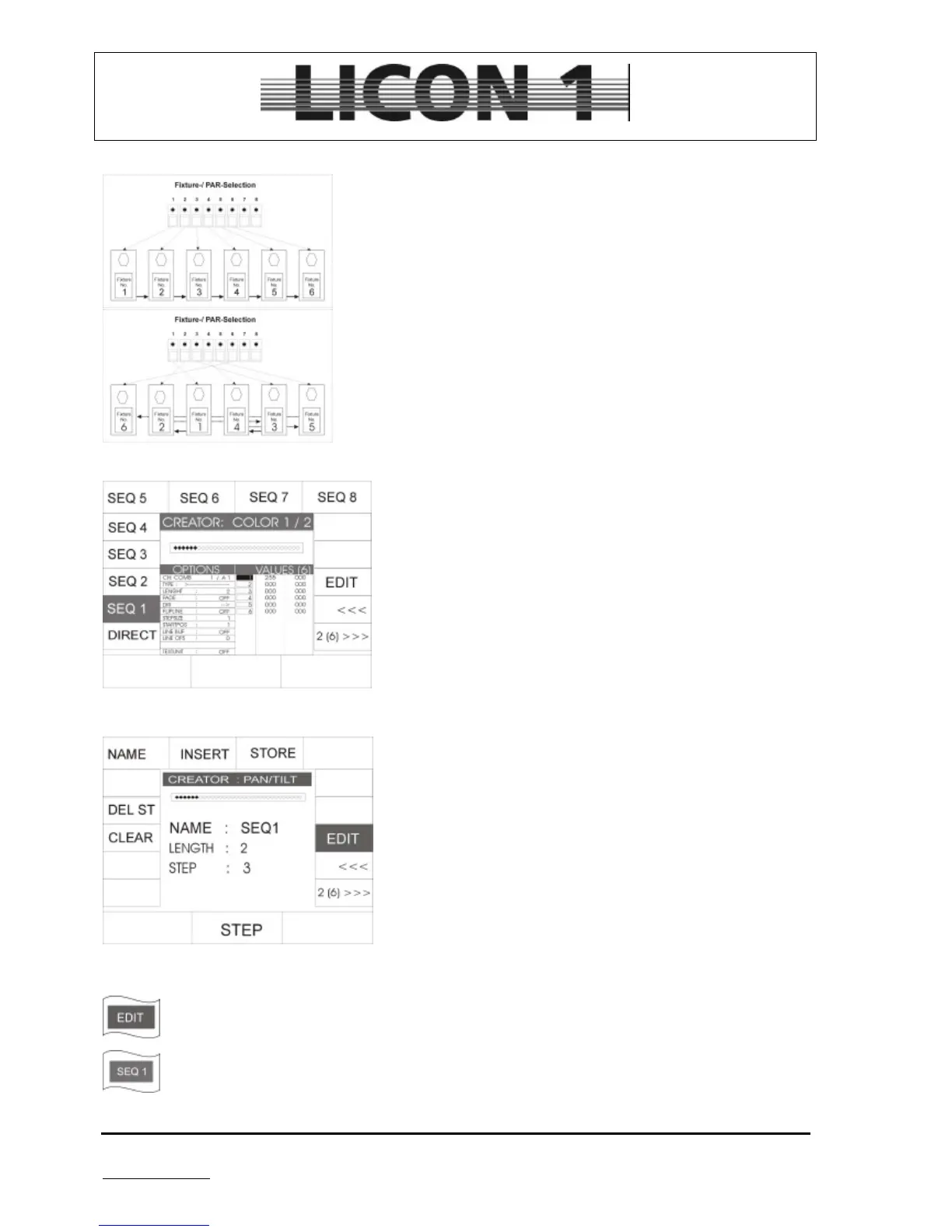
If a chase pattern is programmed in DIRECT mode, the fixtures will be
recalled in order of the keys in the fixture/par selection area. (see
sketch no. 1, left)-
However, the fixtures are often hung in a different order.
This might result in a very uncoordinated replay of the chase.
(see sketch no. 2)
To change the order use options on the second page of the chase generator.
A number of eight different orders (or sequences) can be
programmed. They are stored and recalled by means of the
softkeys SEQ 1 – SEQ 8 (names can be altered).
To program a order select on softkey (SEQ1-SEQ8). If it is
displayed inverted the softkey EDIT will appear.
Press the softkey EDIT to enter the menu.
The softkeys have the following meanings:
CLEAR: Deletes the programmed order.
DEL ST Deletes the active step which was activated by
means of the encoder wheel situated in the middle before
NAME: To name the order/sequence by means of the
keys in cues/chases/sequence block.
INSERT: Insert one step
STORE: Store one step
To store a order/sequence proceed like this.
1. Select page no. 2 of the chase generator and press softkey EDIT
2. Select one of the softkeys SEQ1 – SEQ 8


 To Next Page