JB-lighting Lichtanlagen GmbH Sallersteigweg 15 D-89134 Blaustein phone: +49 7304 9617-0
www.jb-lighting.de - 28 -
6.1.1 The storage matrix
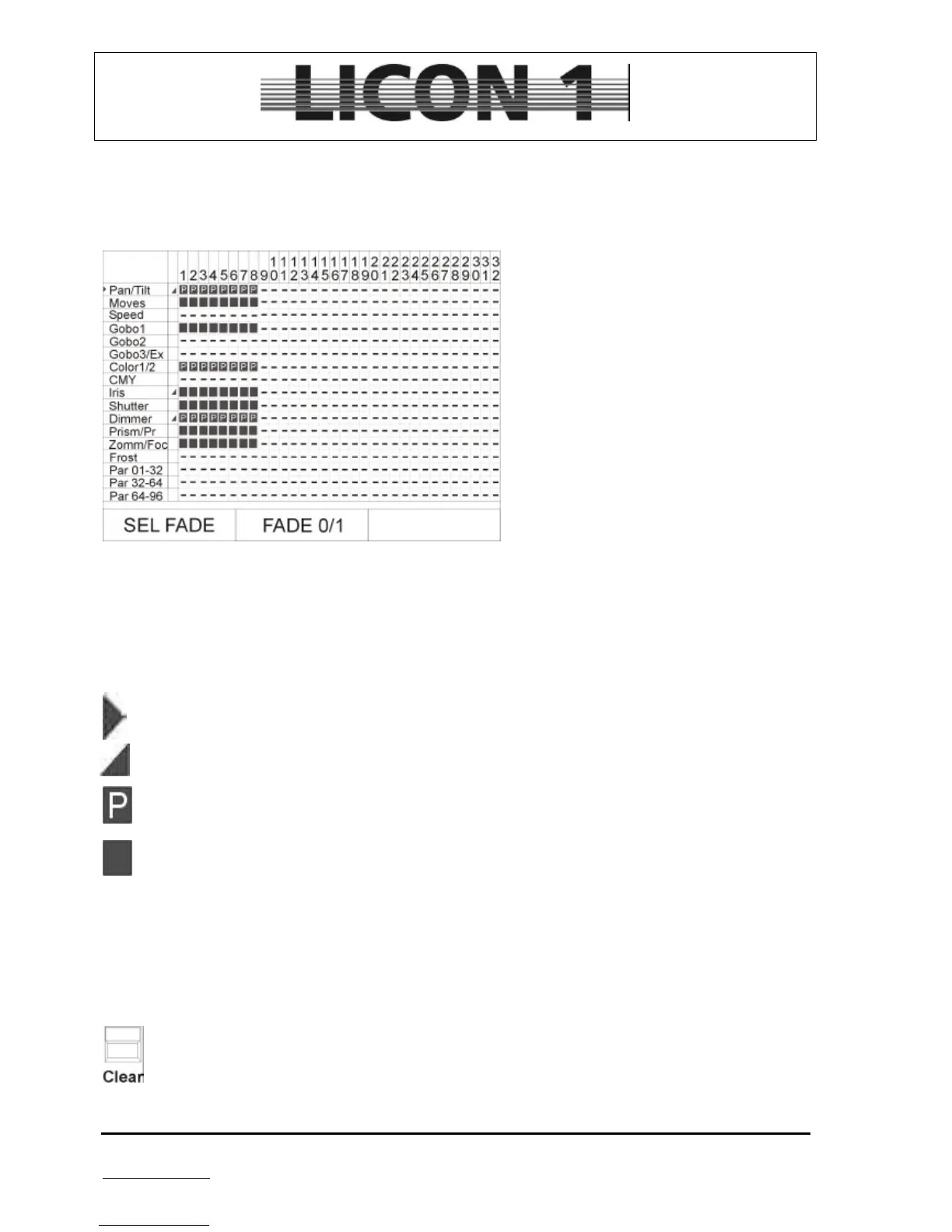
The storage matrix is most important when programming cues, chases or sequences. Each feature
has to be activated in the store matrix if it should be stored in a cue, chases or sequence.
This storage matrix will show up anytime the store keys are pressed during the process of programming
cues, chases and sequences.
The display of the storage matrix will contain:
Number of fixtures/PAR channels patched
Number of parameters available
Marks for the features which can be faded
There are different markers to display the following functions:
A small triangle in front of the parameter display the cursor. It can be moved by means of the left
encoder wheel (SEL FADE).
A ramp displayed marks a parameter which can be faded. To activate/deactivate fade function use
encoder wheel positioned in the middle. (First you have to move the cursor to the parameter)
Features maked with a „P“ have been programmed by means of a preset. The cues contain preset
data will be changed automatically to new DMX values whenever the preset is changed later on.
A dark square makes DMX values which have been entered by means of encoder wheels.
- A hyphen marks fixtures/PAR channels which haven´t been patched or the lack of a fixtures feature.
6.1.2 Selection of the features
Each cue can contain a variety of features. Before actually storing a cue the desired features have to be
selected.
• Selection of all features available
Make sure the desired fixtures are activated (LED is lit).
Press clear key (located in the feature selection block) to select all features available. (The store
matrix will display all features inverted)


 To Next Page