38
5. Operation and maintenance devices
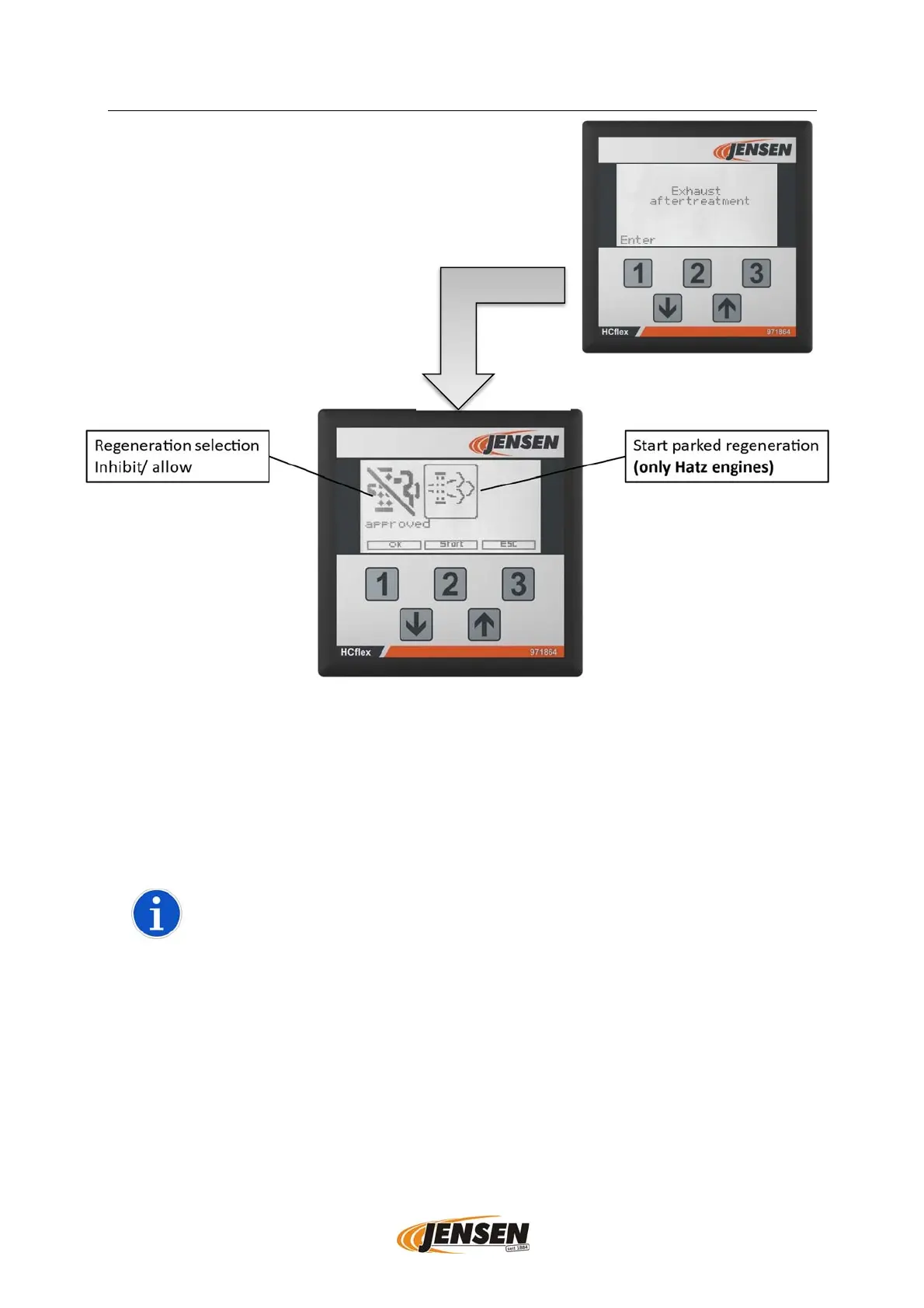
To access the exhaust aftertreatment settings and
monitoring menu, the "Exhaust Aftertreatment" menu
must be confirmed with the [1] button. Then you get to
the operating window, which can be seen on Figure 5.
The [1] button can be used to allow or prevent automatic regeneration. If the
regeneration is suppressed, then the "Display Regeneration" is highlighted in black.
An immediate regeneration process can be initiated using the [2] button (Hatz engines
only). This is especially useful if some regeneration has previously been aborted and
the load is unusually high.
A manually triggered regeneration with the button [2] can only be
triggered with Hatz engines. For all other engine brands, the symbol
"Start regeneration selection" is without function or from software
version S02412d/5288 the symbol has disappeared from the menu.
A manually started regeneration is a parked regeneration (see
5.7.1.3.6
.
Figure 4- Exhaust Aftertreatment Menu
Figure 5- Allow regeneration or start regeneration.


 To Next Page