EasyManua.ls Logo

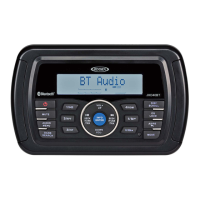
Jensen JHD36A - QUICK REFERENCE - MEDIA AND BLUETOOTH CONTROLS; CD;MP3;USB and iPod Controls; Bluetooth and Phone Call Operations

Jensen JHD36A
24 pages
Print Icon
To Previous Page IconTo Previous Page

Loading...
INCOMING/OUTGOING
PHONE
CALL:
Press
to
answer
incoming
call
if
Auto
answer
function
is
turned
off.
Press
to
end
call
.
Press
and
hold
to
transfer
an
incoming
call.
MUTE/PLAY/PAUSE:
Press
to
PLAY
or
PAUSE
current
track.
PAIRING
A
DEVICE
VIA
BLUETOOTH:
With
stereo
in
BT
Audio
mode,
enter
system
menu
(PTY/CAT
MENU
button).
Scroll
(I<<
or>>!)
through
menu
items
until
you
reach
BJ
Setup
and
press
ENTER
button.
Then
scroll
(I<<
or>>!)
through
setup
items
until
you
reach
BT
Pair
and
press
ENTER
button
.
Pairing
will
then
be
displayed
and
flashing,
waiting
for
a
connecting
device.
When
the
device
has
found
the
stereo,
it
will
display
JHD36A
in
its
list
of
available
devices.
Select
JHD36A
to
complete
pairing
process
.
The
Bluetooth
logo
icon
will
then
appear
on
the
stereo
LCD
.
VOLUME
:
Rotate
clockwise
to
increase
(+)
volume
;
counter-clockwise
to
decrease(-)
volume
.
MUTE/PLAY/PAUSE
:
RPT:
Press
to
REPEAT
INTRO
SCAN:
Press
when
album/
ROM:
Press
when
album/
USB:
Insert
USB
device
here
.
Press
to
PLAY
or
PAUSE
current
audio
.
VOLUME
:
Rotate
clockwise
to
increase
(+)volume;
counter-
clockwise
to
decrease
(-)volume
.
DISP/SCROLL:
Press
to
change
display
info
between
single
and
dual
line
text
display
.
Press
and
hold
to
scroll
Artist
&
Song
Title
info.
VOLUME:
Rotate
clockwise
to
increase
(+)volume
;
counter-
clockwise
to
decrease
(-)volume.
current
playing
track
.
folder
is
playing
to
play
each
track
folder
is
playing
to
play
each
Press
to
release
function
.
for
10
seconds
in
seQuential
order
.
track
in
RANDOM
order.
MUTE/PLAY/PAUSE:
Press
to
PLAY
or
PAUSE
current
audio
.
Press
again
to
SELECT
current
song.
Press
again
for
NORMAL
play
.
RPT
:
Press
to
REPEAT
INTRO
SCAN
:
Press
when
current
playing
track
.
iPod
is
playing
to
play
each
Press
to
release
function
.
track
for
10
seconds
in
seQuential
order.
Press
again
to
SELECT
current
song.
ROM:
Press
when
iPod
is
playing
to
play
each
track
in
RANDOM
order.
Press
again
for
NORMAL
play.
TUNE/TRK:
Press
to
play
previous
or
next
track.
INFO/ENTER
:
Press
to
select
BT
ON
or
BT
OFF.
When
BT
ON,
press
to
turn
BT
Pair
ON
to
put
unit
into
pairing
mode.
PTY/CAT
MENU:
Press
and
hold
to
access
system
menu.
Press
I<<
or
>>!
to
navigate
through
menu
items.
TUNEITRK
:
Press
to
tune
to
next
or
previous
track.
Press
and
hold
to
FAST
FORWARD
or
REWIND
current
track
playing.
Release
for
normal
playback.
PTY/CAT
MENU:
Press
to
access
folder
list.
Press
I<<
or
>>!
to
navigate
through
folder.
Press
ENTER
to
select
desired
folder.
Press
I<<
or>>!
to
navigate
through
songs
.
Press
ENTER
to
select
desired
song.
TUNE/TRK:
Press
to
play
previous
or
next
track.
Press
and
hold
to
FAST
FORWARD
or
REWIND
current
track
playing
.
Release
for
normal
playback.
PTY/CP.J
~1ENU:
Press
to
enter
play
list
selection
mode.
Press
I<<
or
>>!
to
navigate
through
Playlists,
Artists,
Albums,
Genres
,
Songs,
Audiobooks
&
Podcasts.
Press
ENTER
to
select
desired
item.
Press
I<<
or
>>!
to
navigate
through
selected
item
folder
.
Press
ENTER
to
select
desired
song.
EJECT:
Press
to
EJECT
CD.
TUNE/TRK
:
Press
to
tune
to
next
or
previous
track.
Press
and
hold
to
FAST
FORWARD
or
REWIND
current
track
playing.
Release
for
normal
playback.
MUTE/PLAY/PAUSE
:
Press
to
PLAY
or
PAUSE
current
audio
.
RPT:
Press
to
REPEAT
INTRO
SCAN:
Press
when
current
playing
track.
CD
is
playing
to
play
each
Press
to
release
function
.
track
for
10
seconds
in
se-
Quential
order
.
Press
again
to
SELECT
current
song
.
ROM
:
Press
when
CD
is
playing
to
play
each
track
in
RANDOM
order.
Press
again
for
NORMAL
play.
PTY/CAT
MENU:
Press
to
access
folder
list.
Press
I<<
or>>!
to
navigate
through
folder
.
Press
ENTER
to
select
desired
folder.
Press
I<<
or>>!
to
navigate
through
songs.
Press
ENTER
to
select
desired
song.

Related product manuals