51
VX6020
USB and SD Operation
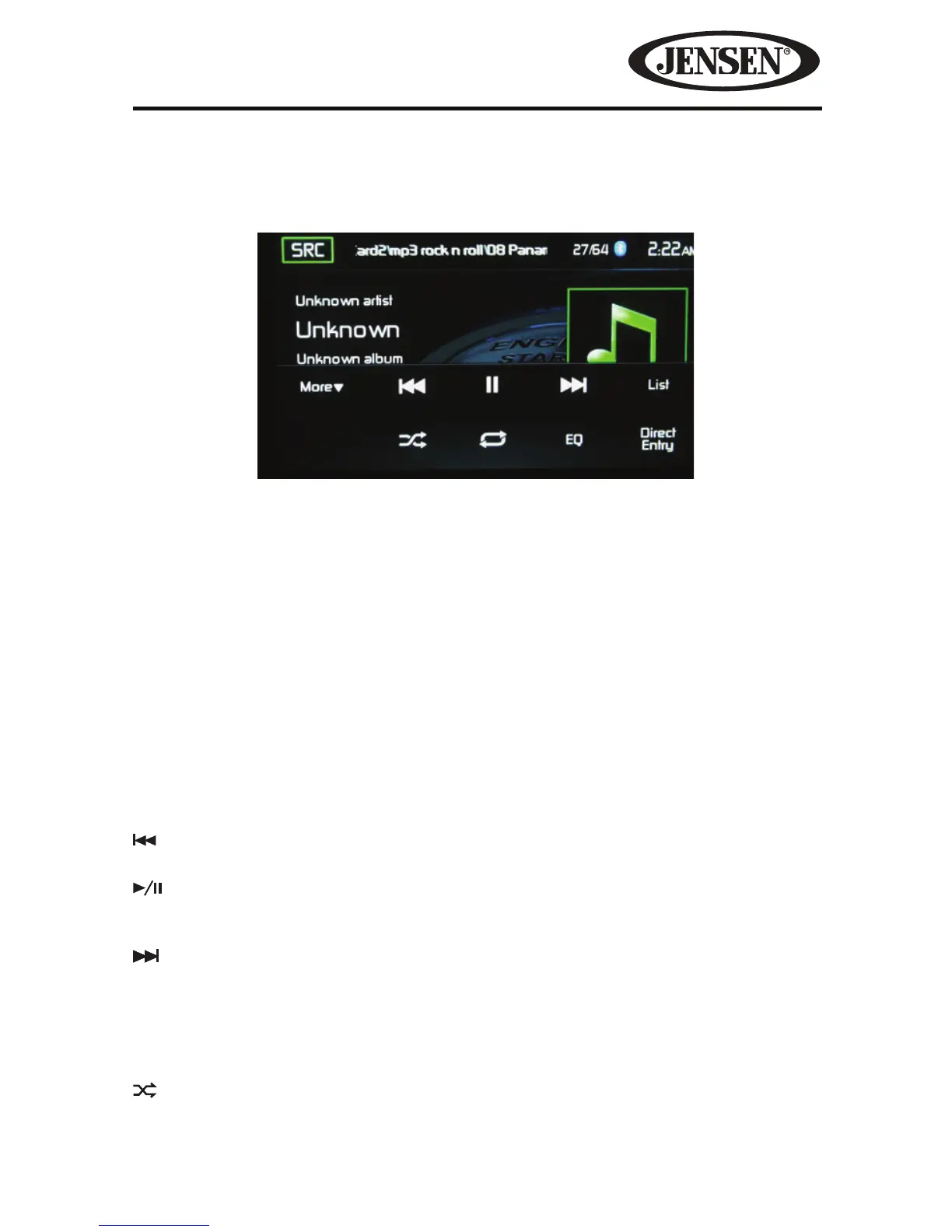
SDHC and USB Main Menu
SRC Icon- Touch this icon to return to the Main Menu Screen.
iPod- Displays the current source.
Track Number- Lists the current audio track playing and the total number of audio
tracks in audio mode. Lists the current video folder and the total number of video
folders in video mode.
Time Display- This indicator displays the time as entered by the user in the Settings
Menu.
More ( S/T )-
Touch the S/T icons to display the next or previous page of the
SD/USB menu.
Previous- Touch this icon to play the previous track.
Play/Pause- Touch this icon to begin playback. Touch this icon again to pause
playback.
Next-Touch this icon to play the next track.
List- Touch this icon to access the list of audio and video les contained on the
iPod®. Touch a folder icon and the contents of the folder will be displayed. Touch a
desired track icon twice and the track will begin playing.
Shue- Touch this icon to play audio or video tracks in a random order. The icon
will light on the main TFT LCD screen.
Figure 40. SDHC and USB Main Menu



 To Next Page