51
5.3.3.3-1
5.3.3.3-2
5.3.3.3-3
5.3.3.3-4
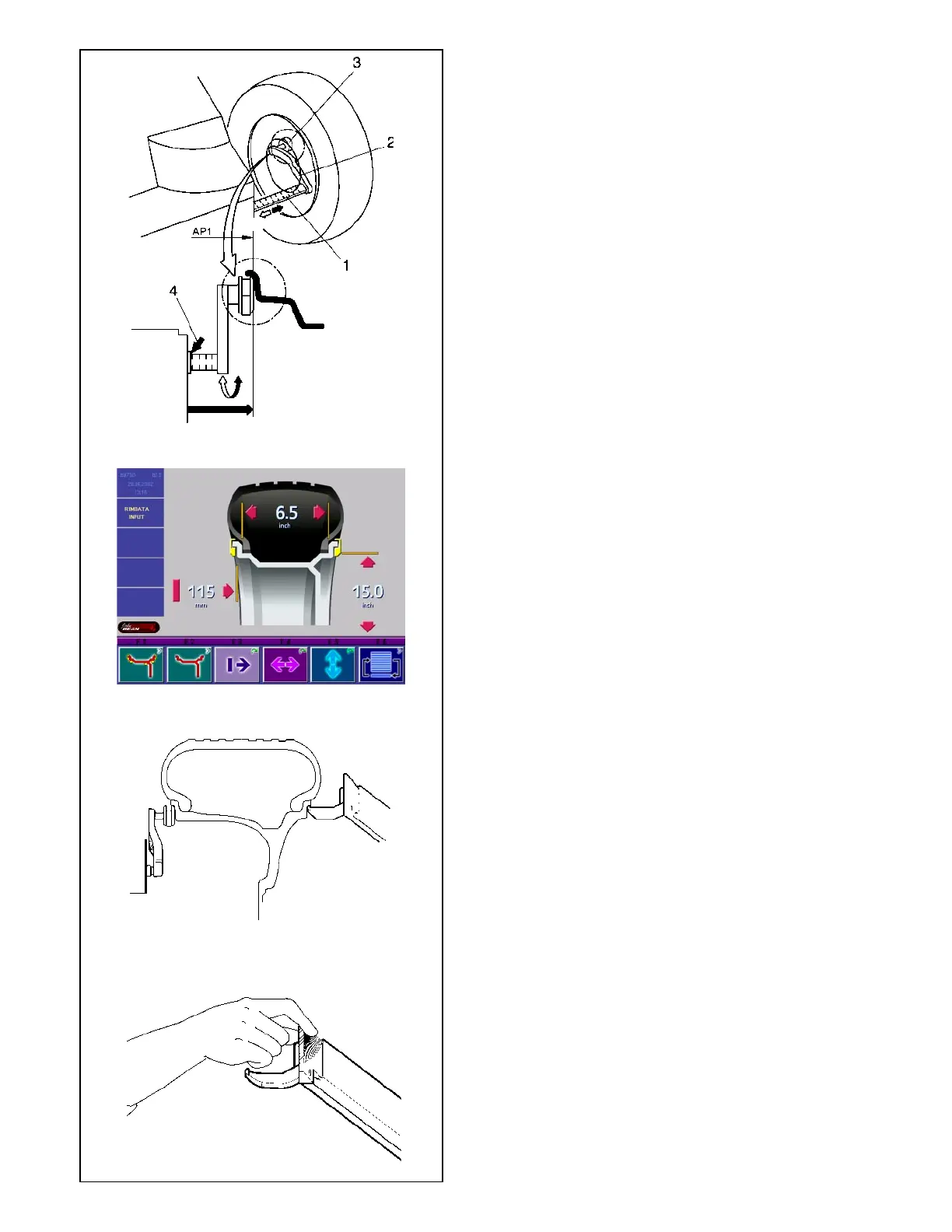
in Fig. 5.3.3.3-1, and hold in that position.
Within short an audible signal confirms that distance
and rim diameter have been stored automatically.
• Re-place the gauge arm in its home position.
The distance and the rim diameter are read out on the
screen RIM DATA INPUT (Fig. 5.3.3.3-2).
Automatic determination of the width.
• Make sure that both gauge arms are in the idle
position.
• Position the gauge arms correctly on the rim so that
the reference point of the arm touches the reference
point on the rim (Fig. 5.3.3.3-3). The arms can either
both be moved at the same time or first one and
then the other. There is no priority for either left or
right.
Note: The external gauge arm is provided with
an appropriate handle. A correct measure
is made only when using this handle (Fig.
5.3.3.3-4) places the arm.
• Hold the gauge arm in position for at least a second.
A short beep signals that the measurement has
been taken and that the data has been recorded
amongst the parameters in the program.
• Re-place the gauge arm in its home position.
The rim data are read out on the screen RIM DATA
INPUT (Fig. 5.3.3.3-2).
Manual input of distance rim/machine
If automatic determination of the distance rim/machine
is not possible (error code E 92), the distance can be
determined manually in balancing modes normal, Alu
1, Alu 2, Alu 3, Alu 4 and Alu 5.
Attention: In balancing modes Alu 2Sand Alu 3S
manual input of the distance rim/machine will produce
an incorrect measurement result.
• Pull the gauge arm (2, Fig. 5.3.3.3-1) out of the
cabinet, apply the gauge head (3, Fig. 5.3.3.3-1)
on the rim flange as shown in Fig. 37 and hold in
that position.
• Read and note down the distance shown on the
scale (4, Fig. 5.3.3.3-1).
• Return the gauge arm to its home position.
• Press and hold the menu key F3 for distance (1,
Fig. 5.3.3.3-1).
• Holding the key F3 pressed, rotate the wheel to enter
the distance previously indicated on the scale.
• Release the menu key F3 after making the input.
5.3.3.4 Determination and input of wheel diameter
Manual input of diameter
• Read and note the wheel diameter on the rim or
tire.
• To enter the wheel diameter, press and hold the
menu key F5 (2, Fig. 5.3.3.3-1).
• Rotate the wheel while the key is pressed in order
to enter the previously noted diameter.
• Having made the input release the menu key F5.



 To Next Page