110
6.3.1-1
6.3.1-2
6.3.1-3
6.3.1-3
If several measuring runs are necessary to balance a
wheel because balance weight size and position have
to be readjusted repeatedly, this is often due to
insufficient measurement accuracy.
In such case the operator has the possibility of
readjusting the machine.
For readjustment by the operator a calibration weight
is sup-plied with the machine (kept on the right at the
back of the weight box).
A calibration run takes longer than a regular measuring
run.
Electrical compensation of adapter unbalance, if carried
out, will be cancelled by readjustment.
IMPORTANT:READJUSTMENT MUST BE
CARRIED OUT USING THE CLAMPING
ADAPTER SUPPLIED WITH THE MACHINE
FROM OUR WORKS.
Readjustment
• Make sure no wheel or other clamping means is
clamped on the machine.
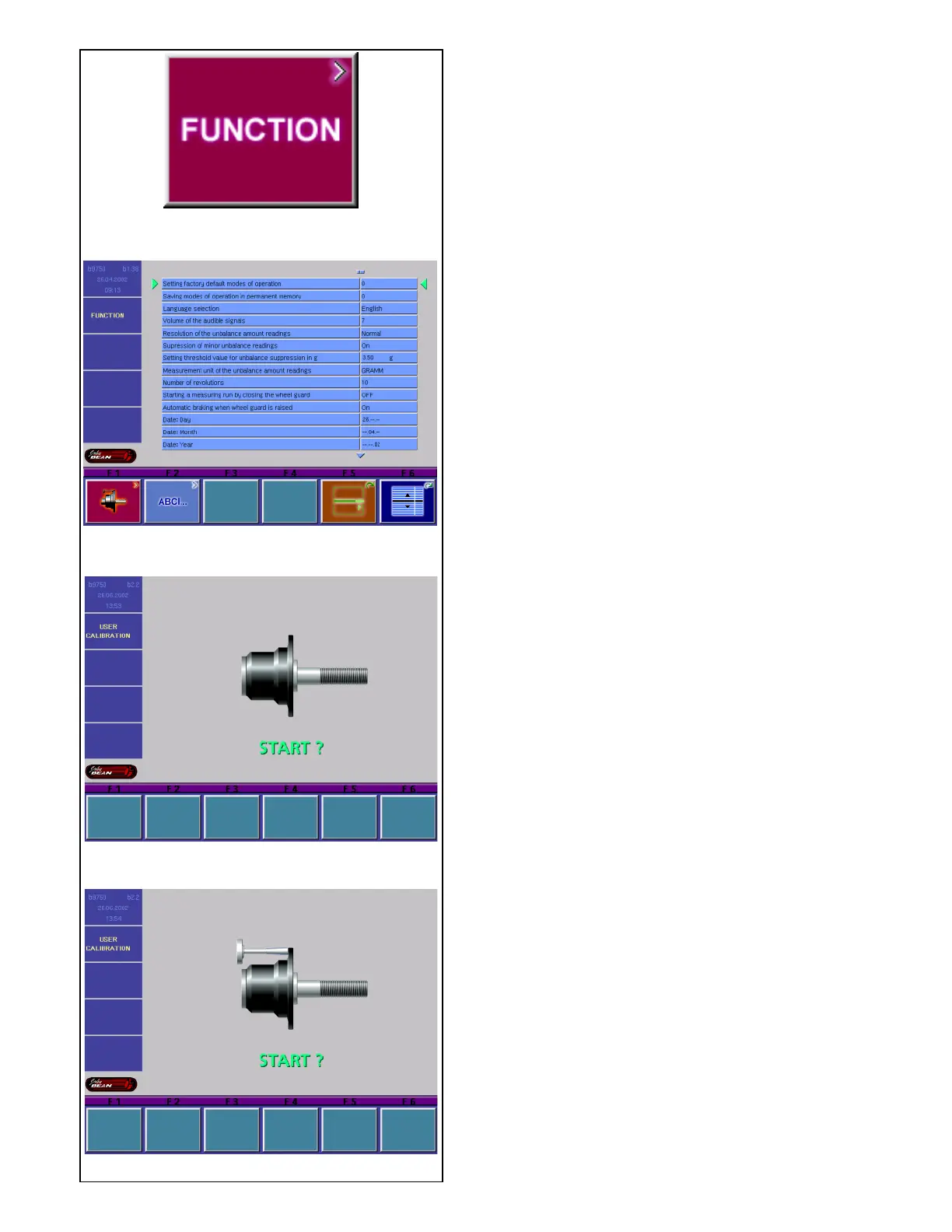
• Press menu key F1 in the main menu (Fig. 6.3.1-1)
- if necessary return to the main menu by pressing
the ESC key.
The FUNCTION screen (Fig. 6.3.1-2) appears.
• Press menu key F1 in the FUNCTION menu (Fig.
6.3.1-2).
The screen USER CALIBRATION (Fig. 6.3.1-3)
appears.
• Close the wheel guard, and press the START key
to carry out a first readjustment run (long measuring
run - to detect residual unbalances, if any).
During the calibration run three points are displayed in
place of the start symbol. On completion of the first
readjustment run a screen as in Fig. 6.3.1-4 appears.
• Screw the calibration weight into the threaded bore
pro-vided for this purpose in the basic body of the
wheel adapter (Fig. 6.3.1-4).
• Press the START key to carry out a second
readjustment run with the calibration weight fitted
on the adapter (to detect the correction values).
On completion of the second run the electronic unit
processes the data determined in the calibration runs
and enters them into the permanent memory. On
completion of the processing operation a three-tone
signal is given and readjustment is completed.
• Once readjustment is completed, be sure to remove
the calibration weight from the wheel adapter and
put it back in its designated place.
• Press the ESC key to return to the main menu.
6.3 Calibration procedure.
This chapter contains the calibration procedures that
are accessible to the user.



 To Next Page