CONTROL SYSTEM
6-22
TC-15001-rev.3
6.4.7 Installation
6.4.7.1 Setting Batteries
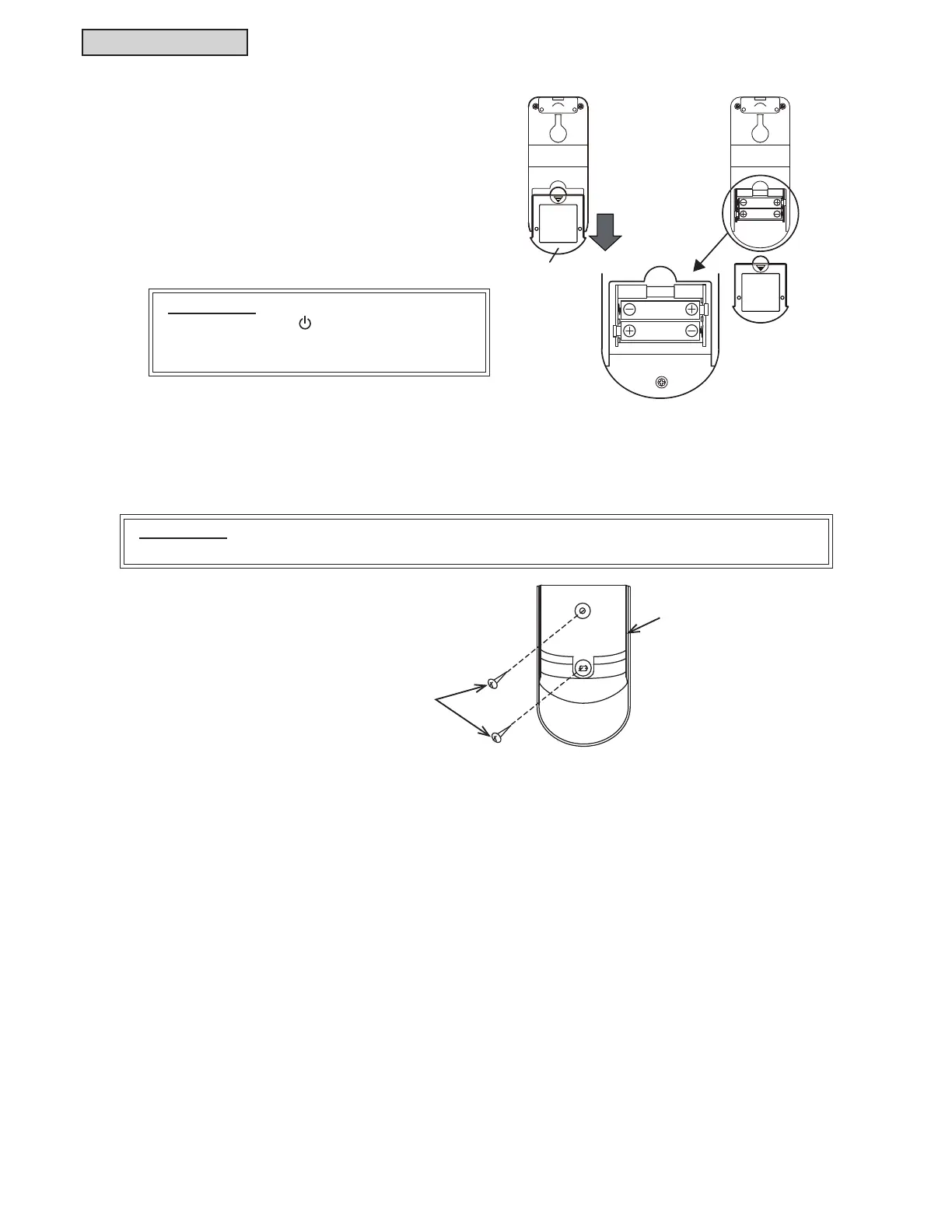
Set the batteries (AAA/1.5V × 2) for the controller as
follows.
(1) Remove the battery cover by sliding and pushing
the cover in the direction of the arrow as shown
LQWKH¿JXUHDWWKHULJKW
(2) Set the batteries. (Insert the batteries according
WRWKHPDUNVRIDQGRQWKHFDVH
Slide and push the
cover in the direction
of the arrow.
AAA Batteries
Battery Cover
ATTENTION:
Do not press the “
On” and “On Timer”
switches until the preparation for Test Run is
completed.
ATTENTION:
Keep a distance of more than 11-13/16 inches (30 cm) away from power wiring.
Screws
+ROGLQJ%UDFNHW
,QVWDOODWLRQRI+ROGLQJ%UDFNHW
:KHQLQVWDOOLQJWKHZLUHOHVVFRQWUROOHURQWRDZDOORUDSLOODUVHFXUHWKHKROGLQJEUDFNHWRQWRWKHZDOODQG
attach the controller where the receiver can receive the commands.



 To Next Page
 Loading...