17
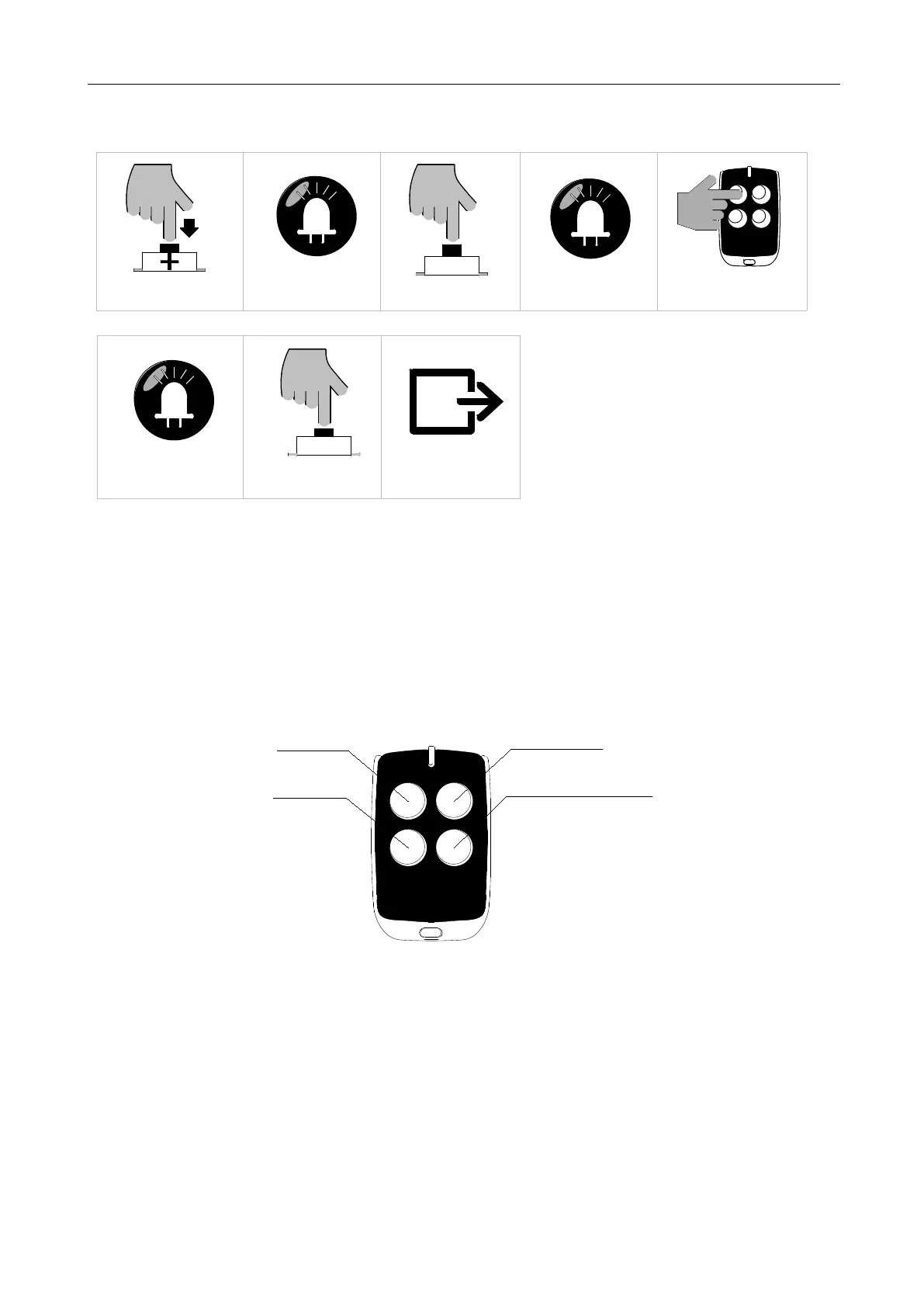
B. Operation Graphic Illustration
Press "+" button for 3 sec
SET
Press "SET" button once
LED
L1 will be on
LED
L1 and L5 will
Press the button which is to be
learned on the remote control
Press "PROG" button
PROG
Save and automatically exit
LED
L1-L5 will be on for 1 sec
flicker alternately
Figure 17
5.4.2 Three-Button Mode Learning (L2)
Under this mode, all buttons on the remote control that are paired to gate opener will be separately
used for gate opening、closing and stop. (Please refer to instruction 5.4.3 for the usage for the forth
button on the remote control)
Opening Button
Closing Button
Stop Button
Pedestrian Mode Button
Figure 18
A. Operation Instruction
1. Press and hold “+” button for 3 sec. to enter into remote control management mode.
Indicator
light L1 will be always on.
2. Press “+” button once to select three button learning mode option. Indicator light L2 will be
always on.



 To Next Page