20
on.
3. Press “SET” button once to enter into remote control delete option. Indicator lights L1-L5 will
be on.
4. Press “SET” button for 6 sec. delete will be complete and automatically exit. Indicator lights
will be off in sequence from L5 to L1, after which indicator lights L1-L5 will be on for one sec.
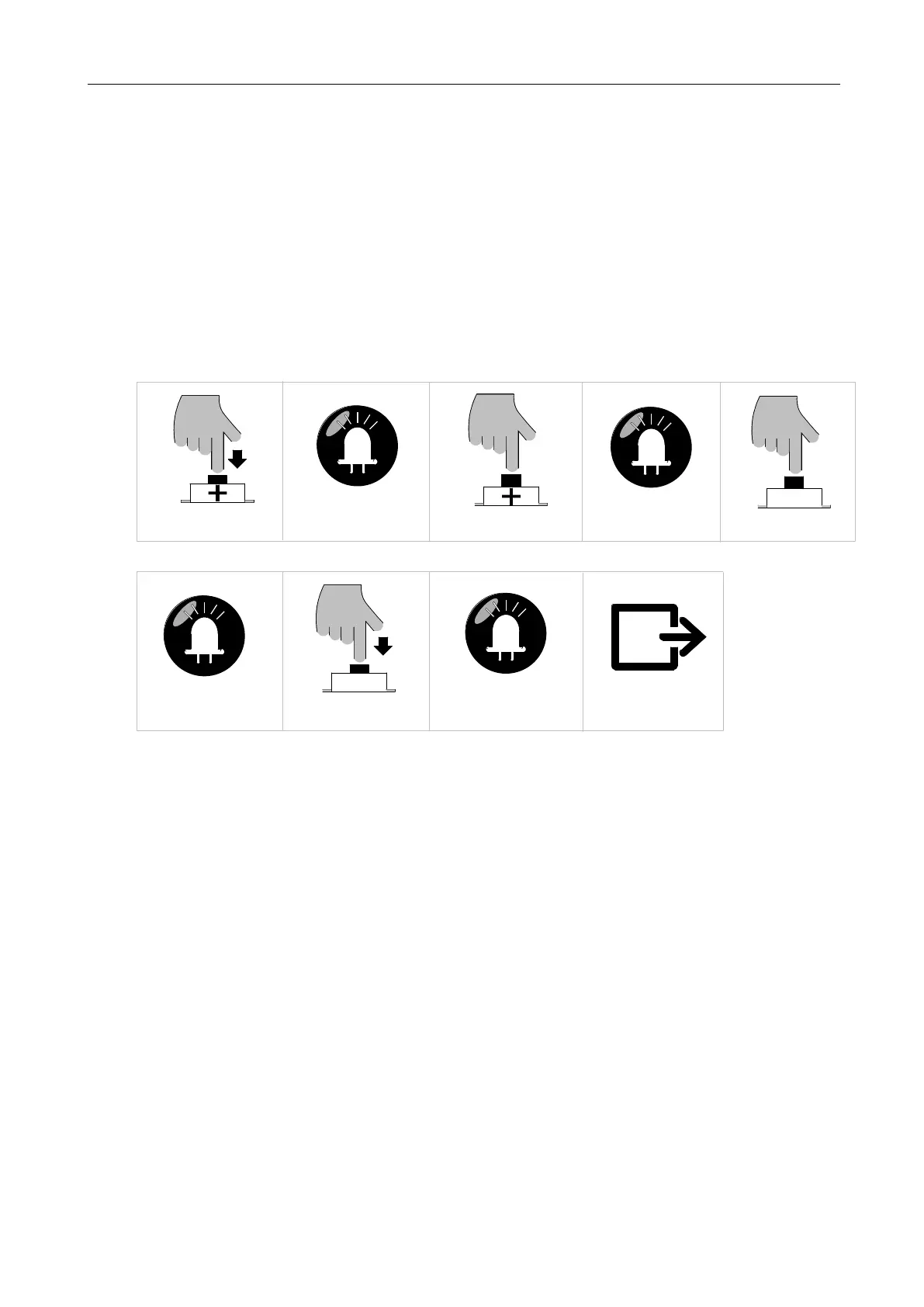
B. Operation Graphic Illustration:
Press "+" button for 3 sec
LED
L1 will be on
Press "+" button three times
LED
L4 will be on
LED
L5-L1 will be off in sequence,
and then will be on for one sec
Delete complete and exit
Press “SET” button for 6 sec
Press “SET” button once
SET
LED
L1-L5 will be on
automatically
Figure 21
5.4.5 Remote Control Intelligent Learning
Remote control intelligent learning function enables user to pair the remote controls to the control
board without dismantling the machine.
Precondition:
1. To have one piece of remote control that has already been paired.
2. To ensure the reliability of learning, please operate the intelligent learning function within 2
meters away from the machine.
3. Please make sure that the gate opener is equipped with an alarm lamp, which will help you to
check the status of remote control learning.
A. Operation Instruction:



 To Next Page