2-27
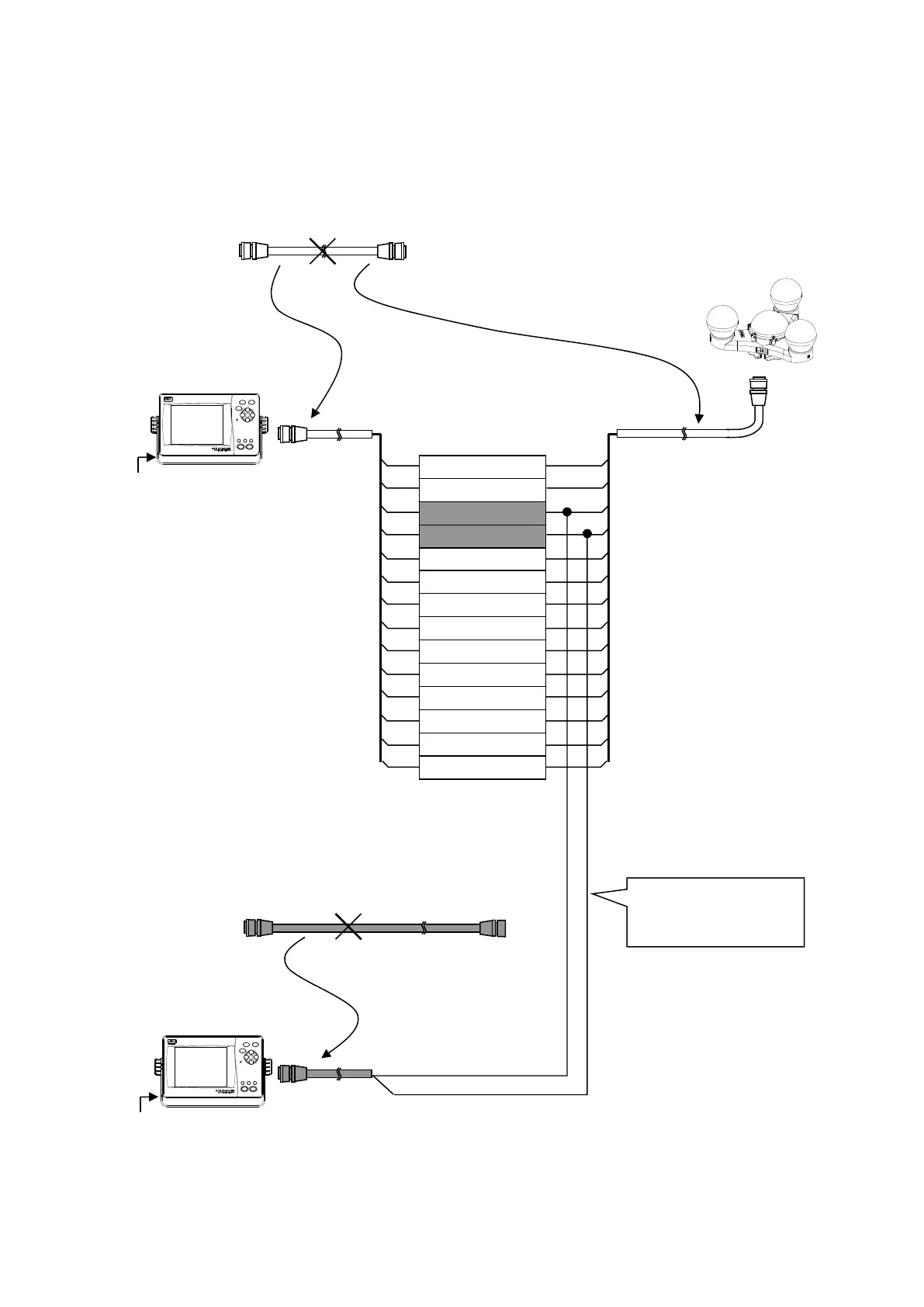
2. Connection with using the optional data extension cable CFQ-7249 and attached CFQ-7248
(Previously mentioned method 1 is recommended.)
Divide the included CFQ-7248 cable (10 m)
Divide the CFQ-7249 cable (20 m)
To select the Sub Display, set “SUB” for DISPLAY TYPE by referring to “5.4.5 Product Type
Configuration.” (Factory setting is “MAIN.”)
Sub Display Unit
Terminal Block
Orange
Connect the receiving
signal line from the
sensor only.
1 (Red Thick)
2 (Black Thick)
10 (Black Thin)
9 (White)
8 (Grey)
7 (Purple)
6 (Blue)
5 (Green)
4 (Yellow)
3 (Orange)
14 (Light Green)
13 (Light Blue)
12 (Pink)
11 (Brown)
Yellow
DC12/24V
DC12/24V
NWZ-4701
NWZ-4701
Main Display Unit


 To Next Page