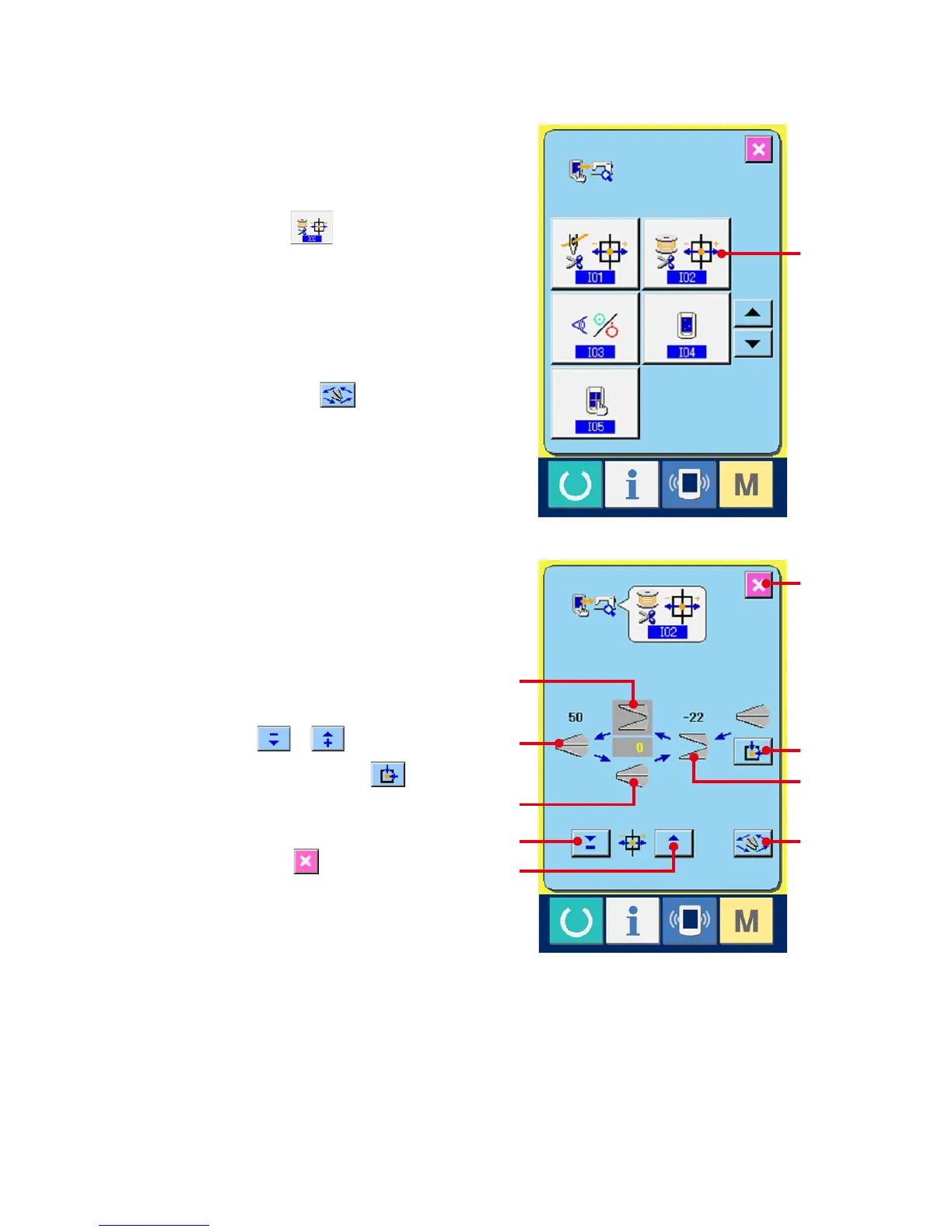
34-3 Performing bobbin thread trimmer origin adjustment
1
Display the bobbin thread trimmer origin
adjustment screen.
When BOBBIN THREAD TRIMMER ORIGIN
ADJUSTMENT button (A) on the check
program screen is pressed, the bobbin thread
trimmer adjustment screen is displayed.
2
Perform the bobbin thread trimmer origin
adjustment.
When OPERATION button (B) is pressed,
the bobbin thread trimmer is actuated to the
positions below and the pictograph showing the
position is displayed in gray.
C : Release position (Initial value : -22 pulses)
D : Waiting position (Initial value : 0 pulse)
E : Thread trimming position
(Initial value : 50 pulses)
F : Thread holding position
(Initial value : 0 pulse)
Data of the respective positions can be changed
with - or + button or (G or H).
When ORIGIN RETRIEVAL button (I) is
pressed, the origin retrieval can be performed
from any position.
When CANCEL button (J) is pressed,
the contents of change can be memorized in
EEPROM of the machine head and the screen
returns to the check program screen.
* For the details of adjustment, refer to the
Engineer's Manual for LBH-1790.
I
D
E
G
J
C
B
H
A
F



 To Next Page