10-1 To continue performing sewing from some point in sewing
1
Release the error.
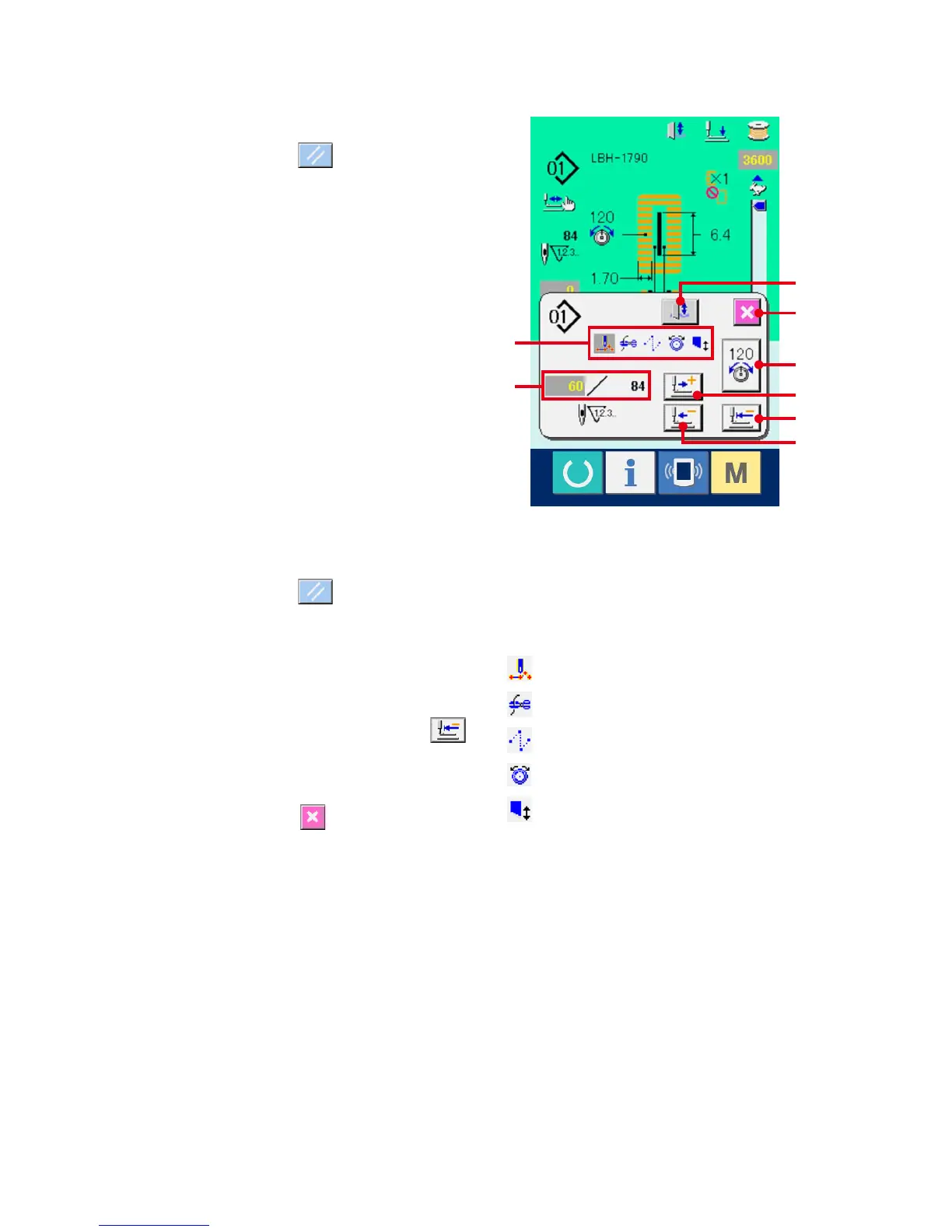
Press RESET button (B) to release the
error. Then the step motion screen is displayed.
2
Return the presser.
Press BACKWARD button (C), and the presser
returns stitch by stitch.
Press FORWARD key (D), and the presser
advances stitch by stitch. Return the presser to
the re-sewing position.
3
Start sewing again.
Depress the right side pedal and sewing starts
again
.
10-2 To perform sewing from the start
1
Release the error.
Press RESET button (B) to release the
error. Then the step motion screen is displayed.
2
Return the sewing product to the setting
position.
Press INITIAL POSITION TRAVEL button
(E) and the presser returns to the sewing product
setting position (start position).
Press CANCEL button (I) to close the pop-
up and the presser returns to the sewing product
setting position (start position).
3
Start the sewing.
When the right pedal is depressed, sewing starts
again.
※ Incase of the continuous stitching, (E)moves
to the sewing start position of the shape during
sewing and when it is pressed subsequently, it
moves to the sewing start position of the previous
shape.
※ Theexistingsewingcommandsareshown
in reverse video in section (F). The kinds of
commands are 5 kinds below.
: Sewing command
: Thread trimming command
: Jump feed
: Thread tension
: Knife drive
※ Theexistingnumberofstitches/numberoftotal
stitches are displayed in section (G).
※ Threadtensionvalueisdisplayedinsection(H).
When thread tension command is inputted in the
needle entry point by means of the external input
device, the button is displayed and thread tension
can be changed.
※ Knifecanbecancelledwith(J).
E
I
D
H
C
F
G
J



 To Next Page