22-2 Editing procedure of the continuous stitching data
1
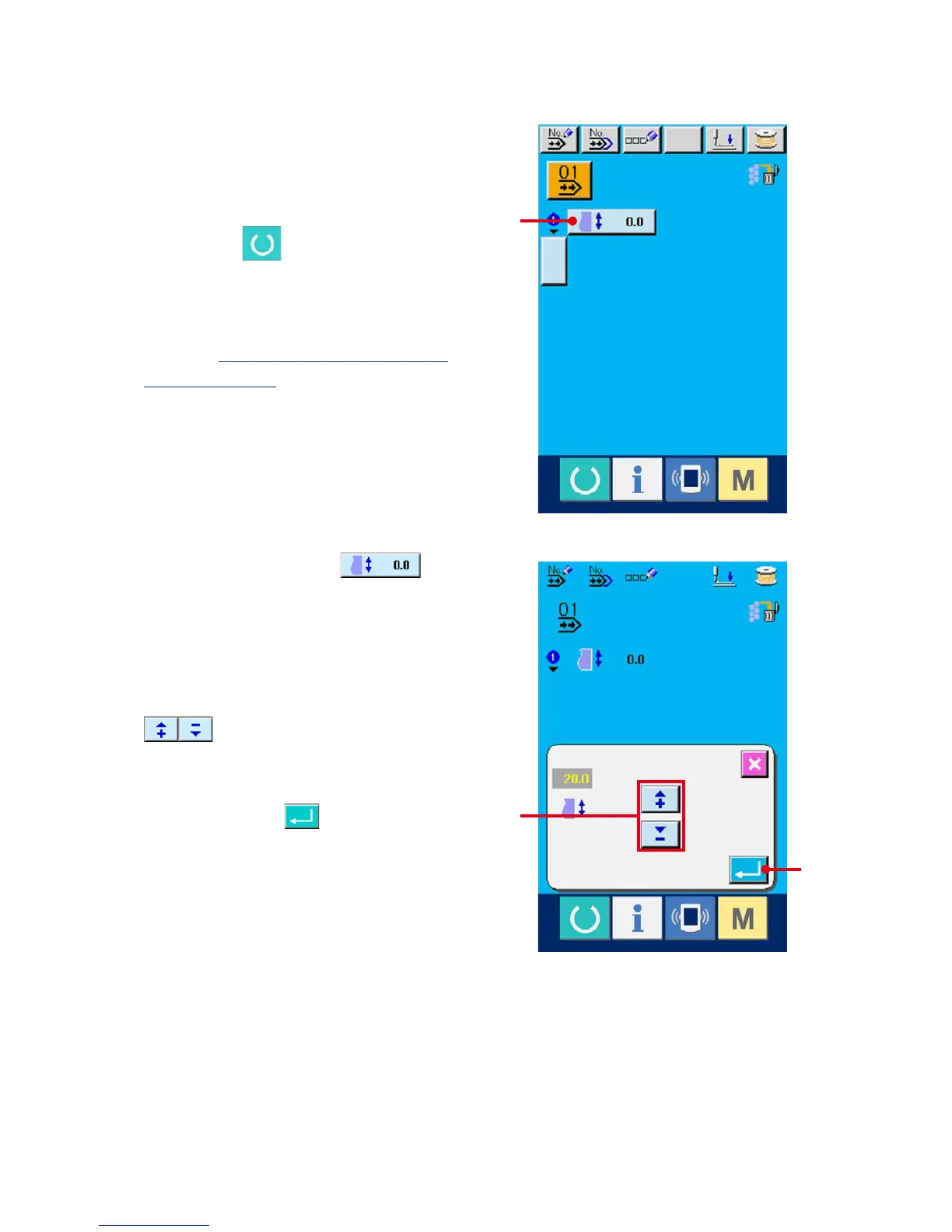
Display the data input screen.
Only in case of the data input screen (light blue),
it is possible to change the continuous stitching
data. In case of the sewing screen (green), press
READY switch and display the data input
screen (light blue).
After the screen is displayed, select the
continuous stitching data No. you desire to edit
referring to
22-1 Selection of the continuous
stitching data, p.63
. Continuous stitching data
No. 1 only has been registered at the time of your
purchase. However, pattern No. has not been
inputted and the screen is displayed as shown in
thegureontherightside.
2
Display the feed amount input screen.
When FEED AMOUNT button (A)
is pressed, the feed amount input screen is
displayed.
3
Input the feed amount.
Input the feed amount with plus/minus buttons
(B).
4
Determine the feed amount.
When ENTER button (C) is pressed, the
feed amount input screen is closed and input has
been completed.
A
B
C



 To Next Page