– 73 –
24-2 Editing procedure of the cycle data
1
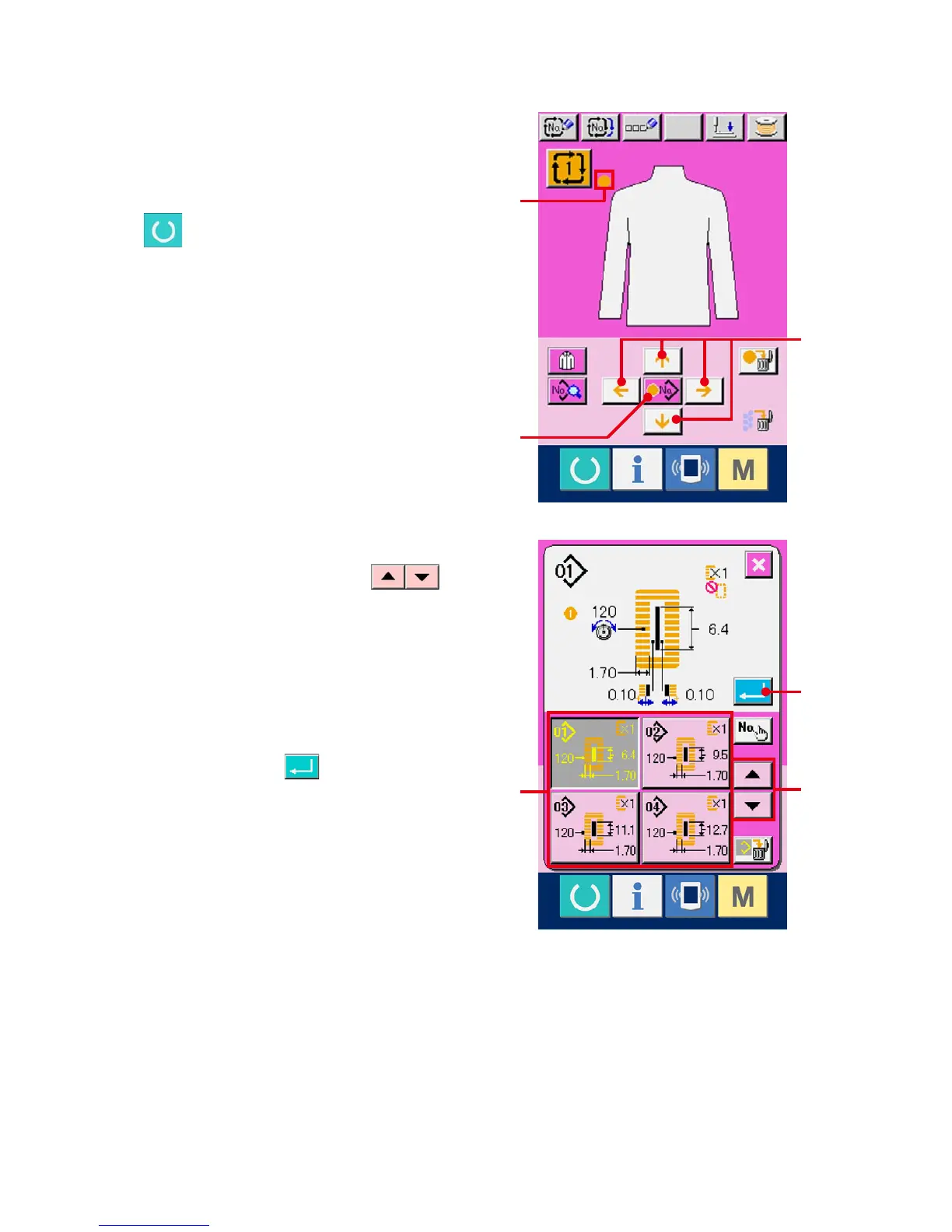
Display the data input screen.
Only in case of the data input screen (pink), it is
possible to input the cycle data. In case of the
sewing screen (green), press READY switch
and display the data input screen (pink).
2
Move the cursor to the position you desire.
Move cursor (B) to the position you desire with
arrow mark button (A), press pattern No. selection
button (C), and call the pattern No. selection
screen.
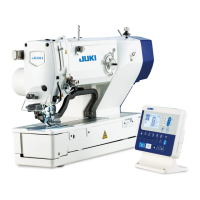
3
Select the pattern No.
When UP/DOWN SCROOL button
(D) is pressed, the registered pattern No. buttons
(E) are changed over in order. Contents of the
pattern data are displayed in the buttons. Here,
press the pattern No. button you desire to select.
4
Determine the pattern No.
When ENTER button (F) is pressed, the
pattern No. selection screen is closed and the
selection has been completed.
B
E
F
C
A
D



 To Next Page