16
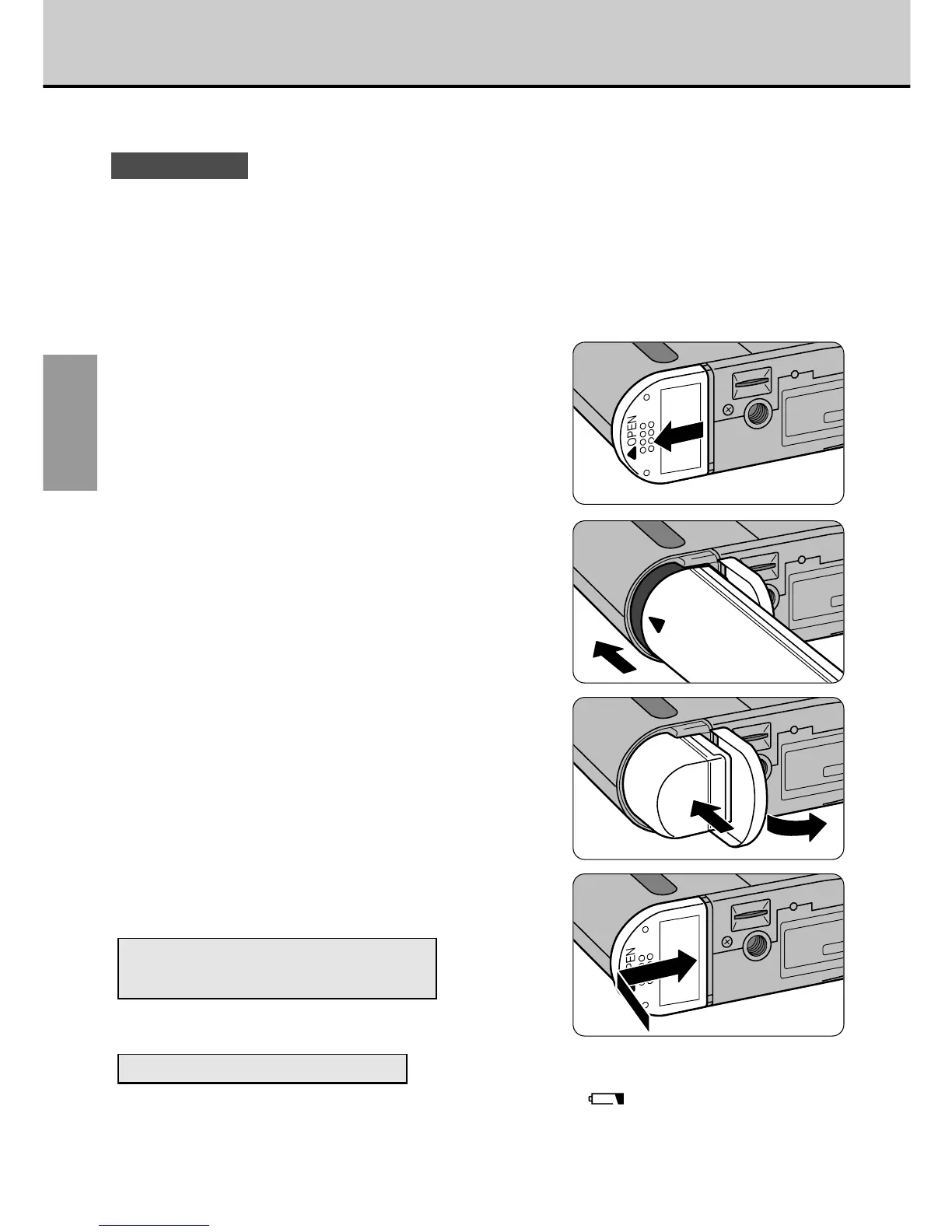
Loading the Battery
GETTING
READY
This section describes how to load the BN-V101 Rechargeable Battery.
! CAUTIONS
• The battery is not fully charged at shipment. Always charge the battery before you use
the camera.
• Always switch off the camera before you replace the battery.
• If you remove the battery without switching off the camera, the date and time will revert
to the initial settings (
aP.64).
• Check the date and time settings after you replace the battery (aP.64).
• Do not use the provided BN-V101 Rechargeable Battery with other devices.
1
Slide the battery cover in the
direction of the arrow.
2
Load the battery.
• Load the battery so that the [>] mark
on the battery is foremost.
• Push the battery in until it stops.
3
Close the battery cover.
Number of Consecutive Shots
Using a Fully Charged Battery
a See P.19.
When to Replace the Battery
When the battery is exhausted, the battery check icon “
”
on the LCD panel
flashes. Load a charged battery as soon as possible.
Use the AA-V101 AC Power Adapter (supplied) to charge the battery.



 To Next Page
 Loading...




