4K HDBaseT™ 8x8 Matrix Switcher
MX-HDBASE8X8-4K 6
KanexPro.com
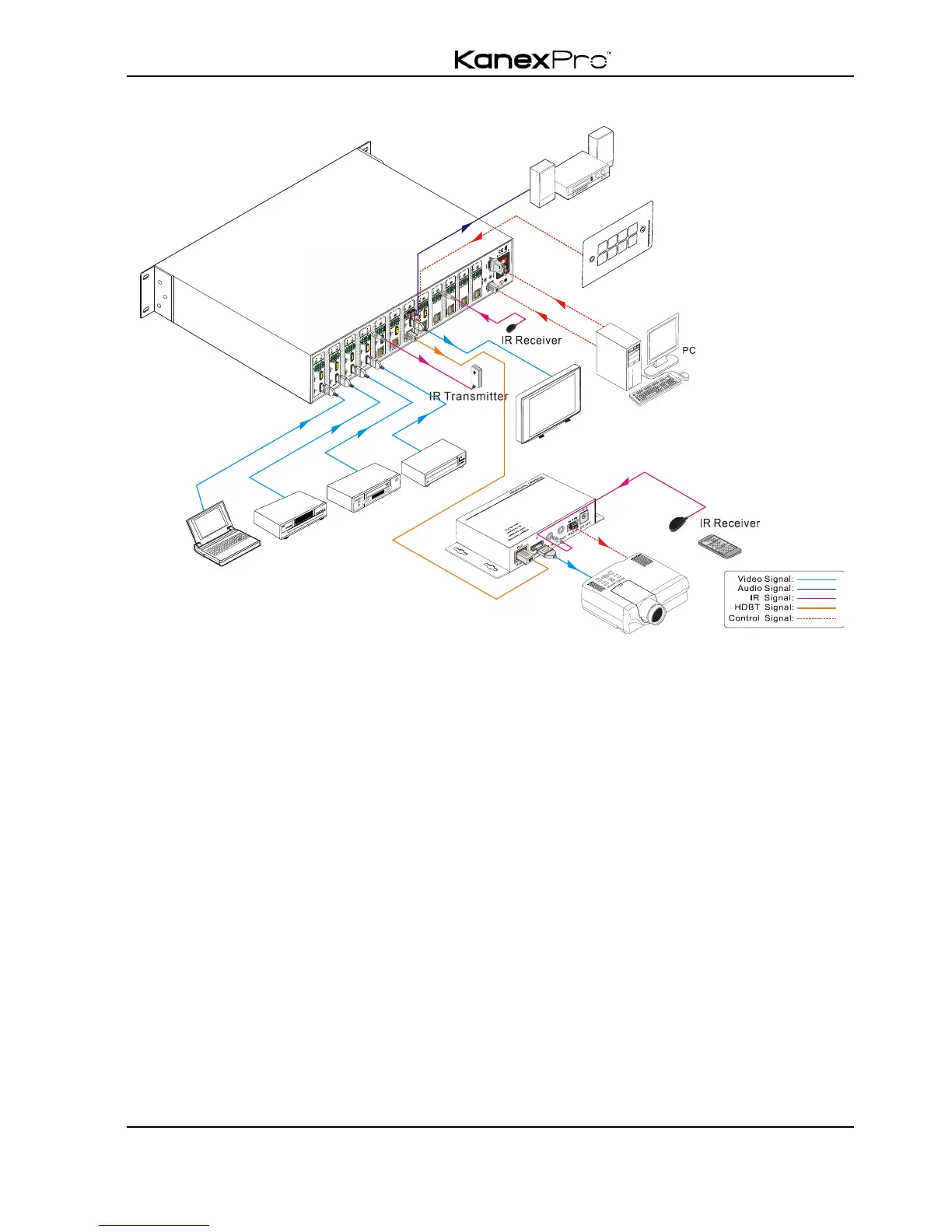
3.3 Connection Diagram
3.4 Connection Procedure
1) Connect HDMI sources (e.g. DVD) to HDMI inputs of the matrix switcher with HDMI
cables.
2) Connect auxiliary audio sources to the AUDIO IN ports with audio cables.
3) Connect HDBaseT receivers (e.g. HDMI Twisted Pair PoC Receiver) to the
HDBaseT Output ports with twisted pair.
4) Connect HDMI displays (e.g. HDTV) to HDMI outputs of the matrix switcher or the
receivers with HDMI cables
5) Connect speakers/earphones to AUDIO output ports
6) Connect the RS232 port of control device (e.g. a PC) to the RS232 port of either
switcher or far-end receivers. RS232 signal can be transmitted bi-directionally
between the switcher and far-end receivers.
7) The switcher can collect IR signal sent by the included IR remote via its built-in IR
sensor or through external IR receiver connected to the IR IN/ IR EYE/ IR ALL IN
port. The IR signal can be transmitted bi-directionally between the switcher and
far-end receivers.



 To Next Page