4K HDBaseT™ 8x8 Matrix Switcher
MX-HDBASE8X8-4K 12
KanexPro.com
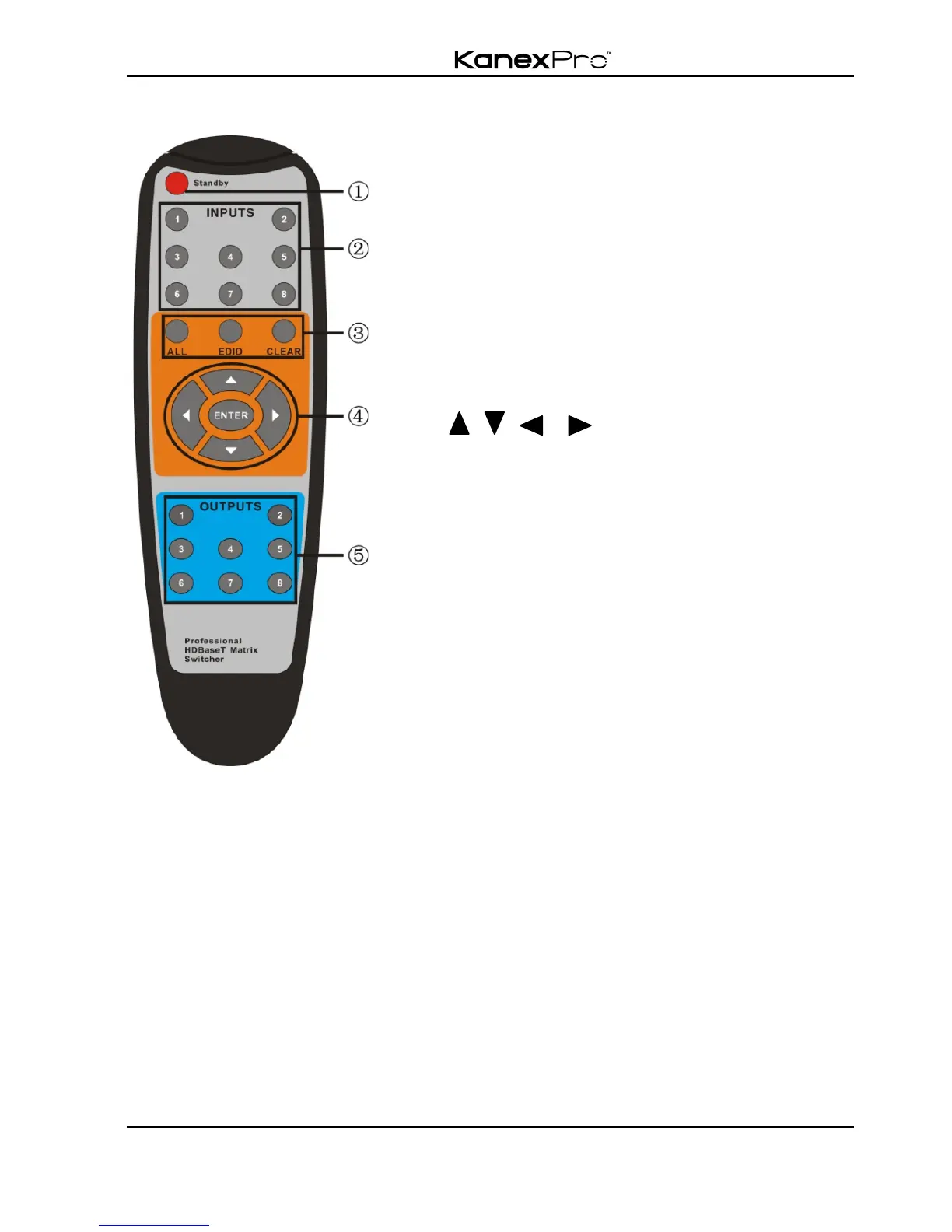
4.2.1 Usage of IR Remote
Standby button, press it to enter/ exit standby
mode
Input channels, range from 1~8,
corresponding IR signal switched
synchronously when switching input
channels.
Menu buttons, ALL, EDID and CLEAR, same
with the corresponding front panel buttons.
Please refer to 4.1 Front Panel Button Control
for details.
Output channels, range from1~8.
Each channel has 1 IR IN, 1 HDBaseT, 1
RS232, and 1 AUDIO outputs, and
channel1~4have HDMI outputs.
Note: With this IR remote, the matrix switcher can be controlled with the built-in IR, the
extended IR receiver connected to the “IR EYE”/”IR ALL IN” and the IR receiver on the
far-end receiver.



 To Next Page