4K HDBaseT™ 8x8 Matrix Switcher
MX-HDBASE8X8-4K 16
KanexPro.com
4.3 RS232 Control
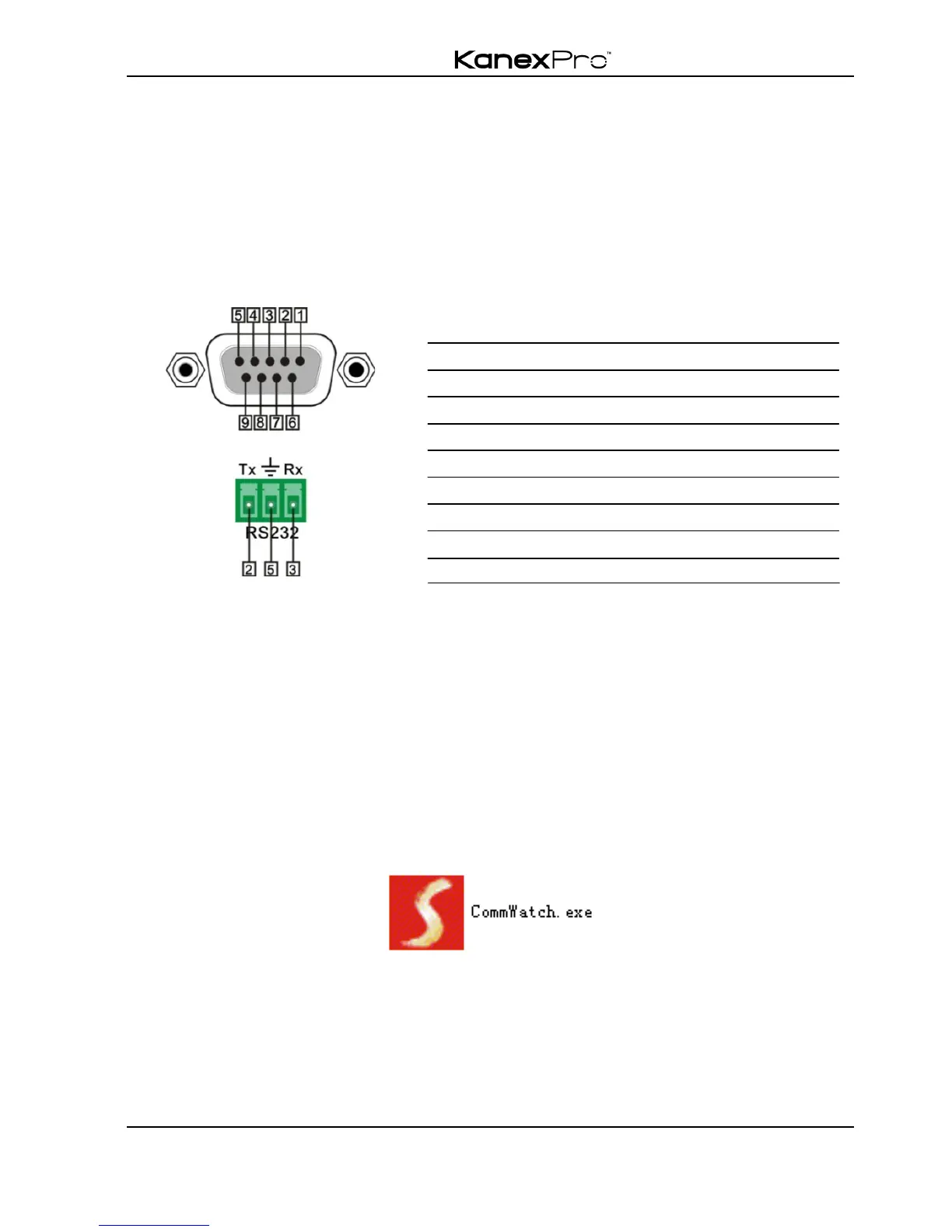
4.3.1 Connection with RS232 Communication Port
Except the front control panel, the matrix switcher can be controlled by far-end control
system through the RS232 communication port. This RS232 communication port is a
female 9-pin D connector. The definition of its pins is listed in the table below.
No. Pin Function
1 N/u Unused
2 Tx Transmit
3 Rx Receive
4 N/u Unused
5 Gnd Ground
6 N/u Unused
7 N/u Unused
8 N/u Unused
9 N/u Unused
4.3.2 Installation/uninstallation of RS232 Control Software
! Installation Copy the control software file to the computer connected with the
switcher.
! Uninstallation Delete all the control software files in corresponding file path.
4.3.3 Basic Settings
Firstly, connect the switcher with an input device and an output device. Then, connect it
with a computer, which is installed with RS232 control software. Double-click the
software icon to run this software.
Here we take the software CommWatch.exeas example. The icon is showed as below:
The interface of the control software is showed as below:


 To Next Page