EasyManua.ls Logo

KanexPro MX-HDBASE8X8-4K - Firmware Update via USB

KanexPro MX-HDBASE8X8-4K
47 pages
Print Icon
To Next Page IconTo Next Page
To Previous Page IconTo Previous Page
Loading...
4K HDBaseT™ 8x8 Matrix Switcher
MX-HDBASE8X8-4K 29
KanexPro.com
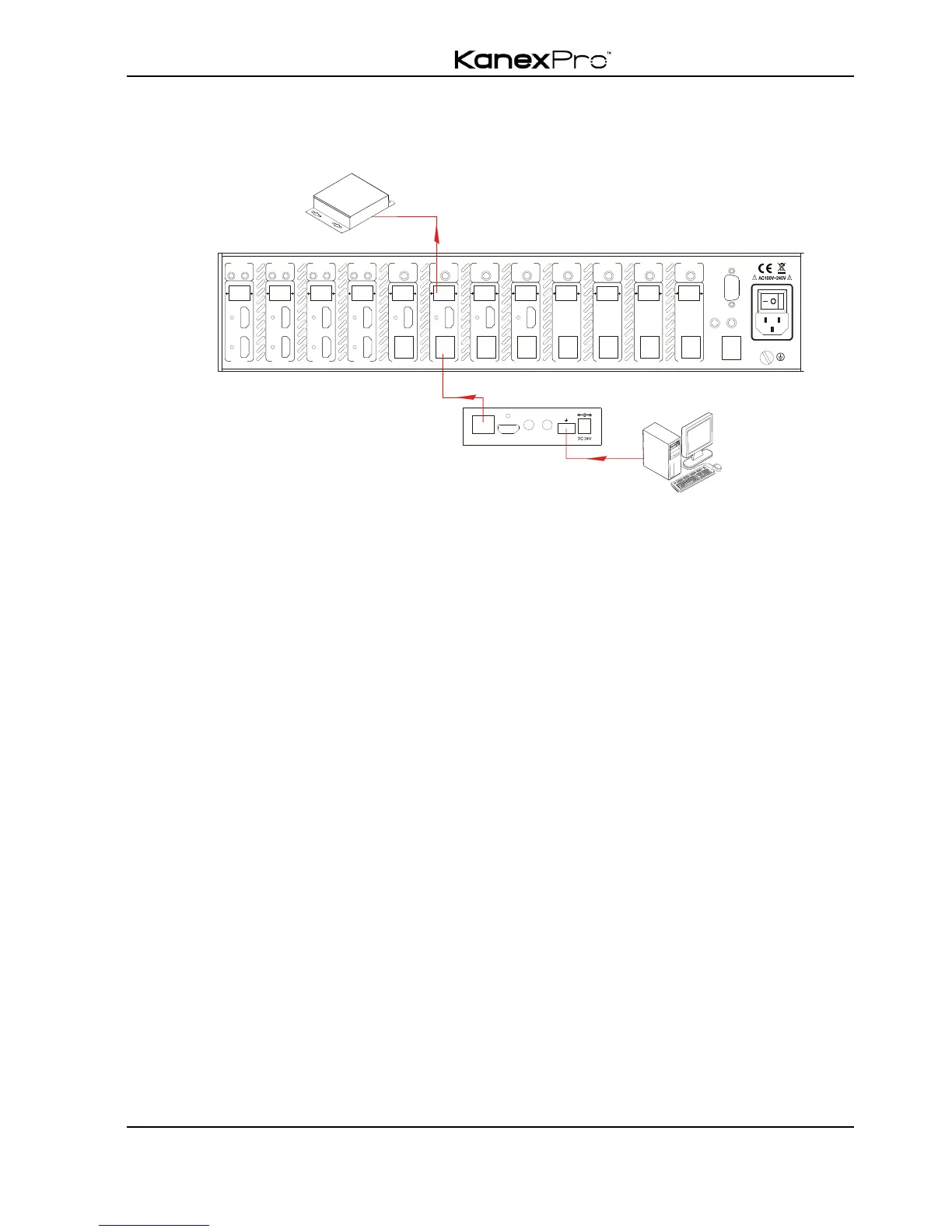
Connect the RS232 (3-pinpluggable terminal block) port in any zone to controlled device
(3rd party device), and connect PC to the corresponding (same zone as controlled
device) receiver, see below:
Control the KanexPro 8x8 Matrix Switcher from remote
4.4 TCP/IP Control
4.4.1 Control Modes
TCP/IP default settings: IP is 192.168.0.178, Gateway is 192.168.0.1, and Serial Port is
8080. IP & Gateway can be changed as you need, Serial Port cannot be changed.
! Controlled by Single PC
Connect a computer to the TCP/IP port of the matrix switcher, and set its network
segment to the same as the matrix switcher’s.

RS232TCP /I P
IR AL L IN
IR E YE
HDMI 8 HDMI 7
7
IR OUT
INPUT
L R
HDBaseT
RS232 AUDIO
OUTPUT 1
Tx Rx
HD MI
1
L R
HDBaseT
RS232 AUDIO
OUTPUT 2
Tx Rx
HD MI
2
L R
HDBaseT
RS232 AUDIO
OUTPUT 3
Tx Rx
HD MI
3
L R
HDBaseT
RS232 AUDIO
OUTPUT 4
Tx Rx
HD MI
4
L R
HDBaseT
RS232 AUDIO
OUTPUT 5
Tx Rx
5
L R
HDBaseT
RS232 AUDIO
OUTPUT 6
Tx Rx
6
L R
HDBaseT
RS232 AUDIO
OUTPUT 7
Tx Rx
7
L R
HDBaseT
RS232 AUDIO
IR INIR I NIR I NIR INI R INI R INIR INIR I N
OUTPUT 8
Tx Rx
8
AUDIO
7
L R
L R
8
8
HDMI 6 HDMI 5
5
IR OUT
INPUT
AUDIO
5
L R
L R
6
6
HDMI 4 HDMI 3
3
IR OUT
INPUT
AUDIO
3
L R
L R
4
4
HDMI 2 HDMI 1
1
IR OUT
INPUT
AUDIO
1
L R
L R
2
2
HDMI OUT
HDBT IN
Tx Rx
RS232IR IN IR OUT
PoC
Receiver
PC
3rd party

Related product manuals