EasyManua.ls Logo

KanexPro MX-HDBASE8X8-4K - IR control setting; Control far-end output device from local

KanexPro MX-HDBASE8X8-4K
47 pages
Print Icon
To Next Page IconTo Next Page
To Previous Page IconTo Previous Page
Loading...
4K HDBaseT™ 8x8 Matrix Switcher
MX-HDBASE8X8-4K 14
KanexPro.com
not with IR carrier, send the command %0901.”to enter infrared carrier enforcing
mode, and then IR signal can be transferred to IR OUT port.
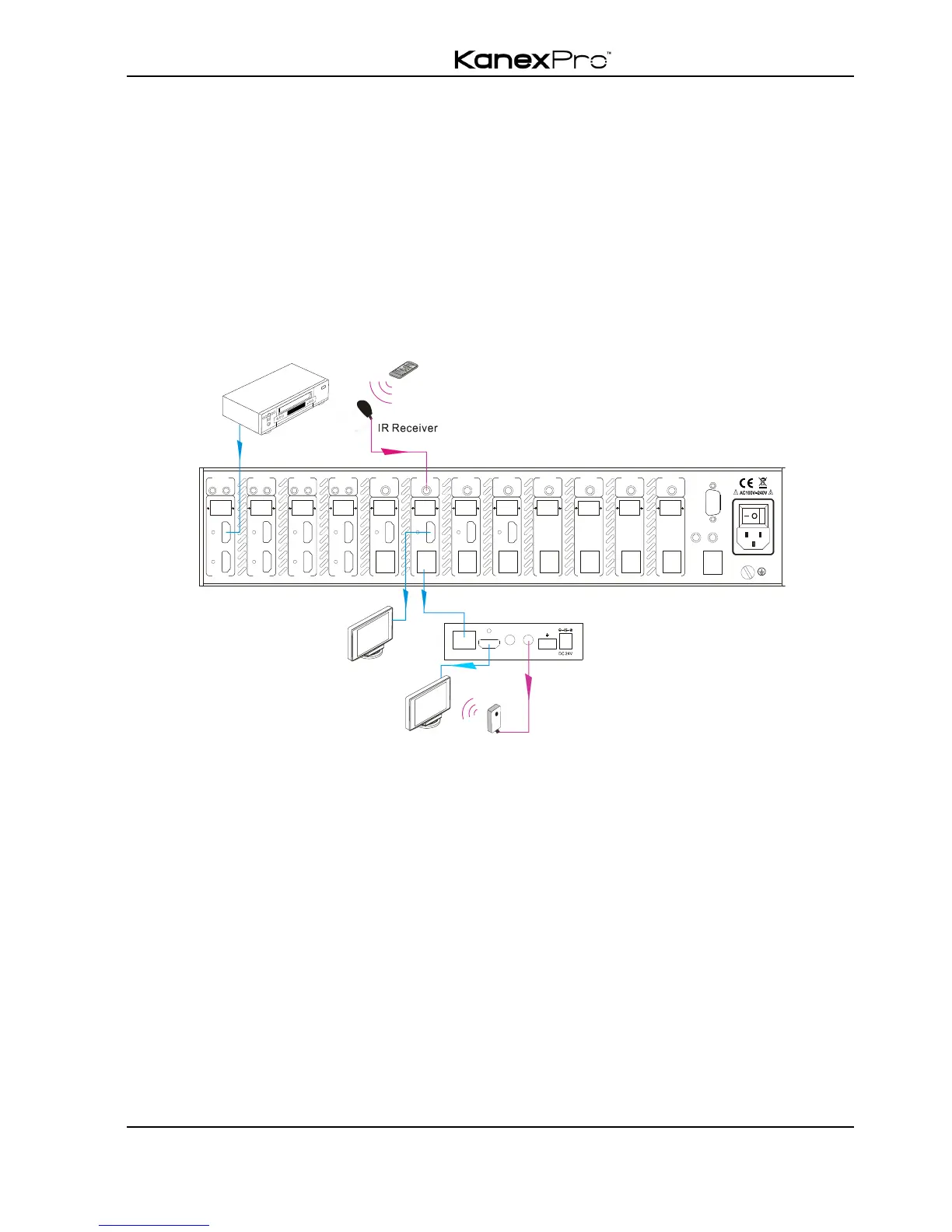
3) IR control setting
! Control far-end output device from local
Connect an IR receiver with IR carrier to the IR IN port of the switcher; users can control
far-end output displayer via its IR remote from local.
In that case, the IR signal is transferred via twisted pair. Only the corresponding IR OUT
port can emit control signals to the remote display.
See the figure below:
Control far-end device from Local
Note: The IR receiver connected to IR IN must be with IR carrier
The IR signal received from IR ALL IN port will be transmitted to all the eight far-end
HDBaseT receivers connected to HDBaseT ports of the matrix switcher. See below:

RS 23 2TC P/ IP
IR AL L IN
IR E YE
HD MI 8 HDM I 7
7
IR OUT
INPUT
L R
HD Ba se T
RS232 AUDIO
OUTPUT 1
Tx Rx
HD MI
1
L R
HD Ba se T
RS232 AUDIO
OUTPUT 2
Tx Rx
HD MI
2
L R
HD Ba se T
RS232 AUDIO
OUTPUT 3
Tx Rx
HD MI
3
L R
HD Ba se T
RS232 AUDIO
OUTPUT 4
Tx Rx
HD MI
4
L R
HD Ba se T
RS232 AUDIO
OUTPUT 5
Tx Rx
5
L R
HD Ba se T
RS232 AUDIO
OUTPUT 6
Tx Rx
6
L R
HD Ba se T
RS232 AUDIO
OUTPUT 7
Tx Rx
7
L R
HD Ba se T
RS232 AUDIO
IR INIR INIR INIR INIR INIR INIR INIR IN
OUTPUT 8
Tx Rx
8
AUDIO
7
L R
L R
8
8
HD MI 6 HDM I 5
5
IR OUT
INPUT
AUDIO
5
L R
L R
6
6
HD MI 4 HDM I 3
3
IR OUT
INPUT
AUDIO
3
L R
L R
4
4
HD MI 2 HDM I 1
1
IR OUT
INPUT
AUDIO
1
L R
L R
2
2
HDMI OUT
HDBT IN
Tx Rx
RS232IR IN IR OUT
PoC
Receiver
DVD
HDTV
IR Remote
HDTV
IR Transmitter

Related product manuals