IP TELEPHONE SET
10
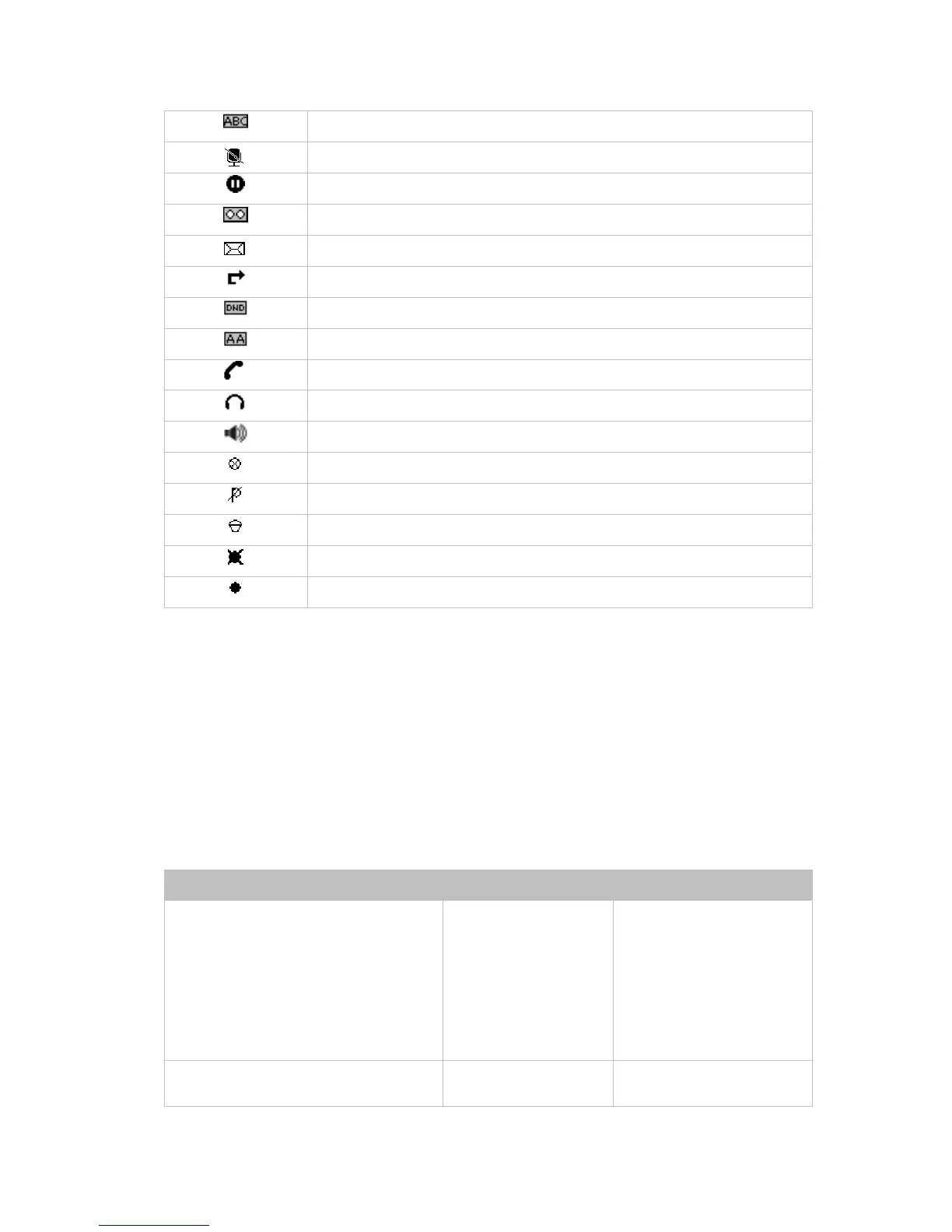
Input Method: multi-lingual letters in upper case
Call mute
Call hold
Voicemail
SMS
Call forward
DND(Do Not Disturb)
Auto answer
In handset mode
In headset mode
In speaker mode
The recording session cannot be started
The recording cannot be stopped
Probably the recording box is full
This call cannot be recorded.
The recording session is successfully started
USER INTERFACE
There are two ways to customize specific options on your phones:
1. Using keypad and display on the phone;
2. Using Web user interface in an Internet browser from your PC; please refer to
“Configuration and Registration” to get into the Web interface.
In many instances, it is possible to use both the user interfaces to operate the phone and
change settings; some, however, are only possible via a phone or web user interface.
Please refer to the following table for differences:
Phone Options Phone UI Web UI
Status
--IP
--MAC
--Firmware
--Network
--Phone
--Accounts
√ √
Call Features
--Call Forward
√



 To Next Page