IP TELEPHONE SET
35
Logo Customization
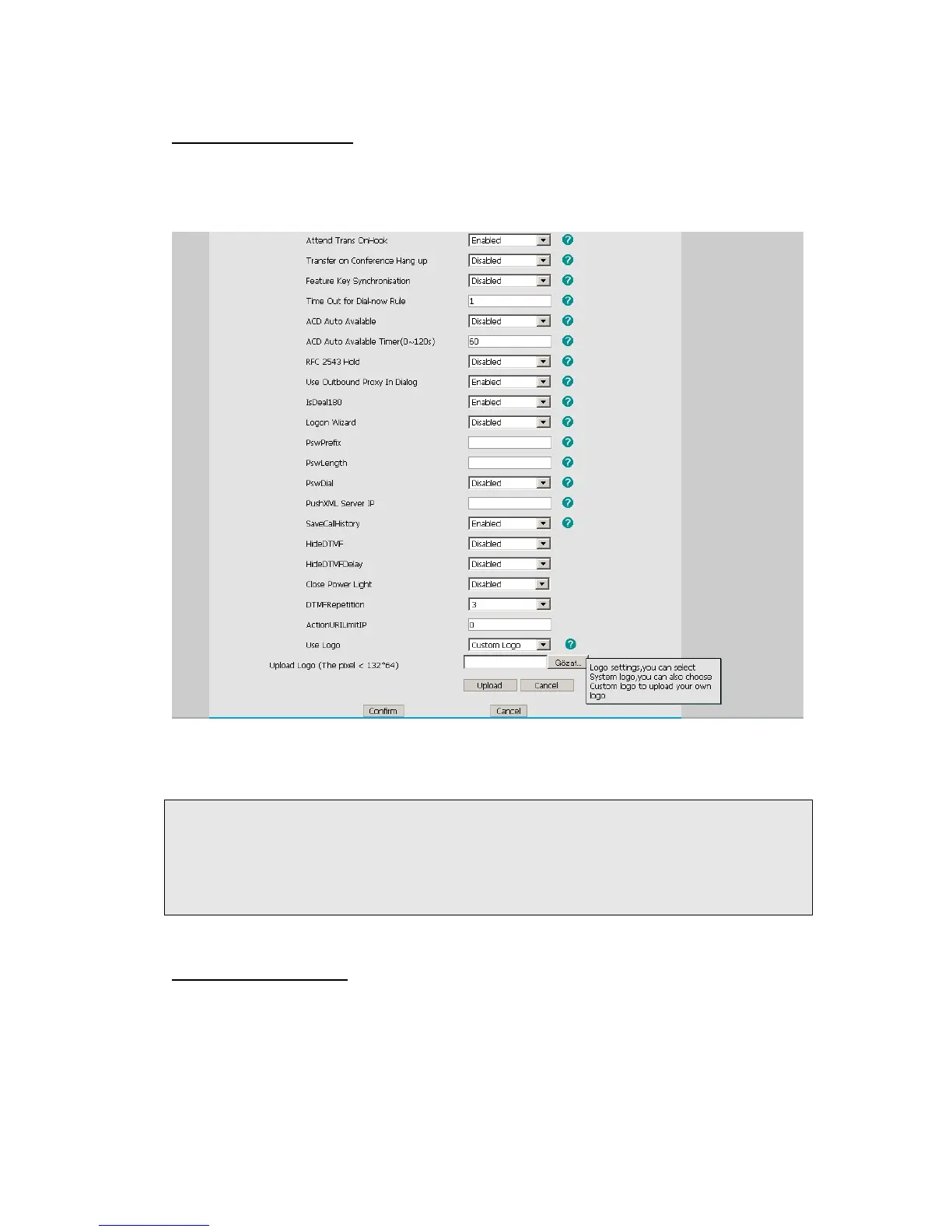
You can upload your own logo which displayed on the idle screen.
1) Choose Phone-> Features-> Use Logo->Custom Logo via the Web interface, press
Browse button, and choose the corresponding file.
2) Press Upload button to complete the Logo Customization. You will find the desired
logo display on the idle screen.
Note:
1. You can also upload the Logo by AUTO PROVISION.
2. By the Web interface, users can set a logo to be a System Logo or a Custom Logo,
and the Custom Logo can be deleted.
3. Only support DOB format file, For more information please contact the administrator.
Programmable Key
The hot-key, navigation keys and function keys on the keypad are editable. Users can
customize specific features for these keys according to their actual needs.
This function can only be set via the Web interface:
1) Choose Phone->DSS Key->Programmable Key.



 To Next Page