IP TELEPHONE SET
16
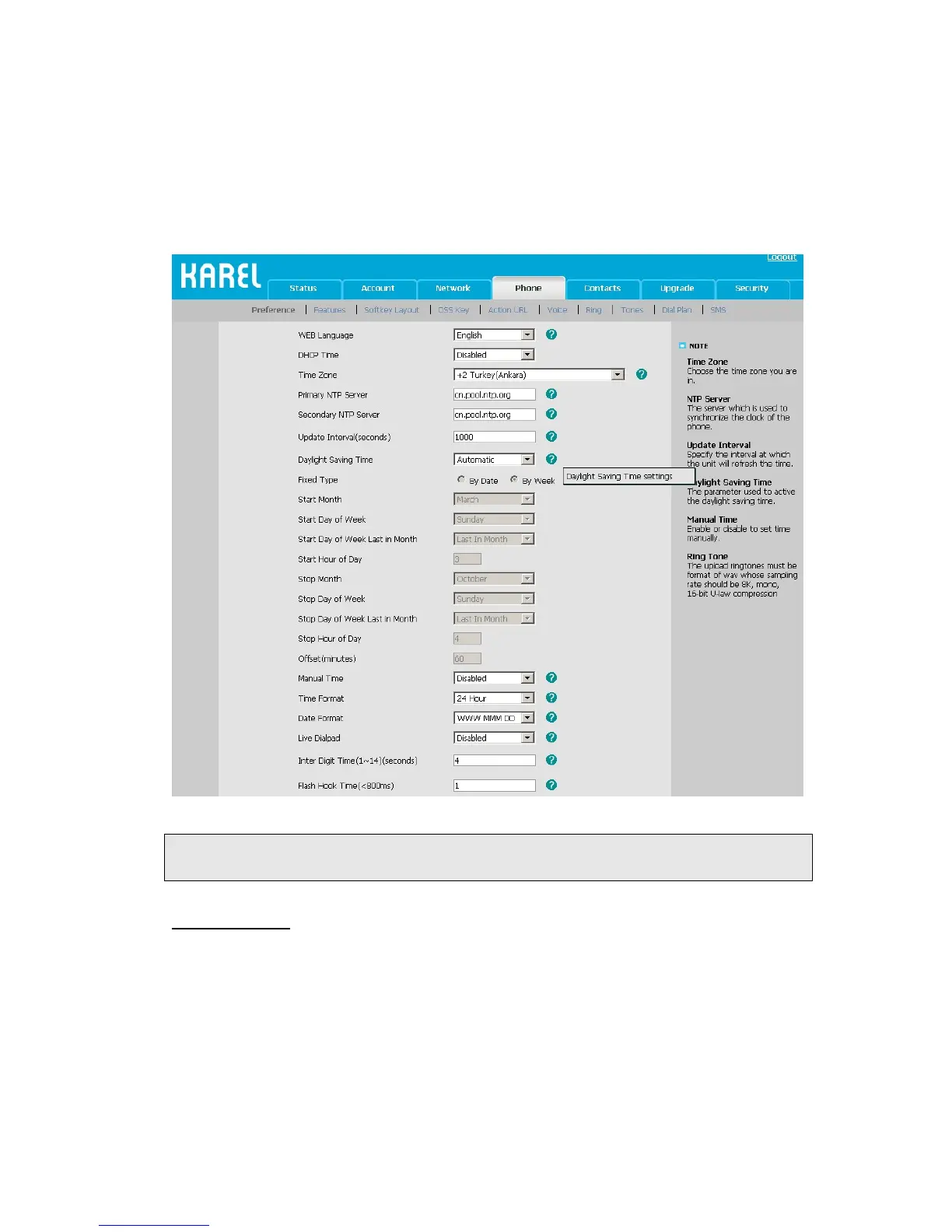
1) Choose Phone->Preference->Daylight Saving Time to do the relating changes.
2) Choose Enable option, then you can set the Daylight Saving Time.
3) Choose Automatic. There is a table named as AutoDST.xml has been saved in the
configuration file, If the table includes daylight saving time of your time zone, it will
show the Fixed Type: By Date or By Week. And the daylight saving time is
unchangeable, unless to update the AutoDST.xml via auto provision.
Note:
By default the time zone is +8 China(Beijing), Daylight Saving Time is Automatic.
Keypad Lock
You can lock the keypad of your phone when you are temporarily not using it. This
function helps you to protect your phone from unauthorized use. You can lock the
following specific keys:
Menu Key: The Menu hot keys can not be used until unlocked. You can not access
the menu of the phone.
Function Keys: The hard function keys (MESSAGE, FORWARD, RD, OK, X, navigation
Keys, Volume adjustment button and line keys) can not be used until



 To Next Page