Care instructions KaVo uniQa
2 Reprocessing steps in accordance with ISO 17664 | 2.9 Automatic cleaning programmes
34 / 56
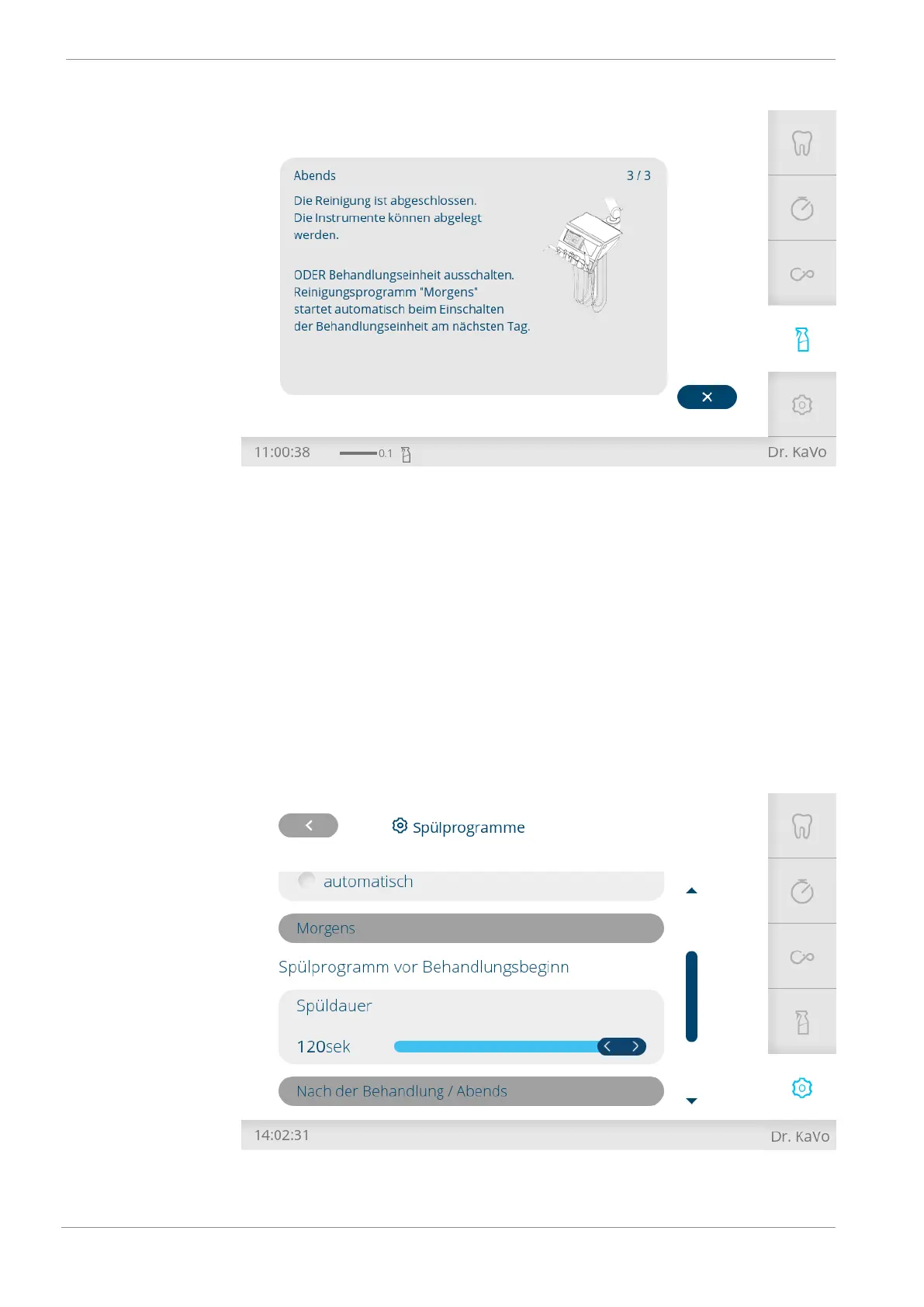
4 After completion of the "Evening" cleaning program, return the instrument
and suction hoses to their holders.
or
4 After completion of the "Evening" cleaning programme, do not place hoses
in holders and switch off the treatment unit. In this case, the "Morning"
cleaning programme starts up automatically when the treatment centre is
switched on again.
2.9.4 Setting the rinsing time
4 Tap "Settings" to open the "Settings" menu.
4 Then tap "General settings" followed by "Advanced settings" and "Weekly
cleaning".
4 Scroll down until "Morning" and "Evening" are displayed.
4 Use the slider bar to set the rinsing time for "Morning", "Evening" and "After
treatment".










 To Next Page