24
Keyline S.p.A. NINJA Man. cod. B409286FG Copyright by Keyline - Italy
ITALIANO / ENGLISH
START UP START UP
6.4.0 Accensione consolle
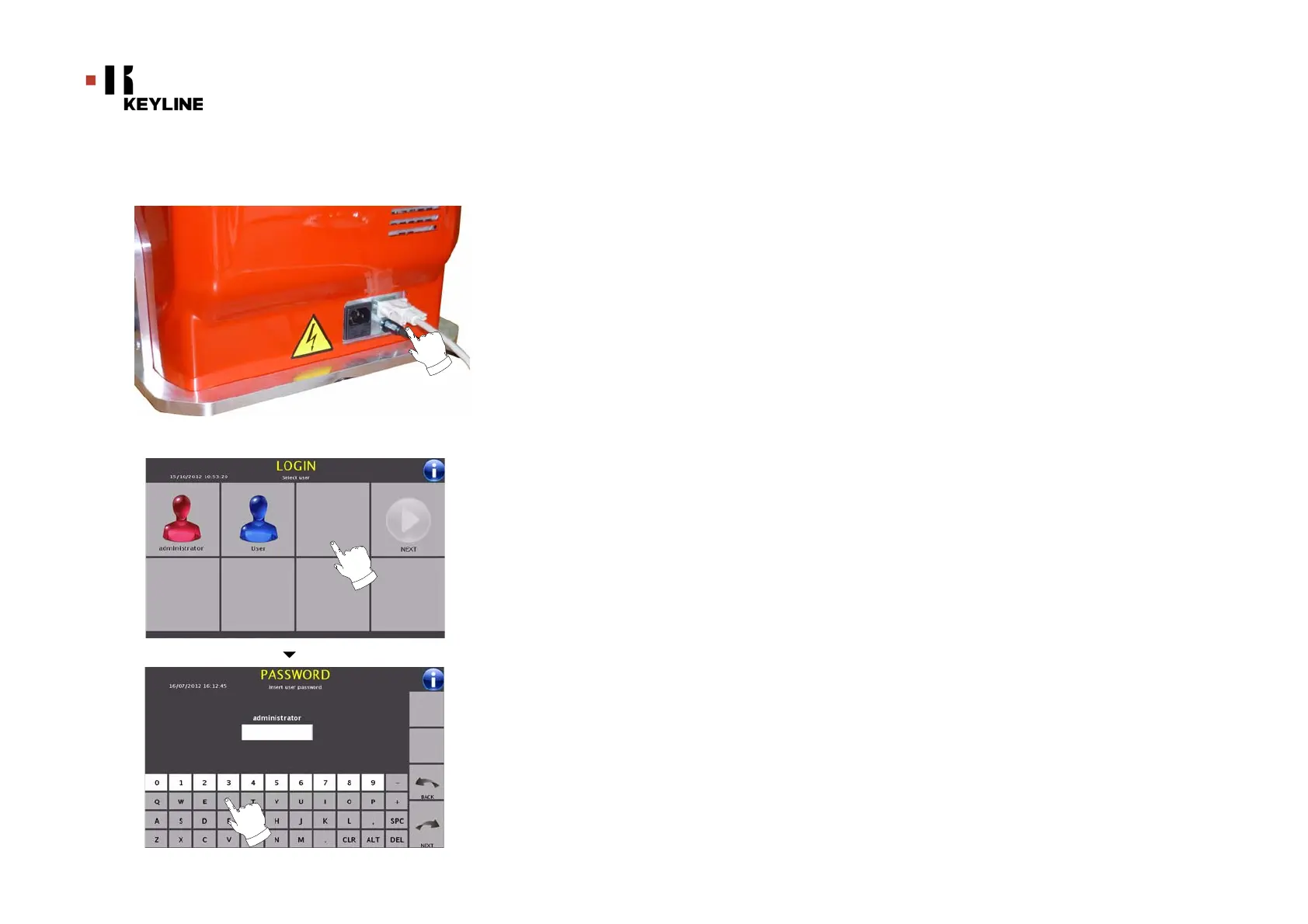
Dopo aver verificato che il pulsante di emergenza non sia premuto,
collegare il cavo seriale ed il cavo di alimentazione della consolle alla
duplicatrice.
Trascorsi alcuni minuti dall’accensione del Touch-Screen verrà visua-
lizzata la pagina “LOGIN”.
•Selezionare l’utente abilitato all’utilizzo della macchina
(es. administrator)
• Con “administrator” è possibile accedere al Menu Setup
per gestire la calibrazione ed il settaggio
• Alla schermata successiva digitare la password per
accedere al MAIN MENU
6.4.0 Starting the consolle
After checking that the emergency button has been pressed, con-
nect the consolle serial cable and the power cable to the dupli-
cating machine.
Within a few minutes of switching on, the Touch-Screen will dis-
play the “LOGIN” page.
• Select the user for operating with the machine
• With the admin user is possible to enter the Setup Menu for
managing calibrations and settings
• In the following page enter the password to access the
MAIN MENU



 To Next Page