Keyline S.p.A. NINJA Man. cod. B409286FG Copyright by Keyline - Italy 25
START UP START UP
ITALIANO / ENGLISH
6.5.0 Impostazione della lingua
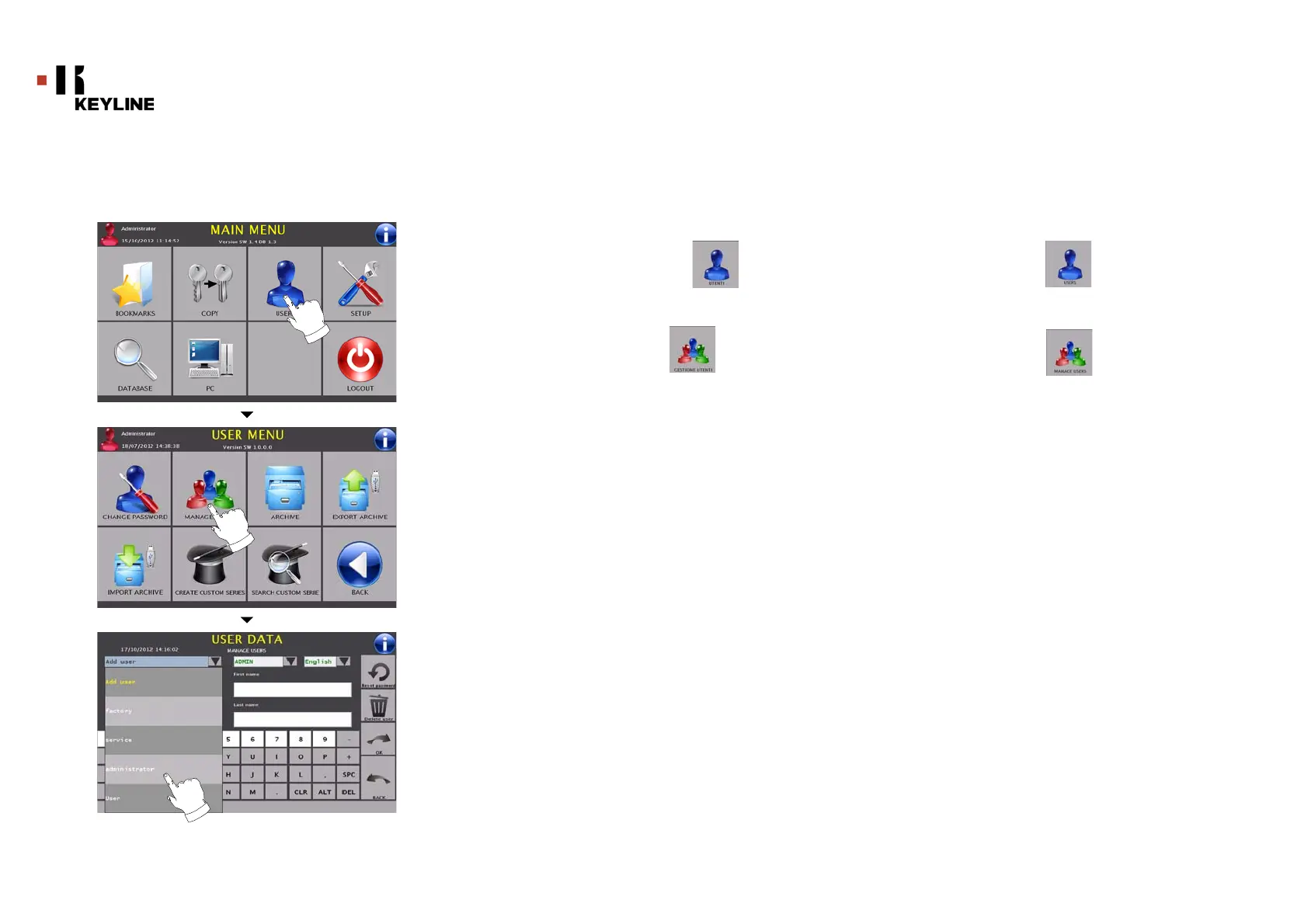
Come accedere alla pagina:
•Dal MENU’ PRINCIPALE selezionare:
Come procedere:
•Dal MENU’ UTENTE selezionare:
• Dalla pagina “DATI UTENTE” selezionare il proprio User-ID
(es. Administrator)
• Selezionare a lato la lingua desiderata e premere OK
•Ritornare al MENU’ LOGIN ed accedere nuovamente al
MENU’ PRINCIPALE attraverso il proprio User-ID
• La pagina verrà visualizzata con la lingua selezionata
6.5.0 Language setting
How to access the page:
• From the MAIN MENU, select:
How to proceed:
•From the USER MENU, select:
• From the "USER DATA" page select your User-ID (e.g.
Administrator)
• From the side menu select the interested language and
press OK
• Return to the LOGIN MENU and use your User-ID to enter
once again the MAIN MENU
• The page will display the language you choose



 To Next Page