32
Keyline S.p.A. NINJA Man. cod. B409286FG Copyright by Keyline - Italy
ITALIANO / ENGLISH
SET UP SET UP
7.3.2 Aggiornamento Keyonline via PC
Qualora non sia possibile configurare la macchina per il collegamento
ad internet, questa procedura permette di effettuare l'aggiornamento
collegandosi a Keyonline tramite un normale PC dotato di connessio-
ne ad internet.
Come procedere:
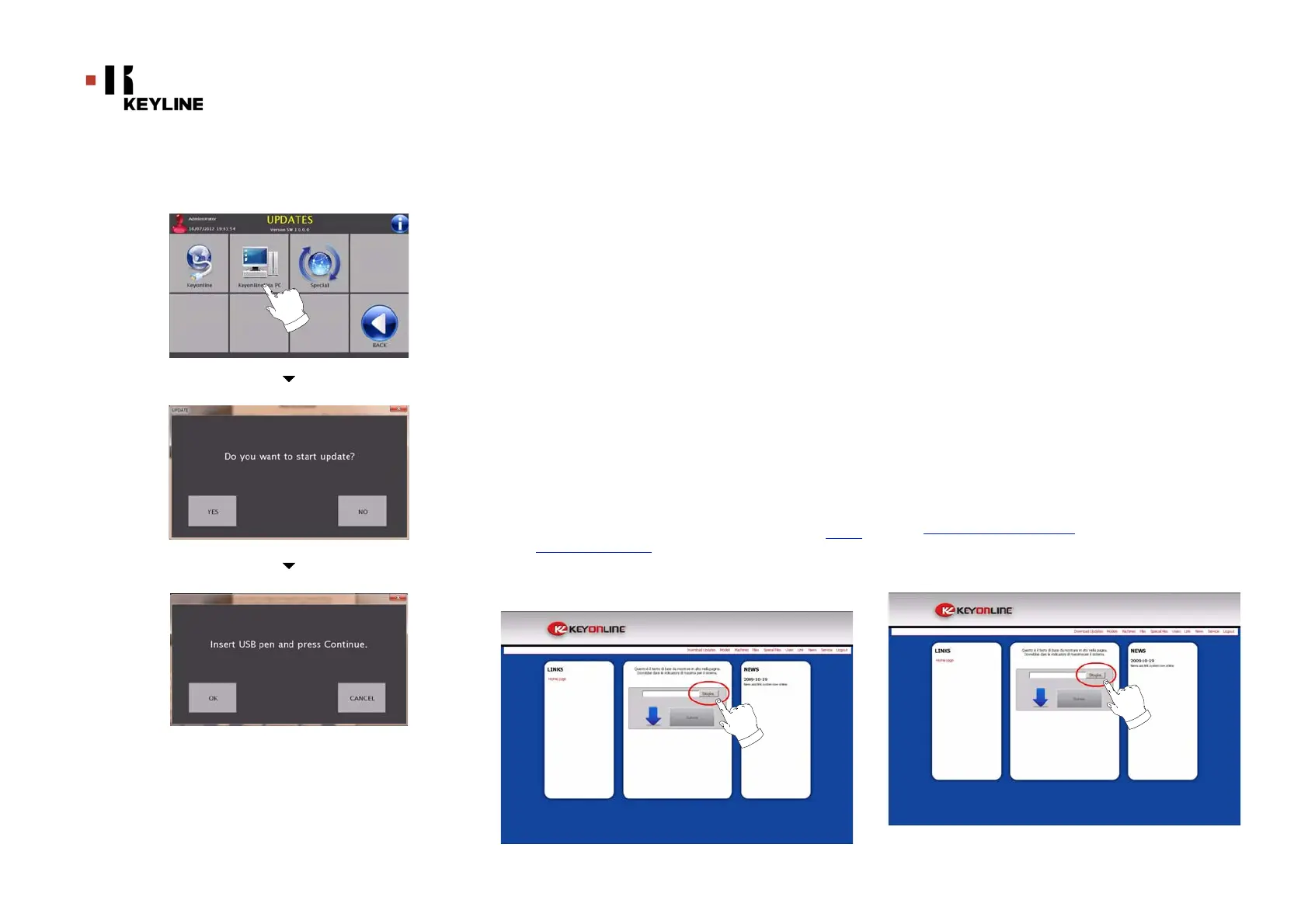
• Premendo il tasto "Keyonline VIA PC" appare un messaggio
che chiede di collegare una chiavetta USB alla macchina.
• Quindi premere "CONTINUA" per procedere o "ANNULLA"
per annullare l'operazione.
• Il programma copierà nella chiavetta USB un file con
estensione .cks contenente le informazioni da inviare a
Keyonline per poter effettuare l'aggiornamento.
• Dopo qualche istante appare un messaggio che segnala il
completamento dell'operazione e verrà richiesto di
scaricare l'aggiornamento da Keyonline.
• Interrompere l'operazione premendo "ANNULLA", oppure
procedere con le seguenti istruzioni:
1. scollegare la chiavetta USB e collegarla ad un PC dotato
di connessione ad internet.
2. usando il browser web collegarsi alla pagina web: http://
keyonline.keyline.it/
3. Selezionare il tasto "SFOGLIA" per accedere alla finestra
di dialogo di selezione di un file.
7.3.2 Keyonline via PC Update
If it is not possible to configure the machine to connect to the in-
ternet, this procedure makes it possible to update it by connect-
ing to Keyonline through a PC with internet connection.
How to proceed:
• Press the "VIA PC" button; a message asking to connect a
USB flash drive to the machine shall appear .
• Then, press the "NEXT" button to proceed, or the "CAN-
CEL" one to cancel the operation.
• The programme shall copy a file with a .csk extension on
the USB flash drive, containing the information to be sent
to Keyonline to update the machine.
• After a few seconds a message stating that the operation
is finished shall appear and the user will be asked to
download the update from Keyonline.
• Interrupt the operation by pressing "CANCEL" or proceed
with the following instructions:
1. disconnect the USB flash drive and connect it to a PC with
an internet connection.
2. using the browser, connect to the following web page:
http://keyonline.keyline.it/
3. Select the "BROWSE" button to access the file selection
dialogue box.



 To Next Page