Keyline S.p.A. NINJA Man. cod. B409286FG Copyright by Keyline - Italy 41
RICERCA CHIAVI KEY SEARCH
ITALIANO / ENGLISH
8.1.4 Ricerca per marca cilindro
Questa funzione viene utilizzata quando si conosce il codice di cifra-
tura della chiave da duplicare o si desidera ricercarlo attraverso il pro-
cesso di decodifica.
Il menù consente di ricercare le chiavi all’intero del database presente
nel sistema come di seguito descritto.
Come procedere:
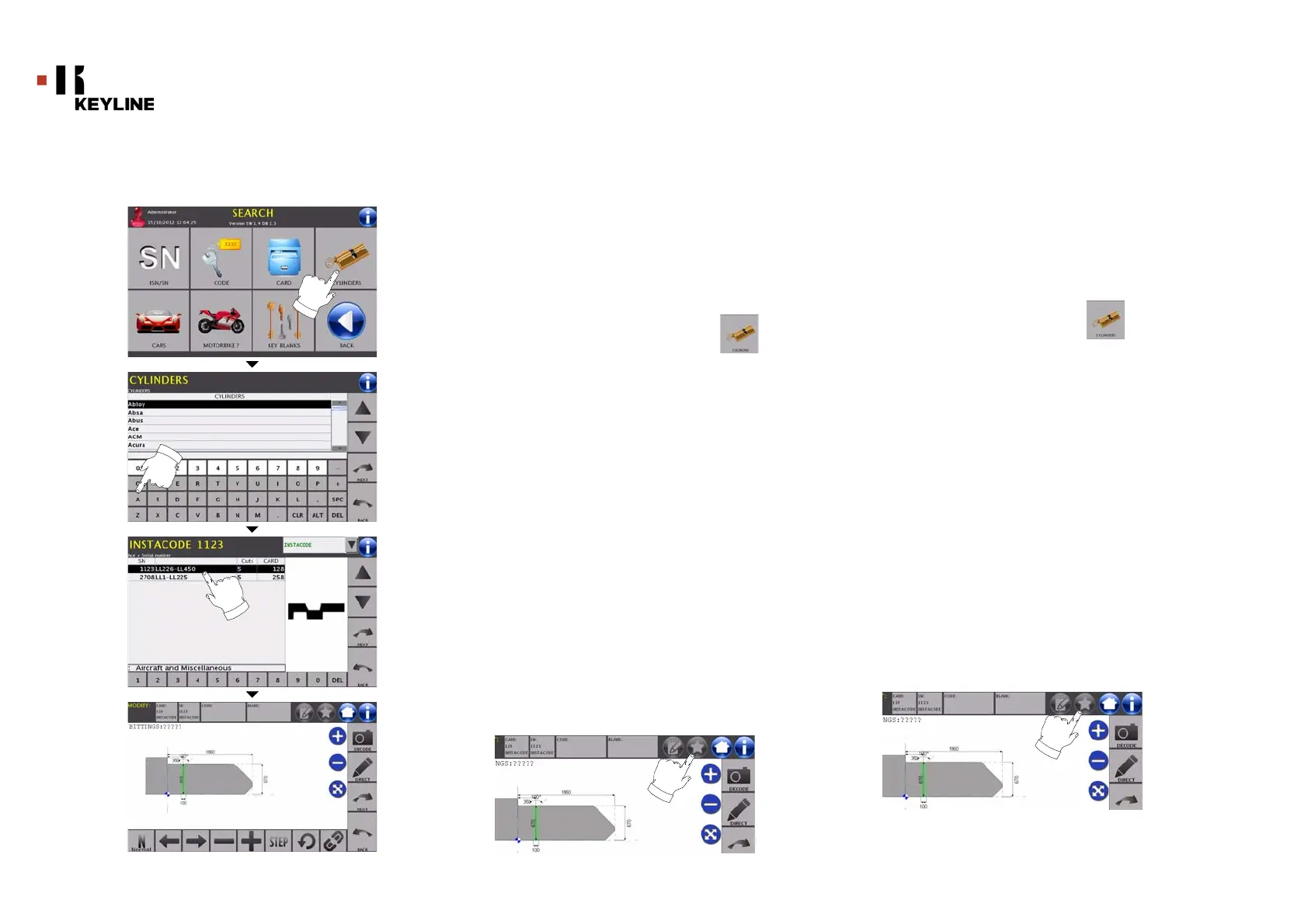
• Dalla pagina “RICERCA” premere il tasto “ ”.
• Scorrere il menù delle marche disponibili e selezionare
quella desiderata (es: ACE) oppure digitare la marca
tramite la tastiera sottostante;
• Premere il tasto “AVANTI” per confermare la scelta e passare
alla pagina successiva dove viene visualizzato l’elenco dei
riferimenti della chiave grezza relativa alla marca selezionata;
• Scorrere il menù e selezionare il codice desiderato (es.
6205) oppure digitare il codice articolo tramite la tastiera
sottostante;
• Premere il tasto “AVANTI” per confermare la scelta e
passare alla pagina successiva;
• A questo punto apparirà la schermata di MODIFICA dove
viene rappresenta la scheda relativa all’articolo
selezionato e dove sarà possibile modificare alcune
caratteristiche della chiave.
Nota: La procedura di modifica della chiave viene descritta al
capitolo 10 a pagina 46.
• Per ritornare alla pagina precedente premere il tasto
“INDIETRO”.
Nota: Da questa schermata l’utente ha anche la possibilità di
memorizzare un bookmark. La funzione bookmark viene
descritta al paragrafo 8.2.0 a pagina 44.
8.1.4 Search by cylinder brand
This function is used when you know the bitting code of the key to be
copied or if you wish to search for it using the decoding process.
The menu makes it possible to search through the system’s data-
base as described below.
How to proceed:
• From the "SEARCH" page, select the “ ” button;
• Scroll the menu of available brands and choose the
required one (e.g.: ACE) or use the keyboard to enter the
brand;
• Press the “NEXT” key to confirm your choice and go to the
next page, to view the list of references for the blank of the
selected brand ;
• Scroll the menu of available articles and choose the
required one (e.g. 6205) or use the keyboard to enter the
article code;
• Press the “NEXT” key to confirm your choice and go to the next
page;
• The MODIFY screen shall appear, showing the card
pertaining to the selected article and where it shall be
possible to modify some of the key's characteristics.
Note: The procedure to modify the key is described in chapter 10
on page46.
• To go back to the previous page, press the "BACK" key.
Note:From this screen the user can also save a bookmark.
The bookmark function is described in paragraph8.2.0
on page44.



 To Next Page