42
Keyline S.p.A. NINJA Man. cod. B409286FG Copyright by Keyline - Italy
ITALIANO / ENGLISH
RICERCA CHIAVI KEY SEARCH
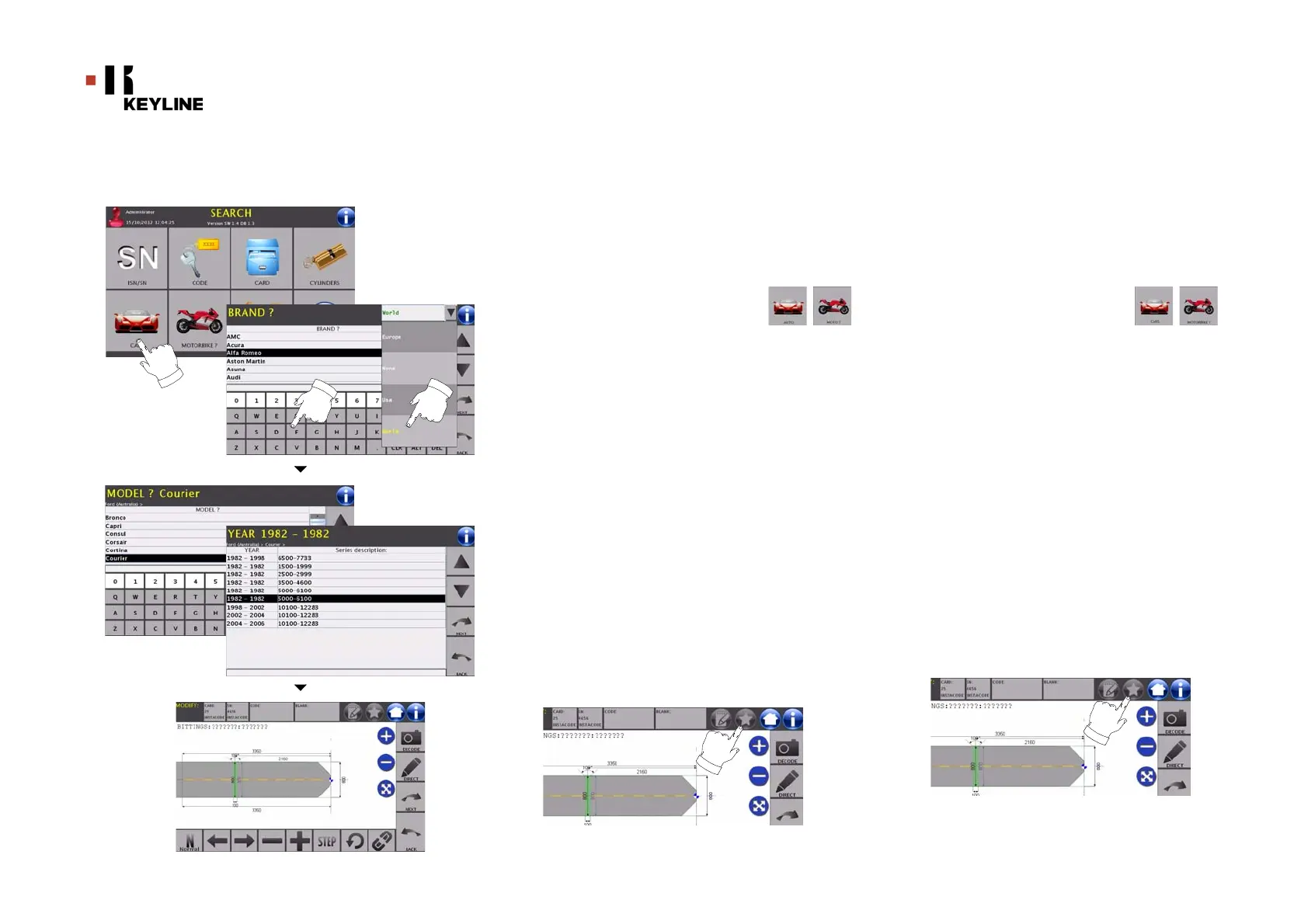
8.1.5 Ricerca per marca auto/moto
Il Menù “MARCA AUTO/MOTO” consente di ricercare e duplicare una
chiave, attraverso l’elenco delle marche di automobili presenti nel da-
tabase.
Come procedere:
• Dalla pagina “RICERCA” premere il tasto “ ”.
•Selezionare l’area geografica dal menù a tendina in alto a
destra (es. WORLD);
• Scorrere il menù delle marche disponibili e selezionare
quella desiderata (es. FORD) oppure digitare la marca
tramite la tastiera sottostante;
• Premere il tasto “AVANTI” per confermare e passare alla
pagina successiva dove scegliere il modello di auto relativo
alla marca selezionata;
• Premere il tasto “AVANTI” per confermare e passare alla
pagina di selezione dell’anno di fabbricazione e confermare
nuovamente con “AVANTI” ;
• A questo punto apparirà la schermata di MODIFICA dove
viene rappresenta la scheda relativa all’articolo
selezionato e dove sarà possibile modificare alcune
caratteristiche della chiave.
Nota: La procedura di modifica della chiave viene descritta al
capitolo 10 a pagina 46.
• Per ritornare alla pagina precedente premere il tasto
“INDIETRO”.
Nota: Da questa schermata l’utente ha anche la possibilità di
memorizzare un bookmark. La funzione bookmark viene
descritta al paragrafo 8.2.0 a pagina 44.
8.1.5 Search by car or motorbike brand
The “CAR/MOTORBIKE BRAND” menu makes it possible to search
and duplicate a key through a list of car brands included in the
database.
How to proceed:
• From the "SEARCH" page, select the “ ”
button;
• Select the relevant geographical area from the drop-down
menu on the top right (e.g. WORLD);
• Scroll the menu of available brands and choose the
required one (e.g.: FORD) or use the keyboard to enter the
brand;
• Press the “NEXT” key to confirm your choice and go to the next
page and select the car model according to selected brand;
• Press the “NEXT” key to confirm and go to the year of
manufacture page; select and confirm your choice with
“NEXT” ;
• The MODIFY screen shall appear, showing the card
pertaining to the selected article and where it shall be
possible to modify some of the key's characteristics.
Note: The procedure to modify the key is described in chapter 10
on page46.
• To go back to the previous page, press the "BACK" key.
Note: From this screen the user can also save a bookmark.
The bookmark function is described in paragraph8.2.0
on page44.



 To Next Page