Updating Firmware
1.
Using the Web browser on your PC, go to www.keysight.com/find/AC6800firmware.
2.
From this page, download and install the STMicroelectronics software from the product support page
onto your PC and install it.
3.
Also from this page, download the DFU file containing the firmware update onto your PC.
4.
After the STMicroelectronics software has installed, you must also install the USB driver.
If you have a 64-bit operating system, go to C:\Program Files (x86)\STMi-
croelectronics\Software\DfuSe v3.0.5\Bin\Driver\Win7\x64. Then run dpinst_amd64.exe
If you have a 32-bit operating system, follow the same path except go to the x86 folder and run
dpinst_x86.exe
5.
Turn off the AC6800B Series instrument and remove the two screws that hold the optional interface
board or slot cover in place on the instrument's rear panel. Set the interface board or slot cover aside.
6.
Push the switch at the back, bottom of the slot into the down position.
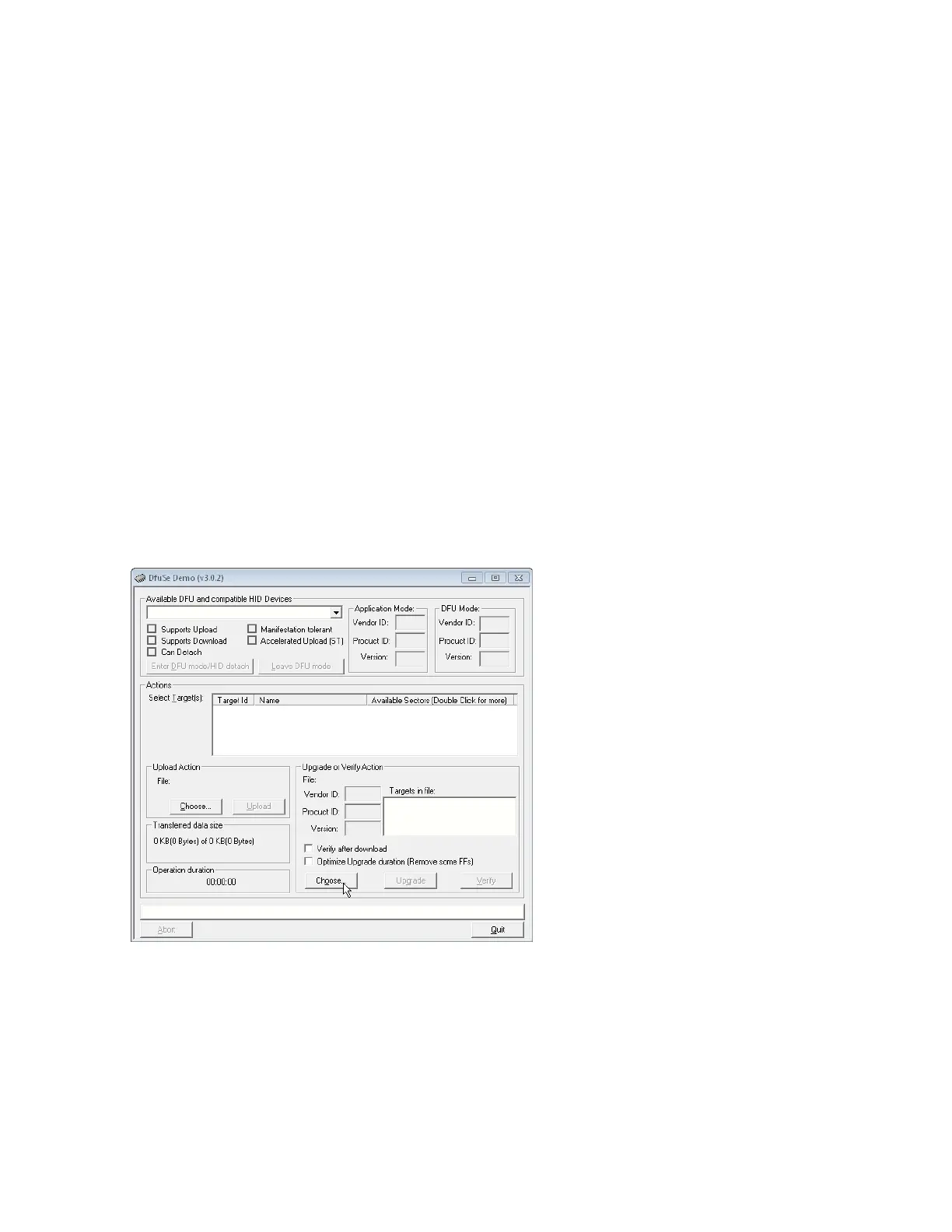
7. On your PC desktop, click Start>All Programs>STMicroelectronics>DfuSe>DfuSe Demon-
stration. When the screen shown below appears, click Choose... in the Upgrade or Verify Action sec-
tion of the screen.
Keysight AC6800B Series Operating and Service Guide 191
4Calibration, Verification, and Service



 To Next Page