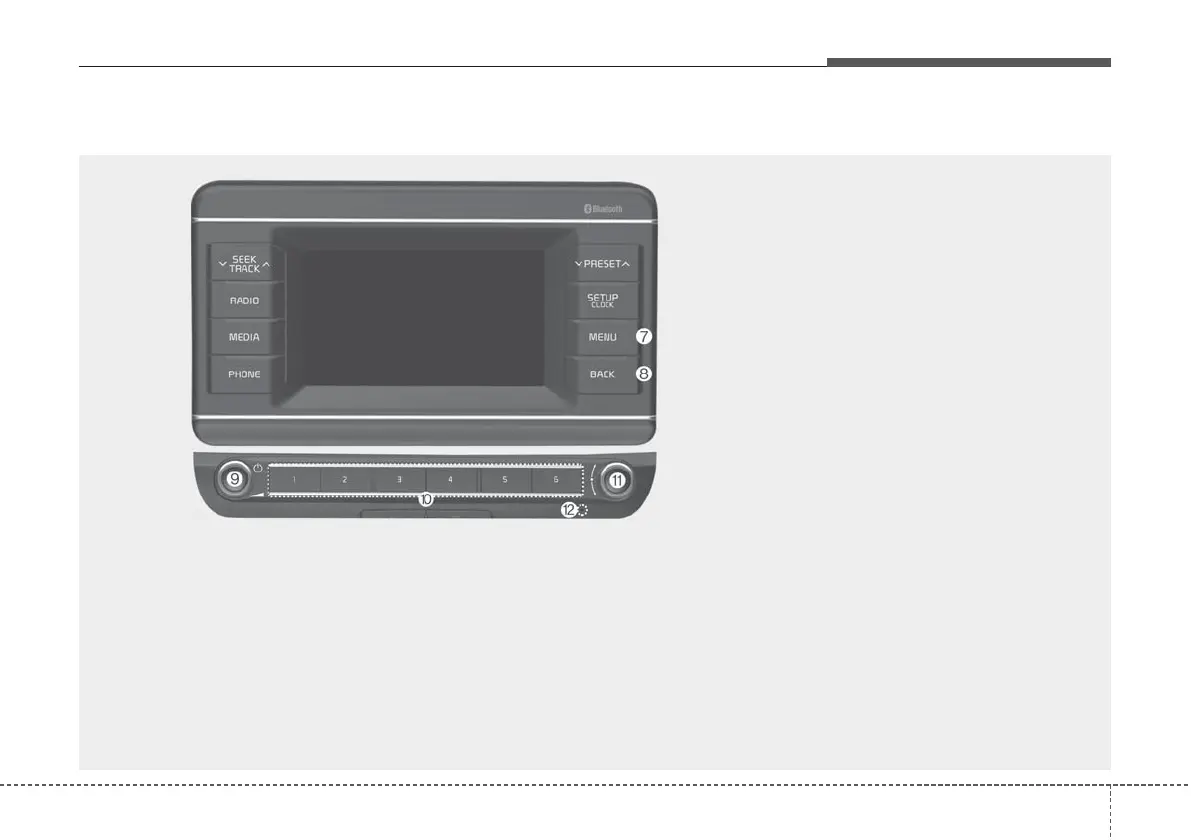
Audio system
75
(With
Bluetooth
®
Wireless Technology)
❈ The actual features in the vehicle may differ from the illustration.
(7) MENU button
• Press to access the menu screen for
the current mode.
(8) BACK button
• Press to return to the previous screen.
(9) POWER button/VOL knob
• Press to turn the system on or off.
• Turn to the left or right to adjust the sys-
tem sound volume.
(10) Number buttons (1–6)
• Whilst listening to the radio, press to lis-
ten to a saved radio station.
• Whilst listening to the radio, press and
hold to save the current radio station to
the preset.
• Press the corresponding number but-
ton to select an item.
(11) TUNE knob/FILE knob/ENTER but-
ton
• Whilst listening to the radio, turn to
adjust the frequency.
• Whilst playing media, turn to search for
a track/file (except for the AUX and
Bluetooth audio modes).
• During a search, press to select the
current track/file.
(12) Reset button



 To Next Page