7-14 Maintenance PAS SERIES
• If you make a mistake in the calibration procedure or connec-
tion and the POWER switch immediately turns OFF when
the OUTPUT
is turned on by performing steps 8 through 13,
the OVP calibration value may be off by a great extent.
In such case, repeat steps 3 through 8 or 9 through 13 until
the PO
WER switch
turns off after 30 s to 60 s. (You may
have to repeat the steps tens of times.)
You are done calibrating the OVP.
Current calibration procedure
■ Connecting the equipment
1. Turn off the POWER switch.
2. Connect
a shunt resistor and a DVM to the output terminal.
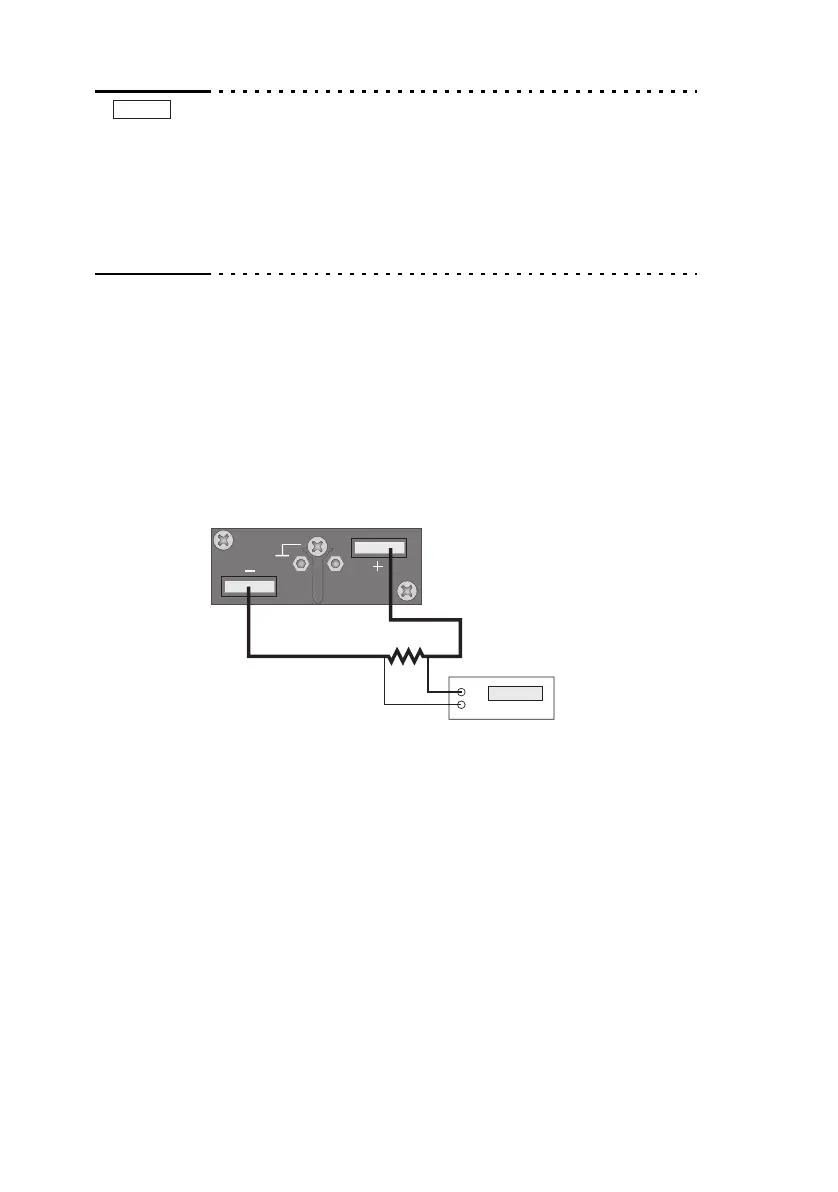
Shown in Fig.7-16.
Fig.7-16Connection for current system calibration
■ W
arming up
3. Turn on the POWER switch while pr
essing t
he SET switch.
4. Check that the voltage display shows "CAL."
If it is not, press the CURRENT switch.
5. Warm up the equipment including the shunt resistor and
DVM for sufficient time.
NOTE


 To Next Page
 Loading...





