49
EN
13. AUX output programming
These programming sequences are not essential for system opera-
tion, but allow the AUX output to be activated by choosing the rele-
vant terminals.
The AUX output delivers 24Vdc
To interrupt the following programming sequences at any time, press
the SET and RADIO buttons simultaneously or wait 10 seconds.
AUX USED AS COURTESY LIGHT
If the AUX output is used as courtesy light to control the lamps, a
relay must be connected.
The light can be activated via a special transmitter button (to be pro-
grammed as indicated in the relevant paragraph)
SWITCHING ON/OFF OF THE LIGHT THROUGH A DEDICATED
TRANSMITTER BUTTON:
- connect a monostable relay;
- set the AUX output on the desired terminals;
- the work mode is only bistable, ON / OFF;
- program the desired transmitter button for the AUX output (see the
relevant paragraph)
The AUX output switches on/off whenever the programmed trans-
mitter is pressed.
13.1 - Selection of AUX output and
operating mode
Default setting = AUX disabled
This procedure allows activating the “AUX” output. By default, the
AUX output is bistable and is associated with the remote control key
memorized for this function.
To control the AUX output you need to register a radio
transmitter by following the procedure described in the rele-
vant paragraph and connect a suitable relay.
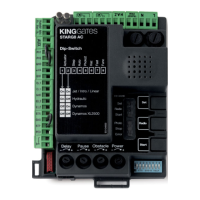
STEP
ACTION RESULT
1
PRESS THE START
BUTTON FOR 3
SECONDS
All the LEDs turn off (if
not, refer to Paragraph
14.1)
2
PRESS THE RADIO
BUTTON FOR 1 SECOND
2.1a
If the “Sic” LED is
off, the AUX output
is deactivated. (if the
setting is correct, go to
Point 4; if not, proceed
to Point 3a)
The “
SIC
” LED is
switched off
3a
Setting the AUX output
on the Phototest
terminals (4 and 8)
PRESS THE SET BUTTON
FOR 1 SECOND
The "
SIC
" LED lights up
in red
or
3b
Setting the AUX output
on the Flash terminals (1
and 2)
PRESS THE SET BUTTON
AGAIN FOR 1 SECOND
The "
SIC
" LED lights up
in green
4
PRESS THE SET AND RADIO
BUTTONS SIMULTANEOUSLY OR
WAIT 10 SECONDS TO EXIT THE
PROCEDURE
The LEDs return to
the normal operation
conguration
STEP ACTION RESULT
1
PRESS START BUTTON
FOR 3 SECONDS
All the LEDs turn off (if not,
consult Paragraph 14.1)
2
PRESS THE RADIO
BUTTON FOR 1 SECOND:
2.1a
If the yellow “Set” LED is
on AUX = Electric lock
(if the setting is correct,
go to Point 4; if not, pro-
ceed to Point 3a)
The red “radio” LED turns
on in the fixed mode
3a
Courtesy light setting
PRESS THE RADIO
BUTTON FOR 1 SECOND
The red “radio” LED
remains lit in the fixed mode
and the red "Error" LED
lights up. The yellow "Set"
LED goes off.
or
2.1b
If the red “Error” LED is
on in xed mode
AUX = Courtesy light
(if the setting is correct,
go to Point 4; if not, pro-
ceed to Point 3b)
The red “radio” LED turns
on in the fixed mode
3b
Electric lock setting
PRESS THE RADIO
BUTTON FOR 1 SECOND
The red “radio” LED
remains lit in the fixed mode
and the yellow "Set" LED
lights up. The red "Error"
LED goes off
4
PRESS THE SET AND
RADIO BUTTONS
SIMULTANEOUSLY OR
WAIT 10 SECONDS TO
EXIT THE PROCEDURE
The LEDs return to
the normal operation
conguration
Advanced programming (not required for standard installation)



 To Next Page