Settings
Using the MobileLite Wireless app, you can customize the wireless network settings for the MLWG3. The
default settings are: Name (SSID): MLWG3-xxxx and MLWG3-5G-xxxx, Security (WPA2): None
(disabled), and Internet (bridge): None.
How to Change the Name (SSID) of the MLWG3
The MLW app provides the option to change the name (SSID) of the MLWG3 device (default MLWG3-
xxxx and MLWG3-5G-xxxx). The last four characters of the unit’s unique MAC address will be in place of
the ‘xxxx’. Changing the name (SSID) will prevent any confusion when multiple devices exist within close
proximity. The Name (SSID), or Service Set Identifier, will allow you to specify a device name (between 1
and 32 characters) that will broadcast in the list of available wireless networks on your mobile device.
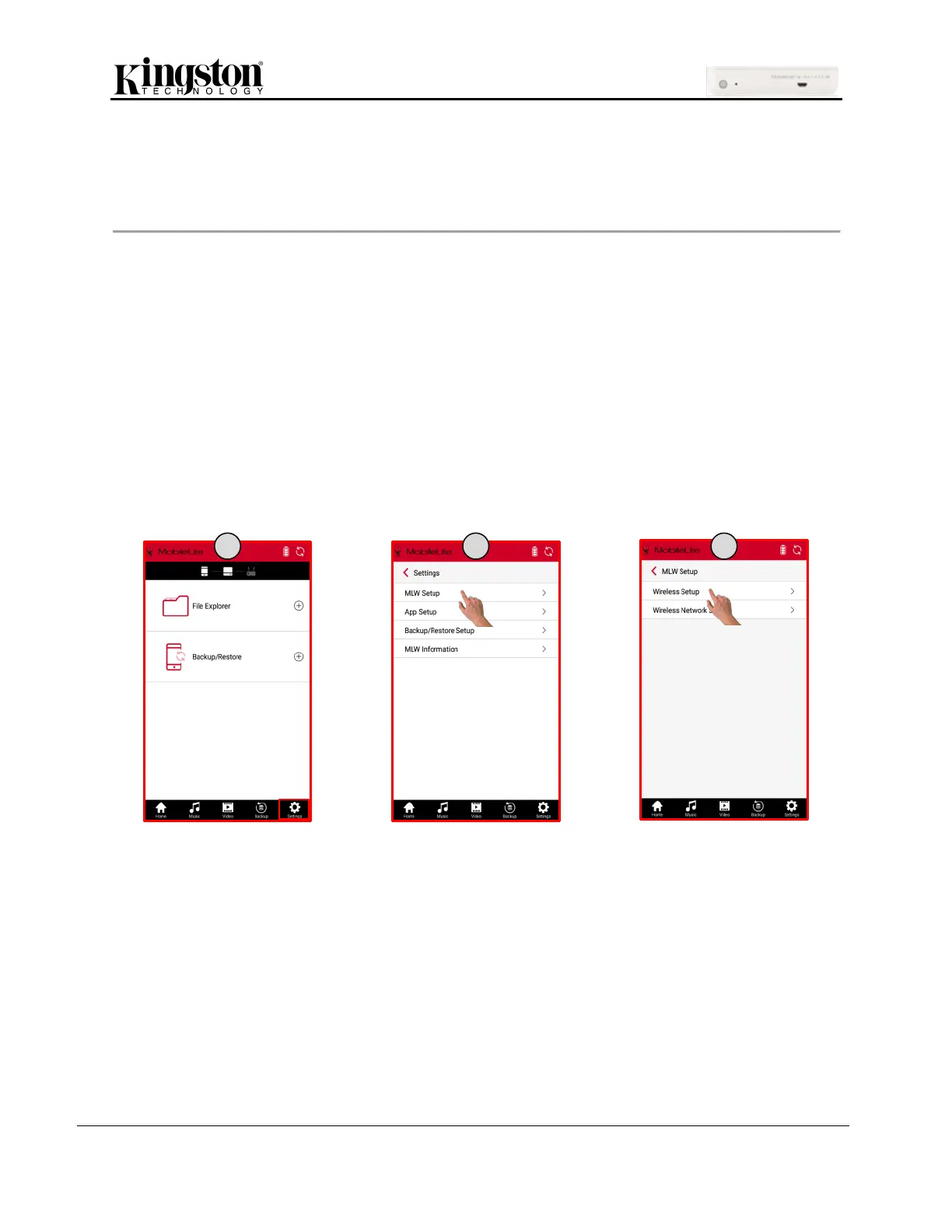
Steps to change the Name (SSID)
1. Click ‘Settings’ at the bottom of the MLW app screen.
2. Click ‘MLW Setup’.
3. Click ‘Wireless Setup’.



 To Next Page
 Loading...
