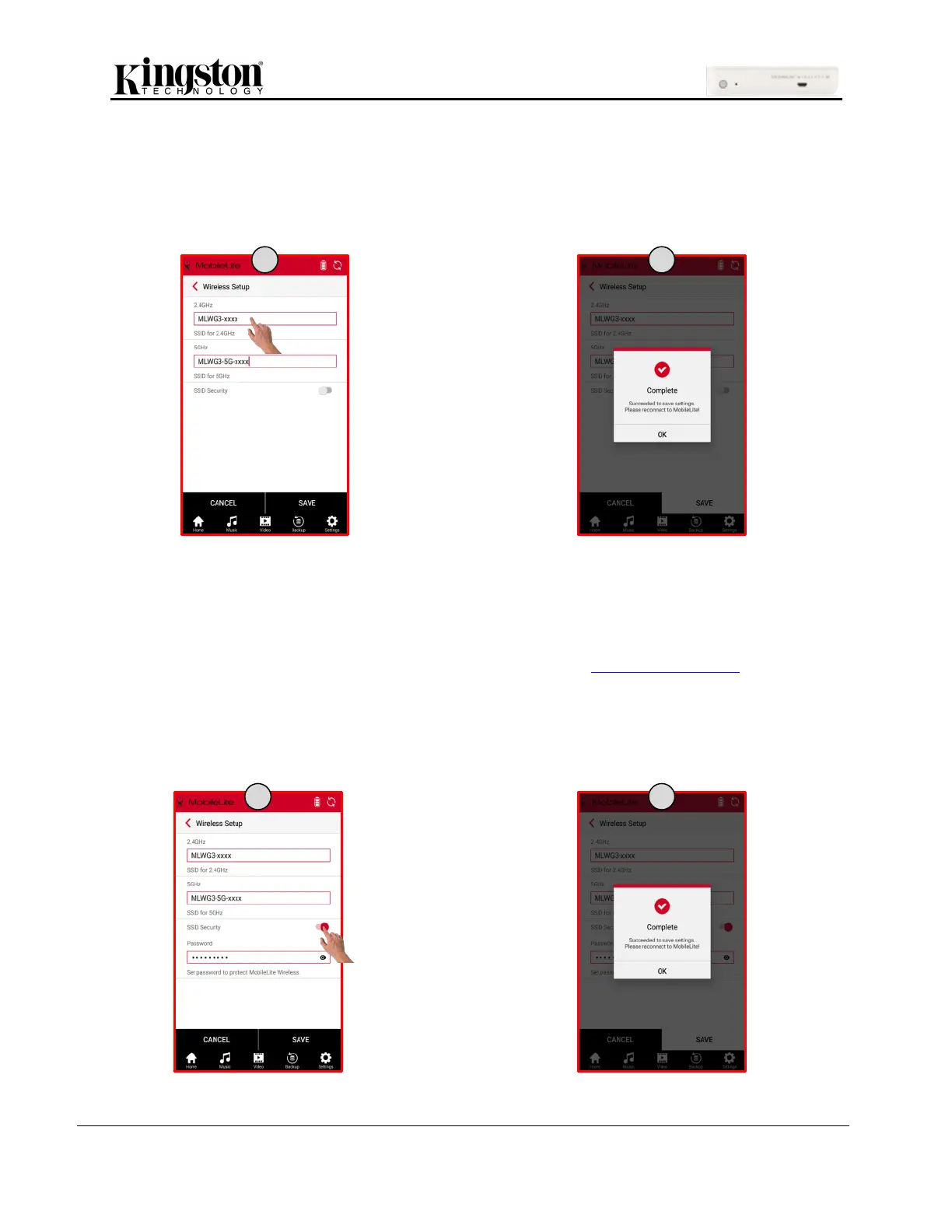
4. Click the box of the Name (SSID) you would like to change.
5. Once the preferred wireless name is ready, click ‘Save’. The MLWG3 device will restart and
disconnect you from its wireless signal. Once restarted, reconnect to the MLWG3 device using
your mobile device’s Wi-Fi settings and select the new Name (SSID).
How to Enable Security (WPA2)
This option helps prevent unauthorized access to your MLWG3 device by prompting for a password.
Steps to enable security:
1. Click ‘Settings’, click ‘MLW Setup’ and click ‘Wireless Setup’ (see images on pg. 22).
2. To enable security, swipe the slider to the right and enter the preferred password. Click ‘Save’.
3. The MLWG3 will restart and disconnect you from its wireless signal. Once restarted, reconnect to
the MLWG3 and enter the new password.


 To Next Page
 Loading...

