A75UM1E1 (Ver. E.2)
1-10
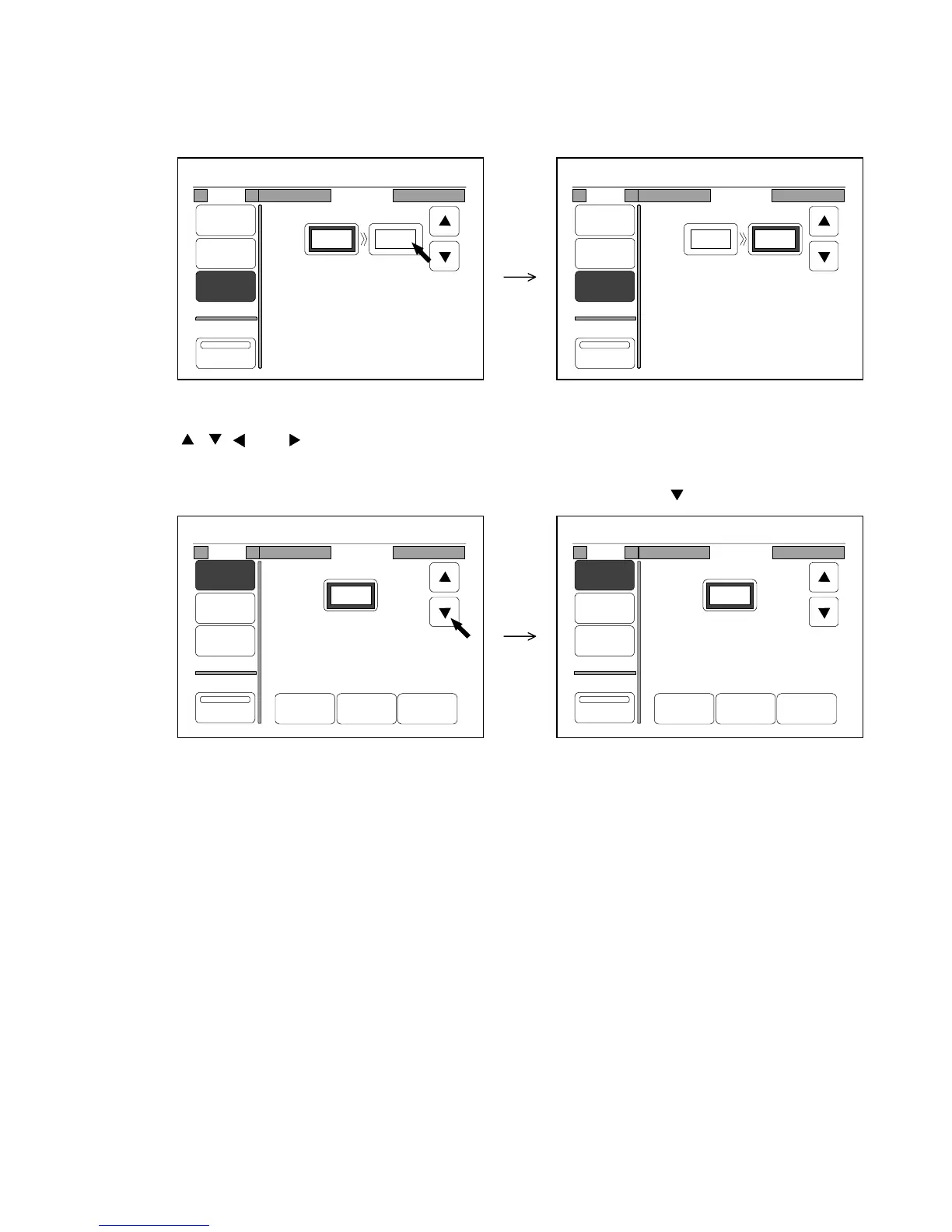
2. If the setting value is indicated in the setting screen and its frame is thick, it is possible to change
that setting value.
If some setting values are indicated as the following Zoom Setting Screen and you wish to change
one of them, press the setting value that you will change in order to make its frame thick.
Example : You press 7.0” to make it possible to change.
3. If , , and are indicated in the setting screen, it is possible to increase or decrease the
framed setting value pressing them.
Example : You change the zoom ratio from 100.0% to 99.0% pressing .
0%
001
Mode Program
%
Media
Size
Zoom
Program
XY Zoom
Original Copy
70.0%
10.0" 7.0"
0%
001
Mode Program
%
Media
Size
Zoom
Program
XY Zoom
Original Copy
70.0%
10.0" 7.0"
0%
001
Mode Program
%
Media
Size
Zoom
Program
XY Zoom
100.0%
Reduce 100% Enlarge
0%
001
Mode Program
%
Media
Size
Zoom
Program
XY Zoom
99.0%
Reduce 100% Enlarge



 To Next Page