A75UM3E8 (Ver. E.2)
3-47
3.5.2 Background Mode
[Function]
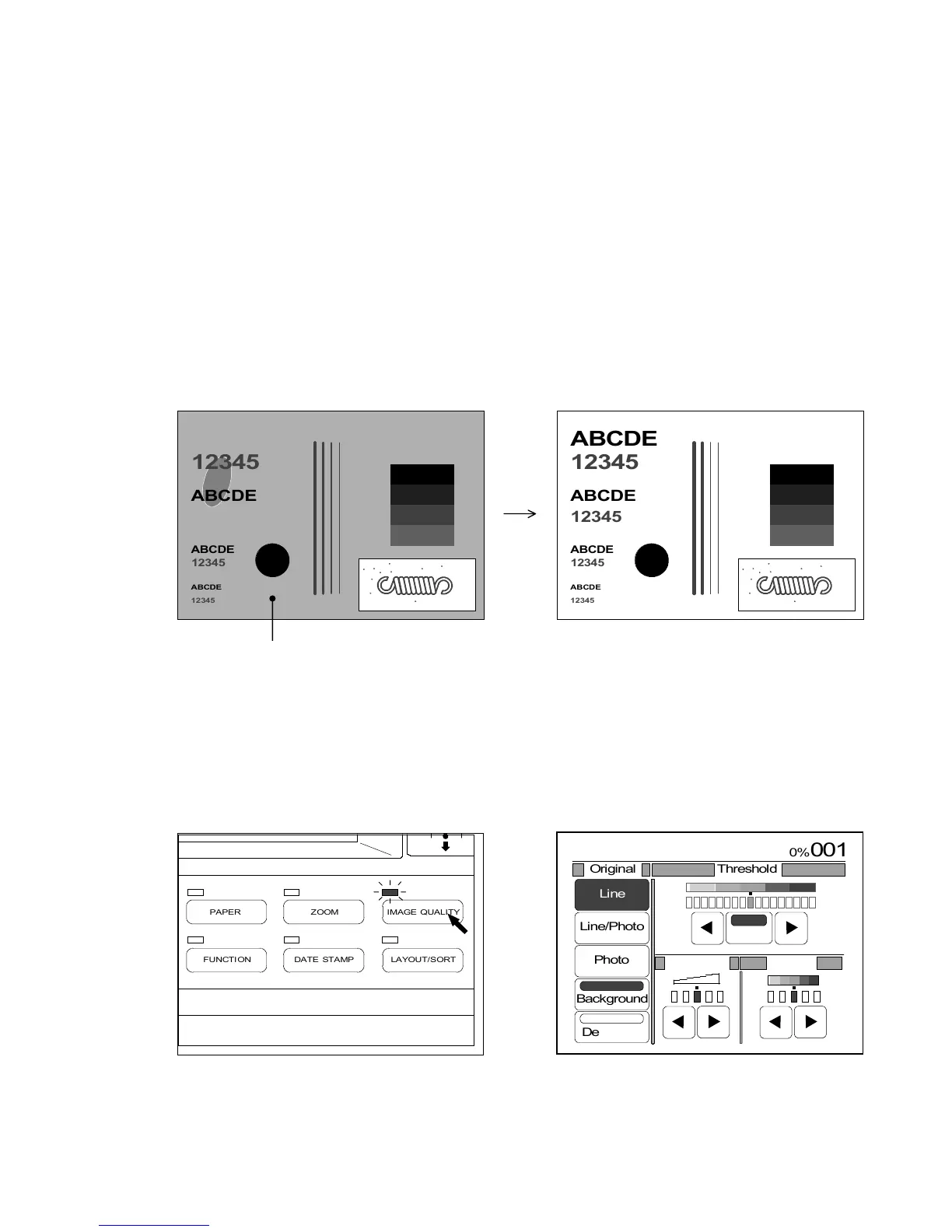
Some kind of original such as newspaper or blue print has unnecessary foggy background image.
In the Background Mode, this kind of image is converted to the “white image” at the time of
scanning.
As the result of it, it is possible to gain a copy having no background image.
If you set the original to the scanner when both “Background Mode” and “Auto Threshold” are
selected, the scanner detects original’s density and automatically decides the best Threshold Level
that can convert the foggy background image to the white image.
It is also possible to select your preferable Threshold Level manually when the “Background Mode”
is selected while the “Auto Threshold” is cancelled.
Since the Background Mode is related with the Threshold, see “Threshold” on the page 3-54 to use
the Background Mode more efficiently.
(Original) (Result of copy in the Background Mode)
Foggy background image
Note : If you select “Photo”, it is impossible to use the Background Mode.
[How to select the Background Mode]
1) Push the Image Quality Key to indicate the Image Quality Setting Screen on the LCD.
(Image Quality Key) (Image Quality Setting Screen)
ABCDE
12345



 To Next Page