A75UM1E1 (Ver. E.2)
1-9
1.8 How to Operate the LCD
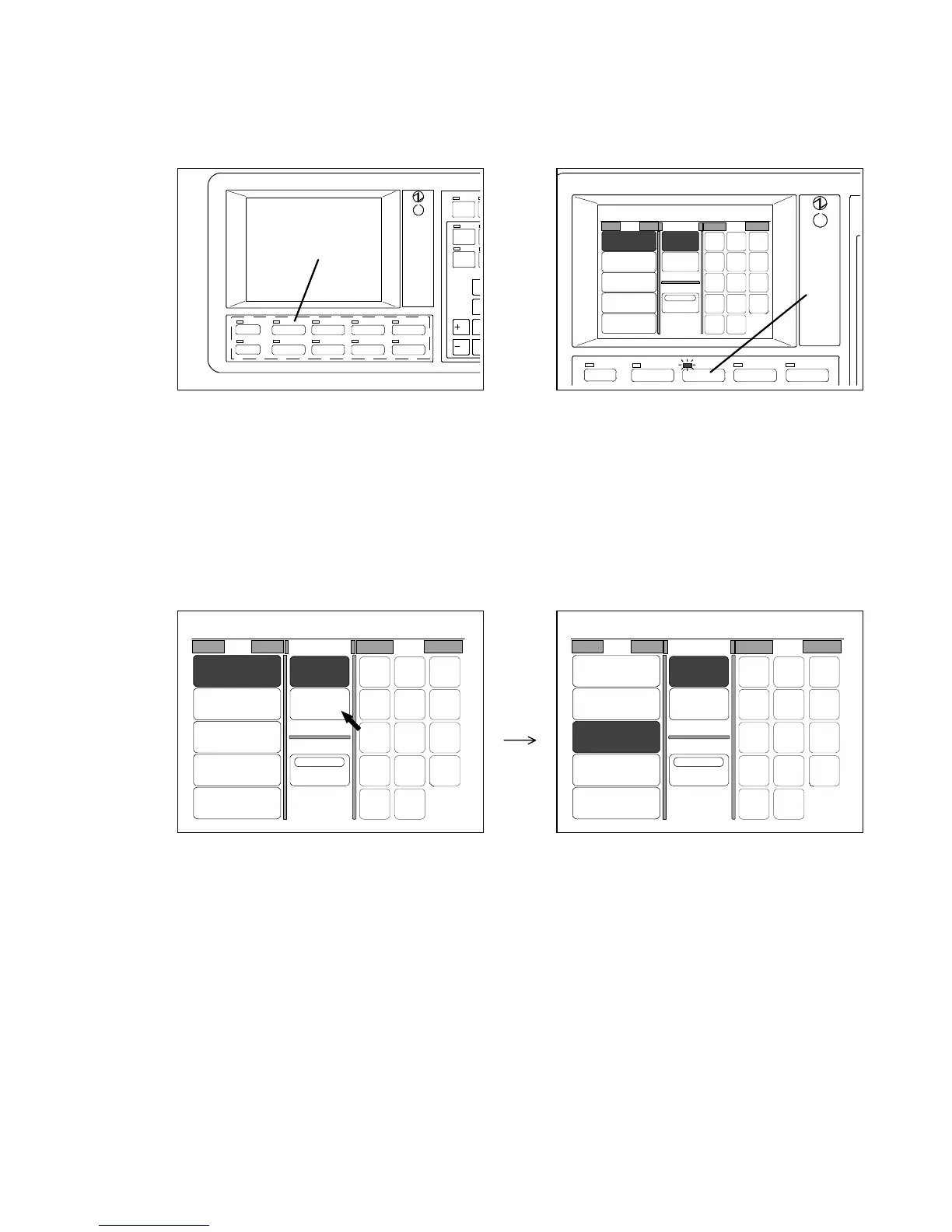
If you push some of keys (A) below the LCD, the corresponding setting screen is indicated on the LCD.
If you push the Paper Key (B), for example, the Paper Setting Screen is indicated which concerns to
the settings of copying media as the following right figure.
Several setting items are indicated in each setting screen.
Settings are done pressing the setting item.
The following are examples for operation.
1. When you have some selectable items as “Roll” in the Paper Setting Screen, it is possible to
choose one of them pressing it.
If the item is selected, it is colored showing it is valid now.
Example : You press [3 : 24” Plain Paper].
/L
/R
LAYOUT/SORT
IMAGE QUALITY
ZOOM
DATE STAMP
PAPER
FUNCTION
BASIC SCREEN
MODE MEMORY
MENU
REFERENCE
POWER
SAVE
SET COPY
AUTO ZOOM
A
B
0%
001
Roll
1:36"
Plain Paper
2:30"
Plain Paper
3:24"
Plain Paper
4:18"
Plain Paper
Bypass
Cut Mode
Synchro
Standard
Div ide
Size
IMAGE QUALITYZOOMPAPERBASIC SCREENMENU
48"
44"
42"
36"
34"
30"
24"
22"
18"
17"
12"
11"
9"
8.5"
0%
001
Roll Cut Mode Size
2:30"
Vellum
1:36"
Plain Paper
3:24"
Film
4:18"
Plain Paper
Bypass
Synchro
Standard
Divide
48"
44"
42"
36"
34"
30"
24"
22"
18"
17"
12"
11"
9"
8.5"
0%
001
Roll Cut Mode Size
2:30"
Vellum
1:36"
Plain Paper
3:24"
Film
4:18"
Plain Paper
Bypass
Synchro
Standard
Divide
48"
44"
42"
36"
34"
30"
24"
22"
18"
17"
12"
11"
9"
8.5"



 To Next Page