EasyManua.ls Logo

KIP 2050 - LCD Adjustments; LCD Contrast Adjustment

KIP 2050
252 pages
Print Icon
To Next Page IconTo Next Page
To Previous Page IconTo Previous Page
Loading...
A75UM5E1 (Ver. E.2)
5-4
5.2 LCD Adjustments
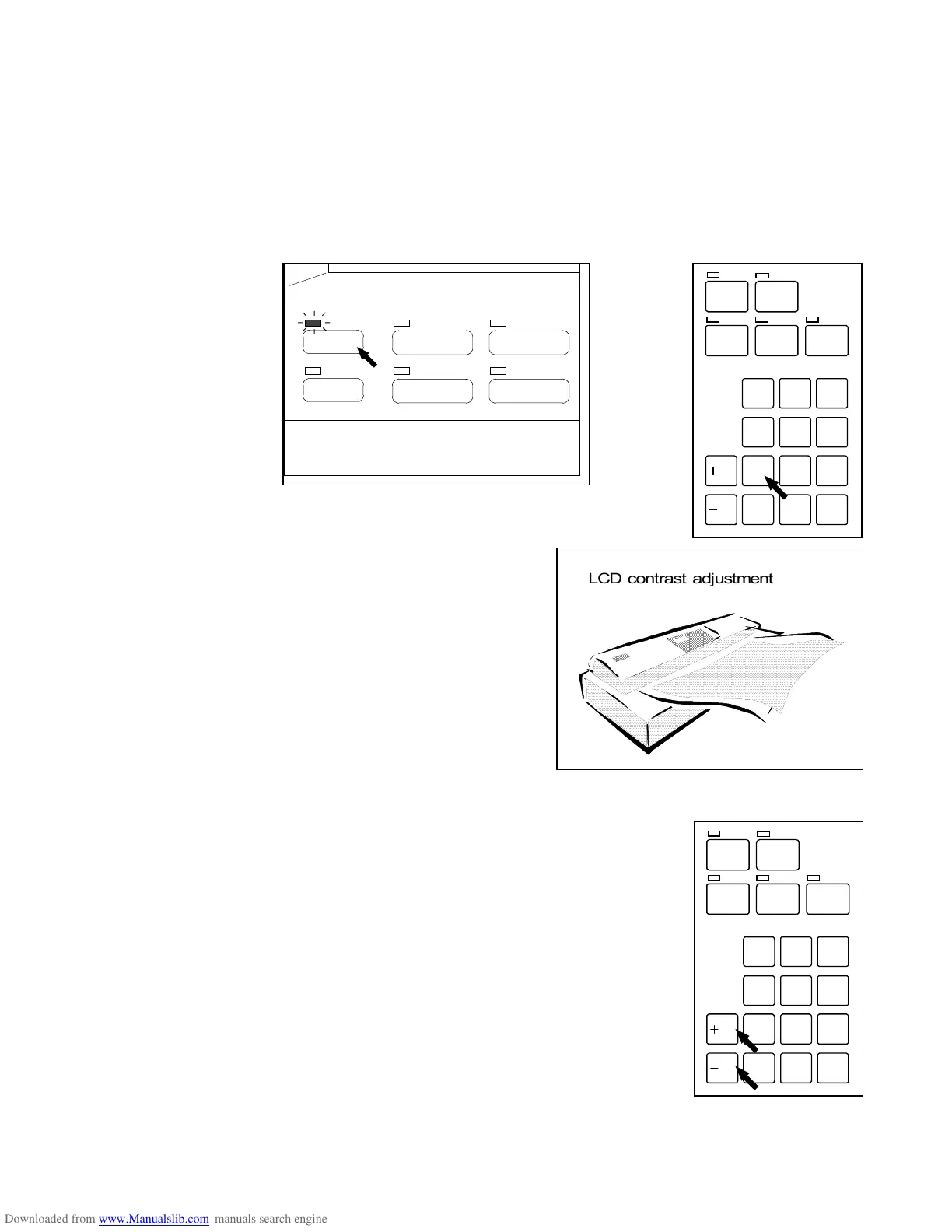
5.2.1 LCD contrast Adjustment
Adjust the contrast of LCD in the following way.
1) Press and hold the Menu Key, and then push “1” of Ten Keys to enter the LCD Contrast
Adjustment Mode.
The LCD indicates “LCD contrast adjustment”.
(Menu Key)
2) Pushing either “+/R” Key or “-/L” Key, adjust the contrast.
/L
/R
SET COPY
ROTATE
AUTO PAPERAUTO ZOOM
PRINT
CONCURRENT
0
1
4
7
.
2
5
8
C
3
6
9
/L
/R
SET COPY
ROTATE
AUTO PAPERAUTO ZOOM
PRINT
CONCURRENT
0
1
4
7
.
2
5
8
C
3
6
9
PAPER
FUNCTION
BASIC SCREEN
MODE MEMORY
MENU
REFERENCE

























































LCD contrast adjustment

Table of Contents

Related product manuals